






Squid Game Sound Effect
Searching for intense Squid Game sound effects? Dubbing AI’s community sounds are packed with chilling cues, eerie music, and iconic moments—from “Red Light, Green Light” to suspenseful heartbeats. Perfect for dramatic edits, games, or memes, these sounds capture the thrill and terror. Dive in and relive the chaos—totally free!
How to make a Soundboard?
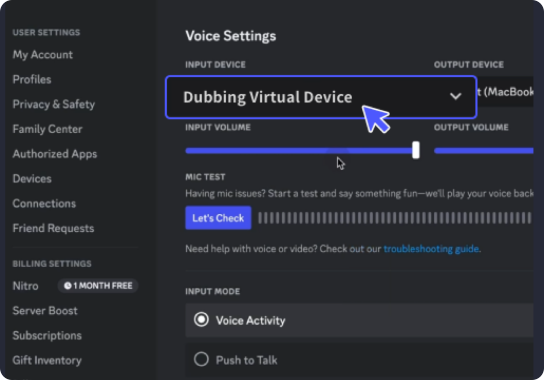
With a few simple steps, you can use any sound effects you want during your exciting raids. 1. Open the third-party platform, such as Discord, Steam, etc., and in the settings, choose "Dubbing Virtual Device" as the input. 2. Click on the "Soundboard" option on the left and choose or customize your preferred sound effects. 3. Enable "Hear Myself" to preview the sound. And now you may enjoy the sound effect with your customized shortcut!
Squid Game Soundboard
Create your own Squid Game soundboard with Dubbing AI Community Sounds—filled with haunting chimes, chilling voiceovers, and pulse-pounding game cues. From the doll’s eerie commands to the final buzzer, mix the most intense audio moments into a suspense-packed board. Perfect for edits, pranks, or immersive content—free and fear-inducing!