





Iron Golem Sound Effect
Looking for Iron Golem grunts and other Minecraft sound effects? Explore Dubbing AI’s community sounds, packed with blocky brilliance—from peaceful village ambiance to battle-ready mobs. Hear the clang of iron fists, the hiss of creepers, and the calm of pixelated winds. Perfect for game edits, memes, or storytelling—totally free!
How to make a Soundboard?
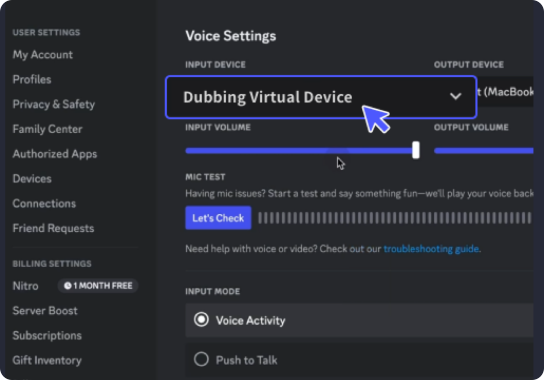
With a few simple steps, you can use any sound effects you want during your exciting raids. 1. Open the third-party platform, such as Discord, Steam, etc., and in the settings, choose "Dubbing Virtual Device" as the input. 2. Click on the "Soundboard" option on the left and choose or customize your preferred sound effects. 3. Enable "Hear Myself" to preview the sound. And now you may enjoy the sound effect with your customized shortcut!
Iron Golem Soundboard
Build your very own Iron Golem soundboard with Dubbing AI Community Sounds—stack it with deep grunts, heavy footsteps, and heroic swing effects. Capture the essence of Minecraft’s silent protector and customize a board perfect for fan edits, gaming clips, or epic memes. Strong, stoic, and totally free to forge!