
Minecraft Movie Sound Effect
Hunting for epic Minecraft movie sounds? Dive into the Dubbing AI sound gallery! From heroic battles to hilarious villager moments, every iconic sound is ready to fuel your creativity. Bring the blocky world to life with a treasure trove of audio gems crafted just for fans like you!
How to make a Soundboard?
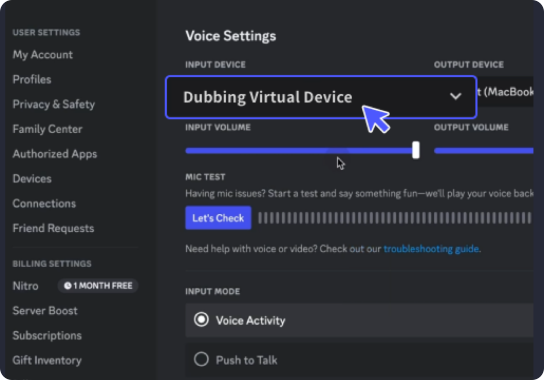
With a few simple steps, you can use any sound effects you want during your exciting raids. 1. Open the third-party platform, such as Discord, Steam, etc., and in the settings, choose "Dubbing Virtual Device" as the input. 2. Click on the "Soundboard" option on the left and choose or customize your preferred sound effects. 3. Enable "Hear Myself" to preview the sound. And now you may enjoy the sound effect with your customized shortcut!
Minecraft Movie Soundboard
Craft your own Minecraft movie soundboard with Dubbing AI and bring the cinematic world of blocks to life! Mix iconic sounds like the Creeper Explosion Remix, Ender Dragon Roar 2.0, and Villager Humming Variations to create a personalized audio experience. Whether you're enhancing gameplay, creating content, or just having fun, Dubbing AI provides the tools to make your Minecraft adventures unforgettable.