
Peeak voice changer

Why Dubbing AI is Perfect for Peak Cooperative Gaming

Dubbing AI is perfect for peak cooperative gaming, turning chaotic team chatter into seamless coordination. Imagine real-time voice changes boosting immersion, hilarious soundboards sparking laughter, and smooth communication strengthening bonds—every mission becomes sharper, funnier, and more unforgettable with friends.

Peak-Specific Gaming Enhancements

1. Immersive Team Strategy Dubbing AI sharpens peak-specific gaming by transforming voices instantly, ensuring clearer strategies, immersive coordination, and stronger teamwork in every mission. 2. Entertainment Value With hilarious voice effects and soundboards, Dubbing AI turns high-pressure matches into thrilling, laughter-filled experiences for both players and viewers. 3. Personalized Identity Dubbing AI empowers gamers to craft unique vocal personas, making peak gaming sessions unforgettable while standing out in competitive communities.

Peak Voice Changer

Peak-Specific Voice Collection

Access our curated voice library featuring 1. Iconic Voice Variety Dubbing AI’s Peak-specific collection brings legendary tones, letting players embody unforgettable characters during thrilling cooperative missions. 2. Enhanced Team Immersion With tailored voices, teamwork feels natural, conversations flow smoothly, and every cooperative challenge becomes an authentic cinematic adventure. 3. Creative Self-Expression Gamers craft unique personas using Peak’s dedicated voice pack, standing out while strengthening bonds with teammates across intense cooperative gameplay.

Peak Voice Changer

Advanced AI Voice Technology

500+ Character Voices: From horror icons to anime characters and celebrities Multi-Language Support: Transform voices in 40+ languages with emotional expressions Ultra-Low CPU Usage: Runs efficiently at <3% CPU without impacting game performance Cross-Platform Compatibility: Works seamlessly on Windows, macOS, and VR platforms

Professional Soundboard Integration

100,000+ Sound Effects: Massive library including horror-specific audio clips Custom Soundboard Creation: Build and share your own horror sound collections Hotkey Integration: Quick access to sound effects during intense gameplay moments Community Sound Sharing: Access user-generated horror soundboards

HOW TO USE DUBBING AI?

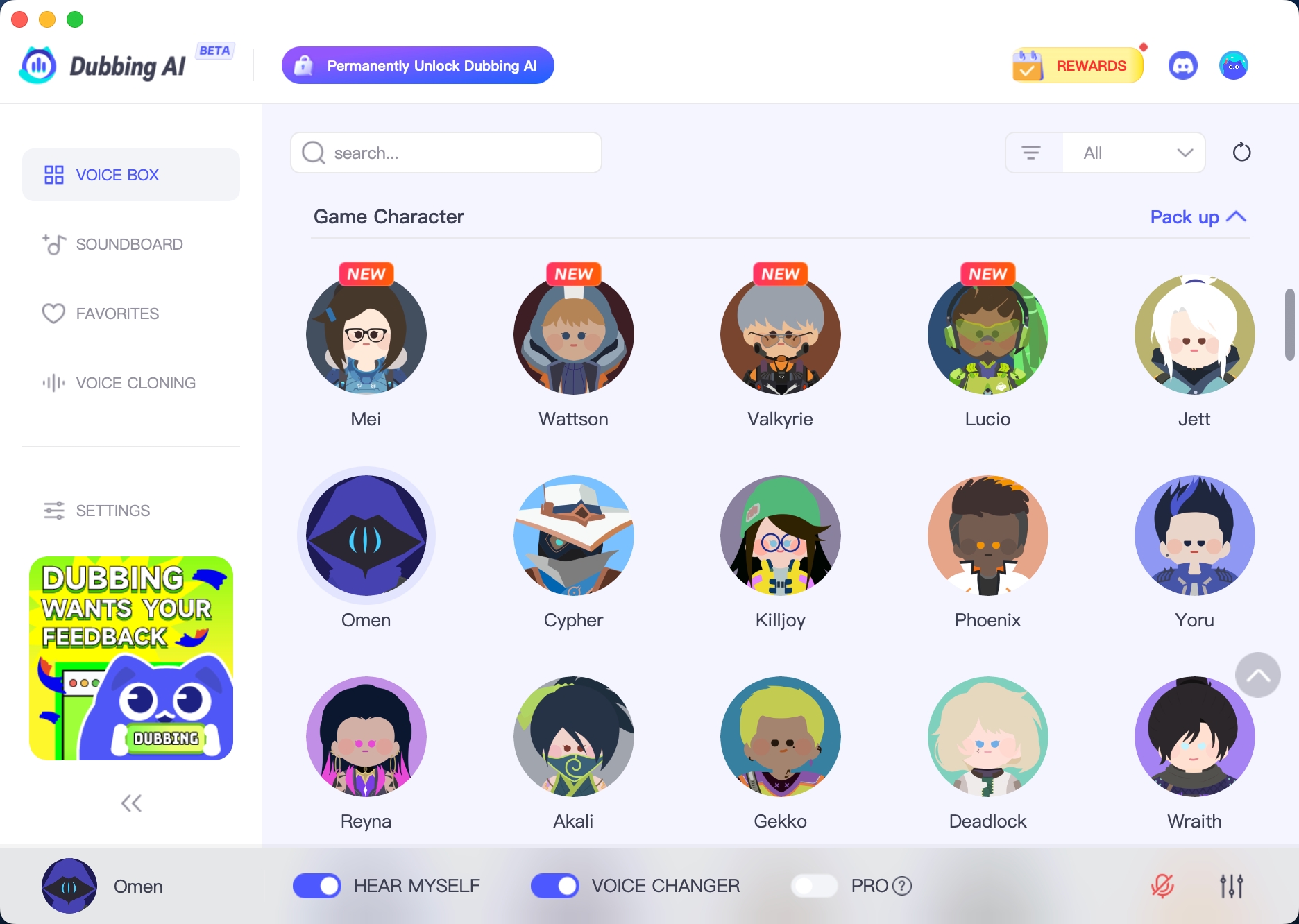
1. Download Dubbing AI: Install the application on your Windows or macOS computer. 2. Configure Your Audio: Set your primary microphone as the input in Dubbing AI. Then, in your computer's sound settings (or Discord/in-game chat), set your input device to "Microphone (Dubbing Virtual Device)". 3. Start Roleplaying: Open the Voicebox in Dubbing AI, select a voice, and make sure the "Voice Changer" is toggled on. Your new voice is ready for the blocky world!

Minecraft Voice Changer
How does Dubbing AI enhance communication in Peak?

It transforms your voice in real time, making teamwork more immersive and fun during cooperative missions with friends.

Can I use different voices for different roles in Peak?

Yes. You can switch between character-inspired voices or fun effects to match your role, strategy, or mood in every session.

Does the voice changer affect gameplay performance?

Not at all. Dubbing AI runs smoothly alongside Peak, ensuring clear communication without lag or interference in your cooperative gameplay.