Sigma Boy Sound Effects
Hunting for the bold, brooding tones of a true sigma boy? Dive into the Dubbing AI sound gallery—your ultimate stash of confident, cool, and unbothered voice clips. From viral lines to ice-cold comebacks, this is where the lone wolf finds his perfect sound.
How to make a Soundboard?
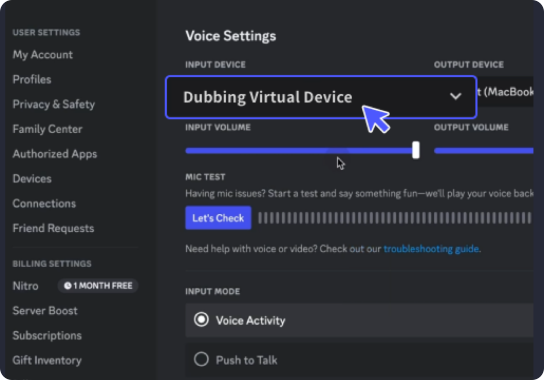
With a few simple steps, you can use any sound effects you want during your exciting raids. 1. Open the third-party platform, such as Discord, Steam, etc., and in the settings, choose "Dubbing Virtual Device" as the input. 2. Click on the "Soundboard" option on the left and choose or customize your preferred sound effects. 3. Enable "Hear Myself" to preview the sound. And now you may enjoy the sound effect with your customized shortcut!
Sigma Boy Soundboard
Craft your ultimate sigma boy soundboard with Dubbing AI—mix stoic one-liners, powerful silences, and alpha energy into one sleek audio arsenal. Whether you’re owning the moment in chat or dropping cold truths, let every click echo that unmistakable lone-wolf vibe.