


Forsaken Sound Effect
Searching for the eerie intensity of a Roblox Forsaken soundboard? Dive into Dubbing AI’s sound gallery—loaded with ghostly whispers, cursed echoes, and dark, dramatic lines. Whether you're crafting horror edits or immersive roleplays, these chilling sounds bring the Forsaken vibe to life. Enter the void—hauntingly free and easy to use.
How to make a Soundboard?
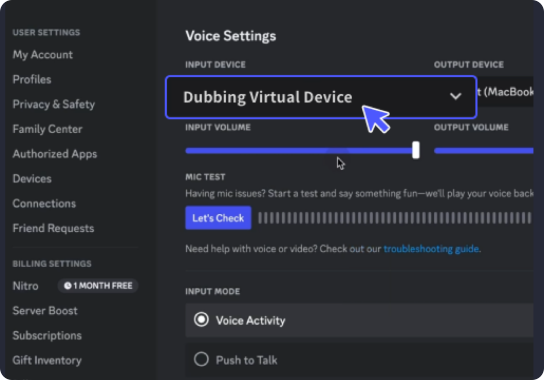
With a few simple steps, you can use any sound effects you want during your exciting raids. 1. Open the third-party platform, such as Discord, Steam, etc., and in the settings, choose "Dubbing Virtual Device" as the input. 2. Click on the "Soundboard" option on the left and choose or customize your preferred sound effects. 3. Enable "Hear Myself" to preview the sound. And now you may enjoy the sound effect with your customized shortcut!
Roblox Forsaken Soundboard
Build your own Roblox Forsaken soundboard with Dubbing AI and summon spine-tingling audio straight from the shadows. Mix spectral voices, sinister chants, and otherworldly effects into a soundboard that drips with dread. Perfect for horror games or dark roleplays—craft your cursed masterpiece in minutes, no spells required.