Bluudud Sound Effects
If you're searching for the best Bluudud sounds, Dubbing AI's sound gallery is your ultimate destination! Explore an extensive collection of high-quality voice clips, perfect for pranks, gaming, or content creation. Bring Bluudud’s iconic voice to life with just a few clicks—completely free and effortlessly fun!
How to make a Soundboard?
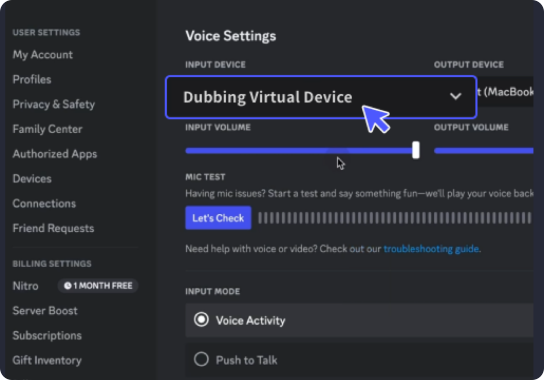
With a few simple steps, you can use any sound effects you want during your exciting raids. 1. Open the third-party platform, such as Discord, Steam, etc., and in the settings, choose "Dubbing Virtual Device" as the input. 2. Click on the "Soundboard" option on the left and choose or customize your preferred sound effects. 3. Enable "Hear Myself" to preview the sound. And now you may enjoy the sound effect with your customized shortcut!
Funny Goofy Sound
Create the ultimate Bluudude soundboard with Dubbing AI! Mix, match, and customize iconic Bluudude voice clips to fit your style. Whether for gaming, streaming, or memes, bring his legendary energy to your soundboard with ease. Unleash creativity and make every moment sound epic!