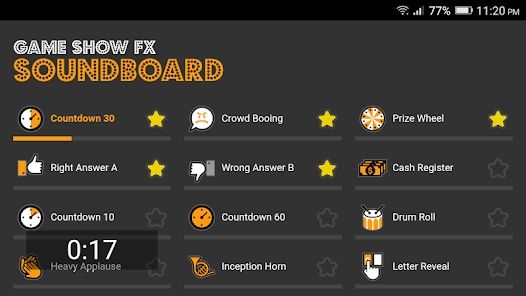

Game shows have captivated audiences for decades with their exciting atmosphere, dramatic music, and iconic sound effects. Whether you’re creating content, hosting your own trivia night, or just want to add some fun flair to your projects, having access to authentic game show sounds can make all the difference. From the classic “ding” of a correct answer to the suspenseful countdown music, these audio elements instantly transport listeners into the world of television game shows.
Finding high-quality, free game show soundboards and effects can be challenging, but fortunately, there are several excellent resources available online. In this guide, we’ll explore the best websites where you can discover and download these entertaining audio gems without breaking the bank. Get ready to bring the excitement of your favorite game shows to your own creative projects!
Key Takeaways
You can find free game show soundboards and effects on trusted websites like 101soundboards.com, ElevenLabs, and Mixkit. These sites have high-quality sounds that are easy to use.
You can use tools like Dubbing AI Sound Effect Generator to make your own sound effects. Just type in simple prompts and download different versions. This helps you match the sounds to your game style.
Put your soundboard near the speakers and label each channel. This makes it easy to find sounds fast during live or online events. It will help make your game show more fun.
Always check if the sounds are royalty-free and look at the license before you download. This helps you avoid legal problems and lets you use the sounds safely in any project.
Try out different websites to find the best sound quality and big libraries. Look for sites with easy-to-use features that fit what you need. This will help keep your game show new and exciting.
Top Free Game Show Soundboard Websites
Are you ready to make your next game show night unforgettable? You can find a game show soundboard and free sound effects on many top websites. Each platform gives you a unique way to access free sound clips, buzzer sounds, and more. Let’s explore the best places to find free tools, massive libraries, and easy-to-search categories for your next event.
ElevenLabs Game Show Sound Effects Generator

You want a creative way to make custom free sound effects? ElevenLabs gives you a game show soundboard that lets you generate sounds with simple prompts. You can type in what you need, like a buzzer, applause, or even a wrong buzzer sound effect. The tool creates four versions for each prompt. Many users say it’s easy to use and quick for making unique free sound effects. You might get a perfect trailer-style whoosh or a realistic buzzer. Sometimes, the sounds may not match exactly, so you may need to try a few prompts. People like the customization and the fast results. You can download your favorite free sound clips and use them in your game show. This platform works well if you want something different from the usual sound effects library.
Tip: Try different prompts to get the best buzzer or wrong buzzer sound effect for your game show.
Dubbing AI Game Show Sound Gallery

Dubbing AI offers a free sound effects library with a broad range of categories. You can search for buzzer, applause, or winner sounds. The platform is user-friendly and easy to search. You can download free sound effects in just a few clicks. Many users love the extensive collection of free sound clips. You can find a wrong buzzer sound effect, timer beeps, and even background music. The platform updates its library often, so you always have new options for your game show soundboard.
iMyFone MagicMic Game Show Soundboard

If you want a fun and interactive game show soundboard, try iMyFone MagicMic. This platform gives you instant access to free sound effects and buzzer sounds. You can play a wrong buzzer sound effect live or download it for later. The soundboard has many categories, so you can pick the perfect sound for any moment. MagicMic is user-friendly and works on both PC and Mac. You can use it for live events, online games, or even classroom quizzes. The platform lets you search for free sound clips and add them to your favorites.
Mixkit Free Game Show Sound Effects

Mixkit is a favorite for anyone who needs free sound effects fast. You can browse an extensive collection of buzzer, winner, and wrong buzzer sound effect clips. The site is easy to search and has clear categories. You can download free sound clips with no sign-up. Mixkit’s sound library covers everything from classic buzzers to dramatic reveals. You can use these free sound effects in your game show, video, or podcast. The platform also offers free to download music and other audio clips.
Zapsplat Free Sound Effects

Zapsplat gives you access to a massive library of free sound effects. You can search for buzzer, wrong buzzer sound effect, or applause in seconds. The platform has over 100,000 free sound clips, so you always find what you need. You can download clips in MP3 or WAV format. Zapsplat’s categories make it easy to find the right sound for your game show soundboard. You can use the free tools to edit or mix sounds before you download them. Many teachers, creators, and gamers trust Zapsplat for its quality and variety.
Freesound Collaborative Sound Library

Freesound is a huge sound library built by a community of creators. You can search for free sound effects, buzzer sounds, and wrong buzzer sound effect clips. The platform lets you preview and download free sound clips for your game show. You can explore categories like timers, applause, and suspense music. Freesound’s collaborative nature means you get an extensive collection of unique sounds. You can also upload your own clips to share with others. The platform is easy to search and works well for anyone who wants a custom game show soundboard.
Sound Show Free Soundboard Software
Sound Show gives you a free game show soundboard you can use on your computer. You can load free sound effects, buzzer sounds, and wrong buzzer sound effect clips into the software. The platform supports many categories, so you can organize your sound clips for quick access. You can play sounds live during your game show or event. Sound Show is user-friendly and works on Windows and Mac. You can download the software and start building your own sound effects library.
Uppbeat Free Game Show Effects

Uppbeat offers a platform full of free sound effects and music for your game show. You can search for buzzer, wrong buzzer sound effect, or winner sounds. The site has clear categories and an extensive collection of free sound clips. You can download clips for free and use them in your projects. Uppbeat’s sound library covers everything from classic game show sounds to modern effects. You can access the platform online and find new clips every week.
Note: Always check the licensing before you download and use free sound effects from any platform.
You now have a list of the best free websites for game show soundboards and free sound effects. Each platform gives you access to a wide range of categories, easy-to-search libraries, and free sound clips. You can find the perfect buzzer, wrong buzzer sound effect, or winner sound for your next game show. Try out these free tools and see which one fits your style best!
How to Use a Game Show Soundboard
Setting Up on Different Devices
You want your game show to sound amazing, right? Setting up a game show soundboard is easy if you follow a few steps. First, choose a spot for your soundboard. Keep it close to your speakers and sound sources. This helps you connect everything without messy cables. Next, plug in your equipment. Connect microphones, speakers, and any other devices to your soundboard. Label each channel so you know which sound comes from where. This makes it simple to play a buzzer or applause at the right time.
Start with all controls at zero. Turn on your gear and test each input. Speak into the mic or play a buzzer sound. Adjust the gain so the loudest sound hits the right level. Then, use the fader to balance everything. You can use a computer, tablet, or even your phone for a free soundboard. Most free soundboards work with Windows 10 or newer. You need a keyboard, mouse, and web browser. Some setups work better with two monitors. If you want more control, try using audio editing software like Audacity or a digital audio workstation. These tools let you edit, mix, and search for the perfect free sound effect.
Tip: Always check your system has enough RAM and CPU power. This keeps your free soundboard running smoothly.
Integrating with Live or Virtual Events
You can use a free game show soundboard for both live and virtual events. For a live show, set up your speakers so everyone hears the buzzer and winner sounds. Use your labeled channels to play the right sound at the right moment. If you run a virtual event, share your screen or audio using streaming software. Many free soundboards let you download new effects or search for fresh sounds online. You can add a buzzer, applause, or even a funny fail sound to your show.
When you plan your event, download all your free sound effects ahead of time. Test each one to make sure it works. If you need a new sound, search for it and add it to your soundboard. You can even create a playlist of your favorite free effects. This makes it easy to play a buzzer or winner sound without delay.
Remember: The best game show moments come from quick reactions. Keep your free soundboard ready and your favorite sounds just a click away!
Choosing the Right Website for Your Needs
Comparing Features and Sound Quality
You want the best experience when you pick a website for free game show soundboards. Not every site gives you the same features or quality. Some sites focus on a huge library of free sound effects. Others give you tools to create your own sounds. You should look for a site that makes it easy to search and download free sound effects.
Here’s a quick table to help you compare:
Website | Library Size | Sound Quality | Royalty-Free | Custom Tools |
|---|---|---|---|---|
ElevenLabs | Medium | High | Yes | Yes |
Mixkit | Large | High | Yes | No |
Zapsplat | Huge | Good | Yes | Some |
Freesound | Huge | Mixed | Yes | No |
You want high quality every time you play a buzzer or applause. Try a few sites and listen to the free sound effects. Some sites let you preview sounds before you download. This helps you check the quality fast. If you need a special sound, look for a site with a custom tool or a big library. Always pick a site that gives you royalty-free sounds. This way, you can use them in any project.
Tip: Make a favorites list of your top free sound effects. This saves time and keeps your quality high.
Legal Considerations and Licensing
You need to know the rules before you use free sound effects. Not every free sound is royalty-free. Some sites ask you to give credit to the creator. Others let you use the sounds with no credit needed. Always read the license before you download from a library.
Look for these things:
Is the sound royalty-free?
Can you use it for commercial projects?
Do you need to give credit?
If you want to use free sound effects in a video or a live show, pick a site with clear rules. Royalty-free means you do not pay each time you use the sound. This makes your project simple and safe. You get peace of mind and keep your quality high.
Note: When in doubt, check the FAQ or contact the website. You want to stay safe and keep your project free from legal trouble.
You get so many benefits when you use these free game show soundboard and sound effect websites.
You find high-quality sounds in many styles and formats.
You enjoy easy-to-use sites with clear search tools.
You see regular updates and huge libraries, so you never run out of options.
Try a few platforms to see which one fits your project best. Always check the licensing before you download. If you found this helpful, share it or bookmark for later!
FAQ
How do I download game show sound effects from these websites?
Most sites have a download button next to each sound. Click it, and the file saves to your device. Some sites may ask you to sign up first.
Can I use these sound effects for YouTube videos?
Yes, you can use most free sound effects for YouTube. Always check the license on each site. Some sounds need credit to the creator.
Do I need special software to play soundboards?
No, you don’t need special software for most online soundboards. You can use your web browser. For offline use, some sites offer free apps.
Are these sound effects safe to use?
You stay safe by downloading from trusted sites listed here. Avoid unknown sources. Always scan files with antivirus software before using them.
See Also
Selecting The Best Voice Changer And Soundboard For Gamers
Boost Your Gameplay Experience Using Dubbing AI Soundboard
Mastering Sound Buttons To Amplify Roblox Gameplay Effects

Related Posts