Imagine transforming your voice into something entirely unique—whether for gaming, content creation, or just for fun. With dubbing ai, you can do exactly that. This tool makes creating your own ai voice changer not only possible but also incredibly accessible.
Why is this so exciting? AI voice changers are everywhere these days. Gamers use them to bring characters to life. Content creators rely on them for fresh, engaging audio. Even brands and educators are jumping on board, using ai to personalize experiences and improve communication.
Dubbing ai stands out because it’s packed with features. You can tweak pitch, tone, and other settings to craft a voice that’s truly yours. Plus, it works seamlessly across platforms, so you can integrate it into your projects without a hitch.
Ready to explore the creative possibilities? Let’s dive in!
The Best AI Voice Changer with soundboard
What is Dubbing AI
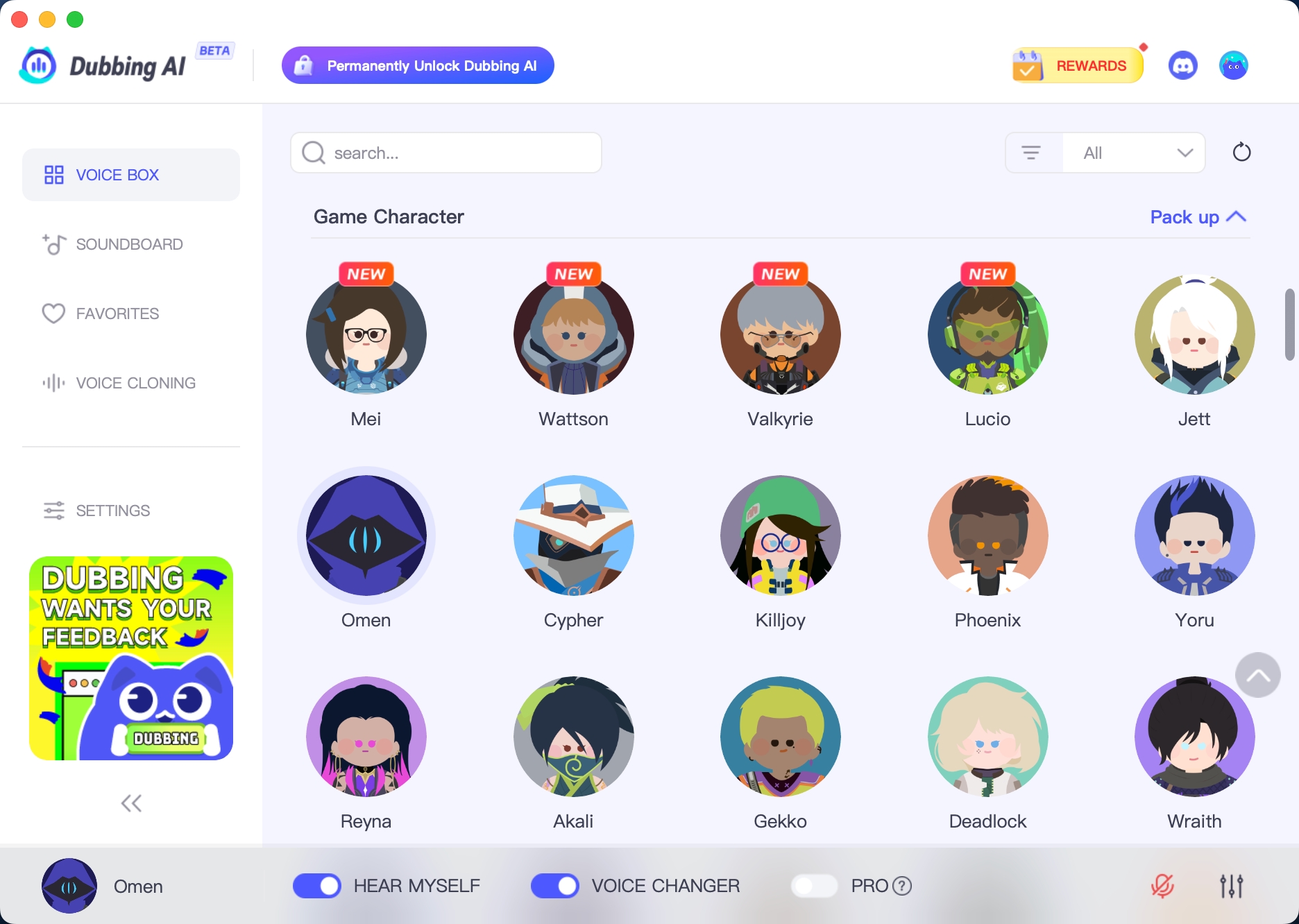
Dubbing AI is a cutting-edge platform that lets you transform your voice in real time. Whether you’re a gamer, content creator, or just someone who loves experimenting with sound, this tool opens up endless possibilities. It combines advanced artificial intelligence with user-friendly features, making it accessible to everyone, from beginners to pros.
What is a Voice Changer
A voice changer is a tool that modifies your voice to sound different. It can adjust pitch, tone, and even add effects to create unique sounds. Think of it as a way to disguise or enhance your voice. Gamers often use voice changers to match their characters, while content creators rely on them to add flair to their videos or podcasts. With AI voice technology, these tools have become more powerful and versatile than ever before.
Dubbing AI takes voice changers to the next level. Unlike traditional tools, it specializes in real-time voice transformation. This means you can hear the changes instantly, which is perfect for live streaming or gaming. Plus, it integrates seamlessly with various platforms, so you can use it wherever you need.
How Dubbing AI Enhances Voice Customization
Dubbing AI stands out because of its advanced customization options. You can fine-tune your voice by adjusting pitch, tone, and even adding special effects. Want to sound like a robot or a movie villain? You can do that. Prefer a softer, more natural tone? That’s possible too. The platform uses state-of-the-art AI algorithms to ensure high-quality and accurate voice effects.
With Dubbing AI, you’re not just changing your voice—you’re creating something entirely unique. It’s a tool that empowers you to explore your creativity and push the boundaries of what’s possible with AI voice technology.
Benefits of Creating Your Own AI Voice Changer

Personalization and Creative Freedom
Creating your own AI voice changer gives you the ultimate freedom to express yourself. You can design a voice that matches your personality or fits a specific project. Whether you want to sound like a futuristic robot, a wise old storyteller, or even a cartoon character, the possibilities are endless. This level of personalization allows you to stand out in gaming, content creation, or even professional presentations.
Think about the creative projects you could tackle. Gamers can adopt unique voices for role-playing games, making their characters more immersive. Content creators can add flair to podcasts, YouTube videos, or TikToks with custom voices. Even educators can use AI voice changers to create engaging audio lessons that capture students’ attention. The ability to customize your voice opens doors to endless creative opportunities.
Cost-Effectiveness of Custom AI Voices
Hiring professional voice actors can be expensive, especially for small creators or businesses. With an AI voice changer, you can achieve high-quality voiceovers without breaking the bank. AI tools allow you to produce multiple versions of a script quickly, saving both time and money. You can experiment with different tones and styles without needing additional resources.
For businesses, the savings are even more significant. AI-generated voices can produce voiceovers at a fraction of the cost of traditional methods. Imagine translating your content into three languages for the price of one! This makes AI voice changers a game-changer for companies looking to expand their reach without overspending. Plus, many AI voice generator tools offer affordable or even free options, making them accessible to everyone.
Expanding Possibilities with Video Dubbing AI
Video dubbing AI takes your content to the next level. It allows you to create multilingual versions of your videos, helping you reach a global audience. This not only increases your viewership but also promotes inclusivity and cultural understanding. Platforms like YouTube now offer auto-dubbing features, making it easier than ever to connect with diverse audiences.
Content creators are using video dubbing AI in innovative ways. From tutorials and documentaries to prank videos and role-playing games, the technology enhances creativity and engagement. AI dubbing tools also provide natural-sounding voiceovers, ensuring your content feels authentic and professional. Whether you’re a gamer, educator, or business owner, video dubbing AI can help you expand your horizons and make a lasting impact.
Step-by-Step Guide to Building a Dubbing AI Voice Changer

Step 1: Install Dubbing AI
Getting started with Dubbing AI is simple. First, make sure your setup meets the system requirements. You’ll need a reliable microphone (USB works great for beginners, while XLR is ideal for professionals), a good pair of noise-canceling headphones, and a compatible device like a Windows PC, Mac, or even your smartphone. If you’re using an XLR microphone, consider adding an audio interface for better sound quality.
Once your hardware is ready, download and install the Dubbing AI software. Follow the on-screen instructions to set it up. During installation, you’ll configure settings like voice selection and modifications. Don’t forget to test your audio input and output to ensure everything works smoothly. If you run into issues, check your recording environment for noise, verify your system meets the requirements, and ensure your OS is updated. These steps will help you avoid common problems like audio quality issues or compatibility errors.
Step 2: Voice Cloning
Voice cloning is where the magic happens. With Dubbing AI, you can create a digital replica of your voice or even mimic someone else’s (with their consent, of course). Start by recording a sample of your voice. Speak clearly in a quiet environment to capture the best quality. The software uses advanced AI voice cloning technology to analyze your voice’s pitch, tone, and unique characteristics.
While cloning, keep ethical considerations in mind. Always get explicit consent if you’re cloning someone else’s voice. Misusing this technology can lead to privacy violations or even identity theft. Respecting these boundaries ensures you use AI responsibly and ethically.
Once the cloning process is complete, you’ll have a custom AI voice ready for use. This step is crucial for creating personalized voiceovers or experimenting with real-time voice synthesis.
Step 4: Testing and Refining Your AI Voice
Now it’s time to test your AI voice. Play around with different settings to see how your voice sounds in various scenarios. Use tools to evaluate performance, such as checking for naturalness, clarity, and emotion. If you’re using the voice for real-time applications like gaming or streaming, test the latency to ensure smooth performance.
Refining your AI voice involves more than just tweaking settings. Start by reading through your voiceovers to ensure they sound natural and engaging. Fact-check any content you’re using to maintain credibility. Review grammar and style to align with your project’s tone. If you’re creating custom voice overs for a specific audience, make sure the voice resonates with them.
Testing and refining might take some time, but it’s worth it. The result will be a professional-grade voiceover that feels authentic and polished. Whether you’re using it for video dubbing AI, real-time voice conversion, or high-quality voiceovers, this step ensures your AI voice meets the highest standards.
Sharing and Implementing Your Dubbing AI Voice Changer
Dubbing AI Community Voice
Once you’ve created your custom AI voice, the next step is sharing it with the world. The Dubbing AI community is the perfect place to start. This vibrant group of creators, gamers, and professionals loves experimenting with AI-powered voiceovers. By joining the community, you can showcase your unique voice changer, get feedback, and even collaborate on exciting projects.
The community also offers a treasure trove of inspiration. You’ll find tips, tutorials, and examples of how others use AI dubbing to enhance their projects. Whether you’re looking to refine your generator settings or explore new ways to use your voice changer, the community has your back.
So, don’t keep your AI voice changer to yourself. Share it, learn from others, and watch your creativity soar. The Dubbing AI community is waiting for you to join the conversation and make your mark.
Creating your own AI voice changer with Dubbing AI unlocks a world of possibilities. Its advanced real-time transformation and precise customization let you craft unique voices that stand out. Whether you’re producing voiceovers, experimenting with creative projects, or simplifying audio content creation, this tool makes it faster, affordable, and fun. From gaming to education to experimental art, the potential is endless. So, why not dive in? Explore, experiment, and let your imagination run wild. With AI voice technology, you’re only limited by your creativity.
FAQ
What makes Dubbing AI different from other voice changers?
Dubbing AI offers real-time voice transformation with advanced customization. You can adjust pitch, tone, and effects to create unique voices. Its user-friendly interface makes it accessible, even for beginners. Plus, it integrates seamlessly with gaming, streaming, and video dubbing platforms.
Can I use my AI voice changer for live streaming?
Yes, you can! Dubbing AI works perfectly for live streaming. Its real-time capabilities ensure smooth voice transformation without delays. Whether you’re gaming, hosting a webinar, or creating live content, your custom voice will enhance the experience.
Is it ethical to clone someone else’s voice?
Cloning someone else’s voice requires their explicit consent. Using this technology without permission can lead to privacy violations. Always respect ethical boundaries and use AI responsibly to avoid misuse or harm.
How do I refine my AI voice for better quality?
Experiment with settings like pitch and tone. Test your voice in different scenarios to ensure clarity and naturalness. Use tools to evaluate performance and make adjustments. Refining takes time, but it ensures your voice sounds professional and polished.
Can I share my custom voice changer with others?
Absolutely! You can share your voice changer within the Dubbing AI community or on social media. Collaborate with others to create exciting projects. Sharing your work helps you gain feedback and inspires creativity in the community.
See Also
Elevate Your Voice Using Dubbing AI’s Innovative Features
2024 Handbook: Transform Your Voice Free with Dubbing AI
Dubbing AI: The Best Voice Modification Tool for Discord
Explore Dubbing AI: The Top Celebrity Voice Alteration App
Exploring Dubbing AI: The Next Generation of Voice Changing Technology

Related Posts