

Fahhh sound effect

The Ultimate Fahhh Soundboard: Collect and Customize Community Sound Effects

The Dubbing AI soundboard is the perfect place for fans to explore a massive, constantly growing collection of this hilarious, viral sound. You can download your favorites, categorize them into personalized soundboards for gaming or streaming, and even use our tools to create your own unique, customized variations of the iconic "Fahhh" sound.

The Iconic Fahhh Sound Pack

The Dramatic "Fahhh" Experience the deep, rolling Dramatic Fahhh that stretches out into pure surprise or disbelief. It’s perfect for peak reaction moments and viral clips. The Quick-Shock "Fahhh" The Quick-Shock Fahhh is an abrupt, high-pitch sound great for jump scares. Instantly react to a sudden, funny event with a sudden, sharp sound. The Cinematic Echo "Fahhh" Choose the Cinematic Echo Fahhh with its built-in reverb. This is ideal for adding an epic, stylized flair and intensity to your content creation.

Fahhh soundboard

How To Customize Your Own Soundboard From Dubbing AI Community Sounds

Easily browse the community collection to select your favorite "Fahhh" sound effects. Curate them into a personalized library for quick access and enjoyment. Map collected sounds to specific hotkeys or buttons in the soundboard interface. This ensures instant, organized use during streams, gaming, or quick chats. Customize sounds further by adjusting pitch, volume, or adding effects like echo. You can mix and create truly unique versions of popular community sounds.

Fahhh sound effect

Advanced AI Voice Technology

500+ Character Voices: From horror icons to anime characters and celebrities Multi-Language Support: Transform voices in 40+ languages with emotional expressions Ultra-Low CPU Usage: Runs efficiently at <3% CPU without impacting game performance Cross-Platform Compatibility: Works seamlessly on Windows, macOS, and VR platforms

Professional Soundboard Integration

100,000+ Sound Effects: Massive library including horror-specific audio clips Custom Soundboard Creation: Build and share your own horror sound collections Hotkey Integration: Quick access to sound effects during intense gameplay moments Community Sound Sharing: Access user-generated horror soundboards
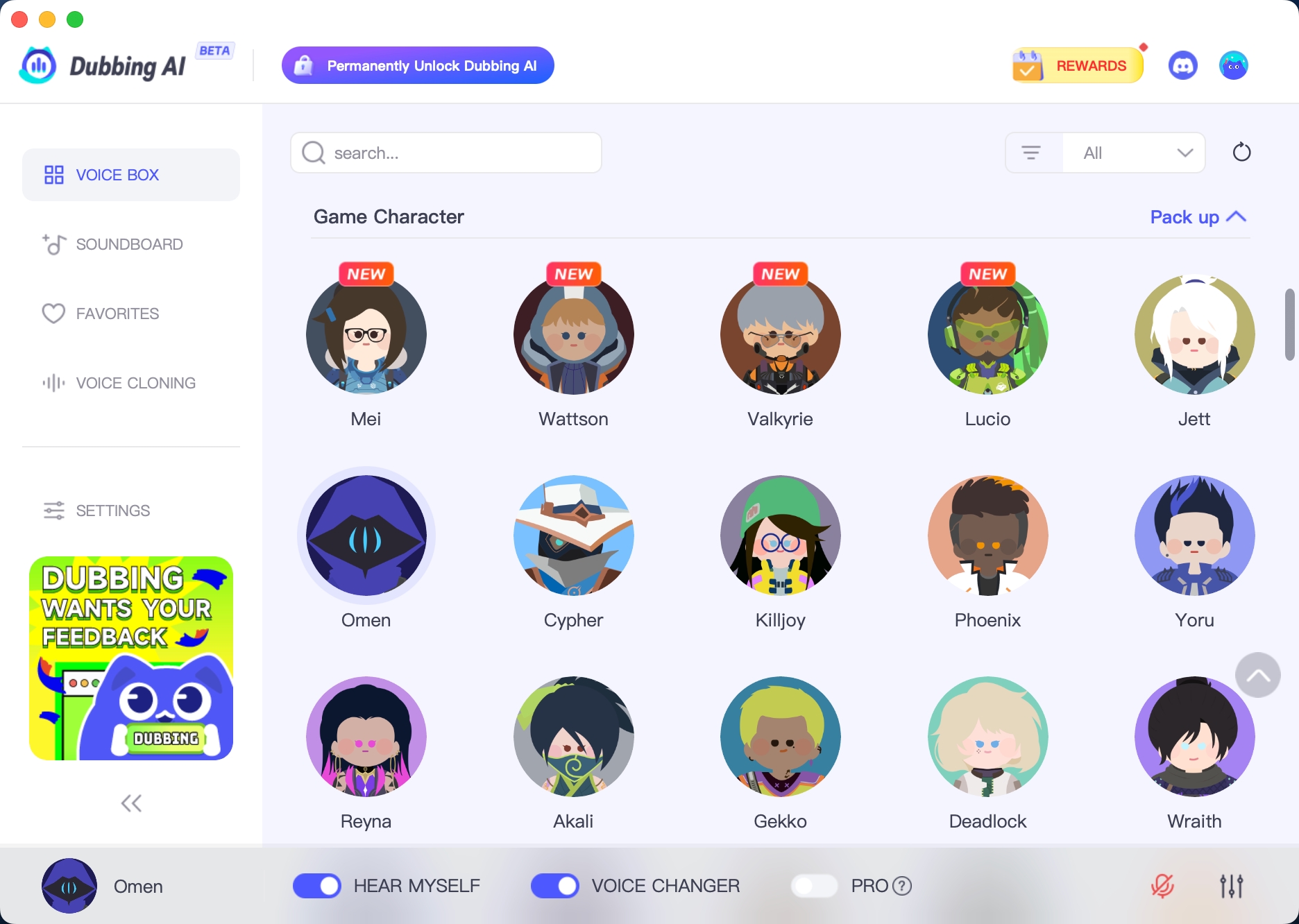

HOW TO USE DUBBING AI?

1. Download Dubbing AI: Install the application on your Windows or macOS computer. 2. Configure Your Audio: Set your primary microphone as the input in Dubbing AI. Then, in your computer's sound settings (or Discord/in-game chat), set your input device to "Microphone (Dubbing Virtual Device)". 3. Start Roleplaying: Open the Voicebox in Dubbing AI, select a voice, and make sure the "Voice Changer" is toggled on. Your new voice is ready for the blocky world!

Minecraft Voice Changer
What is the Dubbing AI Fahhh Soundboard?

The Fahhh Soundboard is a customizable collection of meme-style voice clips created with Dubbing AI’s voice generator. You can design your own reactions, catchphrases, and sound memes using any voice you choose.

How do I create custom Fahhh sounds in Dubbing AI?

Simply type any phrase into the text-to-speech generator, choose a voice model, and click “Generate.” Dubbing AI instantly creates a clean, high-quality audio clip ready to add to your soundboard.

Can I upload my own voice to turn it into a Fahhh sound?

Yes! You can upload a short audio sample, and Dubbing AI will clone the voice style. After that, you can generate unlimited custom Fahhh-type reactions using your own voice model.

How do I add the generated clips to my soundboard?

After generating a sound, select “Add to Soundboard.” You can organize clips into folders, rename them, assign hotkeys, and sort them into categories like meme reactions, screams, punchlines, or chaotic Fahhh moments.

Can I use the Fahhh Soundboard in games, calls, or streams?

Absolutely. The Dubbing AI soundboard works in real time for Discord, Steam games, Roblox, Valorant, Fortnite, Zoom, OBS, and more. Just set Dubbing AI as your microphone and trigger sounds instantly.

Can I export or share my custom Fahhh soundboard?

Yes. Dubbing AI allows exporting individual clips or sharing full soundboard sets with friends. You can also download audio files for TikTok edits, YouTube memes, or mobile use.