
Spider-Man is officially coming to PUBG Mobile, and the first thing squads do with a superhero crossover is not aim practice — it's roleplay. A web-shooter emote lands differently when the callout that follows it sounds like a wisecracking teenager in a red mask. The problem is that PUBG Mobile has no voice-changing setting, and most tutorials for "Spider-Man voice changer" hand you a text-to-speech tool that can't touch live match chat. This guide covers the two setups that do work on a phone — a routed app and voice-changing earbud hardware — plus the mic checks that decide whether your squad hears Spider-Man or hears nothing at all.
How to change my voice on mobile
Mobile voice changing splits into two honest categories, and knowing which one you're in saves an hour of troubleshooting.
Software routing. A real-time voice changer app captures your microphone, converts it, and presents the converted stream to other apps as an input. On Android this generally works, because the OS allows an app to act as an audio source for another app given the right permissions. On iOS it mostly doesn't: Apple keeps a single app from feeding processed audio into another app's live microphone stream, which is why so many iPhone tutorials quietly end with "record it and send it as a clip."
Hardware processing. Here the conversion happens on a chip between your mouth and the phone. The phone sees an ordinary headset microphone and never knows the voice was altered, so app-level restrictions stop mattering — PUBGM, WhatsApp, Discord, and Zoom all behave identically. This is the category the Dubbing AI Voice Changing Earbuds sit in: pair once, pick a voice, and the transformation follows you into any app that accepts a headset mic. Dubbing AI puts end-to-end latency around 300 ms as of August 2026, which is inside the range where live banter still lands.
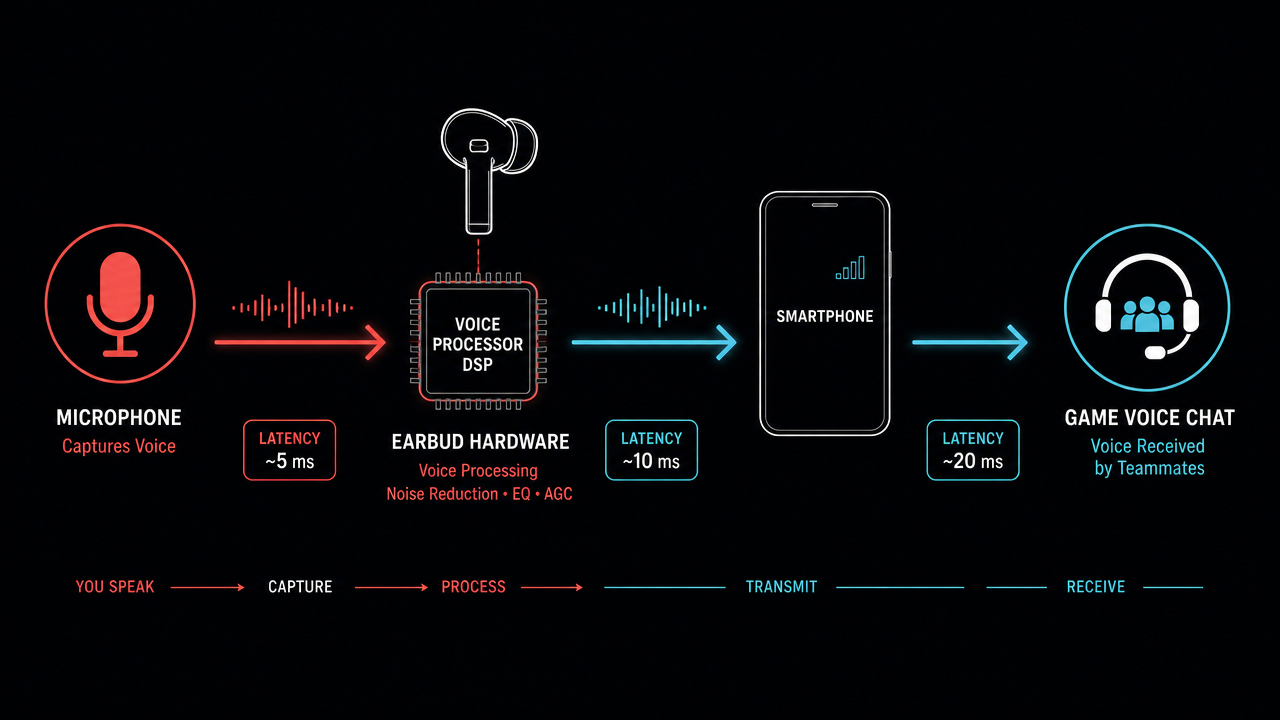
If you already play on a PC, there's a third route: run Dubbing AI on desktop, route the converted output into a call, and use your phone only as a second screen. It's the most flexible option and the least portable one.
How to change my voice on PUBGM
The order of operations matters more than the specific tool.
- Set up the voice source first, game second. Pair the earbuds or install and configure the app before you launch PUBG Mobile. Pick your voice — for the crossover you want a bright, youthful male preset with a light rasp rather than a deep "hero" voice; Spider-Man reads as a teenager, not a Batman.
- Grant microphone permission to PUBGM. Android: Settings → Apps → PUBG Mobile → Permissions → Microphone → Allow. iOS: Settings → PUBG Mobile → Microphone.
- Point PUBGM at the right input. In-game, open Settings → Audio, enable voice chat, and confirm the mic indicator responds when you talk. With hardware earbuds this happens automatically once they're the active headset; with an app you may need to select the virtual input explicitly.
- Test in Training Grounds with a friend. Speak a real callout — "two in the compound, north side" — not just "test test." You're checking that words survive the conversion intelligibly, which is a different question from whether the voice sounds cool.
- Then tune the effect strength. Most people set intensity too high at first. If squadmates ask you to repeat yourself twice a match, dial it back until the character is still obvious but consonants stay crisp.
If PUBGM hears nothing after all of that, the cause is almost always one of three things: the game was already running when you changed the audio source, another app has grabbed exclusive mic access (a music or recording app in the background), or Bluetooth reconnected to the phone's speaker profile instead of the headset profile. Force-close PUBGM, unpair and repair, relaunch.
Making the Spider-Man bit actually land
The voice is half of it. What gets clipped and shared is timing.
- Commit to the register, not the impression. You don't need to imitate a specific film performance. A quippy, slightly nervous delivery reads as Spider-Man far more reliably than an accurate voice with flat energy.
- Save it for moments. A whole match in character gets exhausting for your squad. Turn it on for the drop, for a clutch revive, and for the last circle.
- Match the cosmetics. Pair the voice with whatever the crossover event hands you — outfit, parachute trail, emotes. Visual plus audio is what makes a 15-second clip work on TikTok without a caption explaining the joke.
- Keep your real callouts real. The best players I've watched do this run two modes: character voice between fights, plain voice mid-fight. Nobody wants a web-slinging quip when a squad is pushing.
What the alternatives get you
Dubbing AI isn't the only option, and it's worth knowing where others fit.
Voicemod has a large preset library and a strong desktop reputation, and if you're already streaming PUBGM from an emulator on PC it's a reasonable pick. Its real-time strength lives on Windows, not on a phone in your hands.
Clownfish Voice Changer is free and lightweight, which genuinely matters if your setup is old. The presets are basic pitch-and-formant work, though — good enough for a robot, not for a character read.
Voice.ai leans into community-uploaded voice models, so the variety is enormous and the quality is inconsistent. Expect to audition several models before one holds up in a live match.
None of these solve iOS. That's the specific gap hardware fills, and it's the honest reason to consider earbuds over an app if you play on iPhone.
A note on impersonation
Character voices for play are fine. Using a voice changer to pass yourself off as a specific real person — a streamer, a friend, anyone whose identity carries weight — is a different act, and platforms treat it as one. Keep it to fictional characters and keep it to fun.