Dive into the world of free Minecraft soundboards with Dubbing AI. Imagine enhancing your gameplay with a vast array of sounds, from ambient music to hilarious pranks. You can access over 300,000 curated sounds, perfect for any Minecraft enthusiast. Whether you’re looking to add a unique twist to your game or simply want to explore new audio experiences, Dubbing AI’s soundboard for PC offers endless possibilities. With daily updates, you’ll always find something fresh. Get ready to transform your Minecraft adventures with the power of AI-generated voices and sounds.
The Best AI Voice Changer with soundboard
Understanding Soundboards and Their Relevance to the Minecraft Game

What is a Soundboard?
A soundboard is a tool that lets you play various audio clips at the touch of a button. Think of it as a digital jukebox filled with sounds instead of songs. You can find soundboards in many forms, from simple apps on your phone to more complex software on your computer. They often include a wide range of audio clips, such as music, sound effects, and even voices.
In the context of gaming, soundboards add an extra layer of fun and creativity. For instance, Dubbing AI offer a vast collection of over 300,000 sounds. You can use these to prank your friends or create an immersive atmosphere in your game. The possibilities are endless, and the best part? You can customize them to suit your style.
Why Use a Soundboard in the Minecraft Game?
Using a soundboard in the Minecraft game can transform your gaming experience. Imagine exploring your blocky world with ambient music that matches the environment or using free sound effects to surprise your friends during a multiplayer session. Soundboards like those offered by Dubbing AI provide a unique way to enhance your gameplay.
Here’s why you might want to consider using a soundboard in Minecraft:
Enhance Immersion: Add background music or environmental sounds to make your Minecraft world feel more alive.
Prank and Entertain: Use funny sounds or voices to entertain yourself and others. The Scandalous Soundboard is a great example, compatible with Minecraft 1.19.2, offering both client and server-side fun.
Creative Expression: Customize your game with unique sounds. Whether you’re building a castle or exploring a cave, tailor the audio to fit your adventure.
Community Engagement: Share your soundboard creations with friends or the wider Minecraft community. It’s a great way to connect and collaborate.
With tools like Dubbing AI, integrating a soundboard into your Minecraft game is straightforward. You can easily access a variety of sounds and even create AI-generated voices to add a personal touch. So, why not give it a try and see how it can elevate your Minecraft adventures?
Accessing Free Minecraft Soundboards in Dubbing AI
Ready to dive into the world of Dubbing AI? Let’s get you started with accessing those amazing free Minecraft soundboards. Follow these simple steps to enhance your gaming experience with unique sounds and voices.
Creating a Dubbing AI Account
First things first, you need an account. Head over to the Dubbing AI website. Look for the “Sign Up” button, usually at the top right corner. Click it, and you’ll be prompted to enter your email and create a password. Once you’ve filled in the details, hit “Create Account.” Check your email for a confirmation link. Click it to verify your account. You’re now part of the Dubbing AI community!
Navigating to the Free Soundboard Section
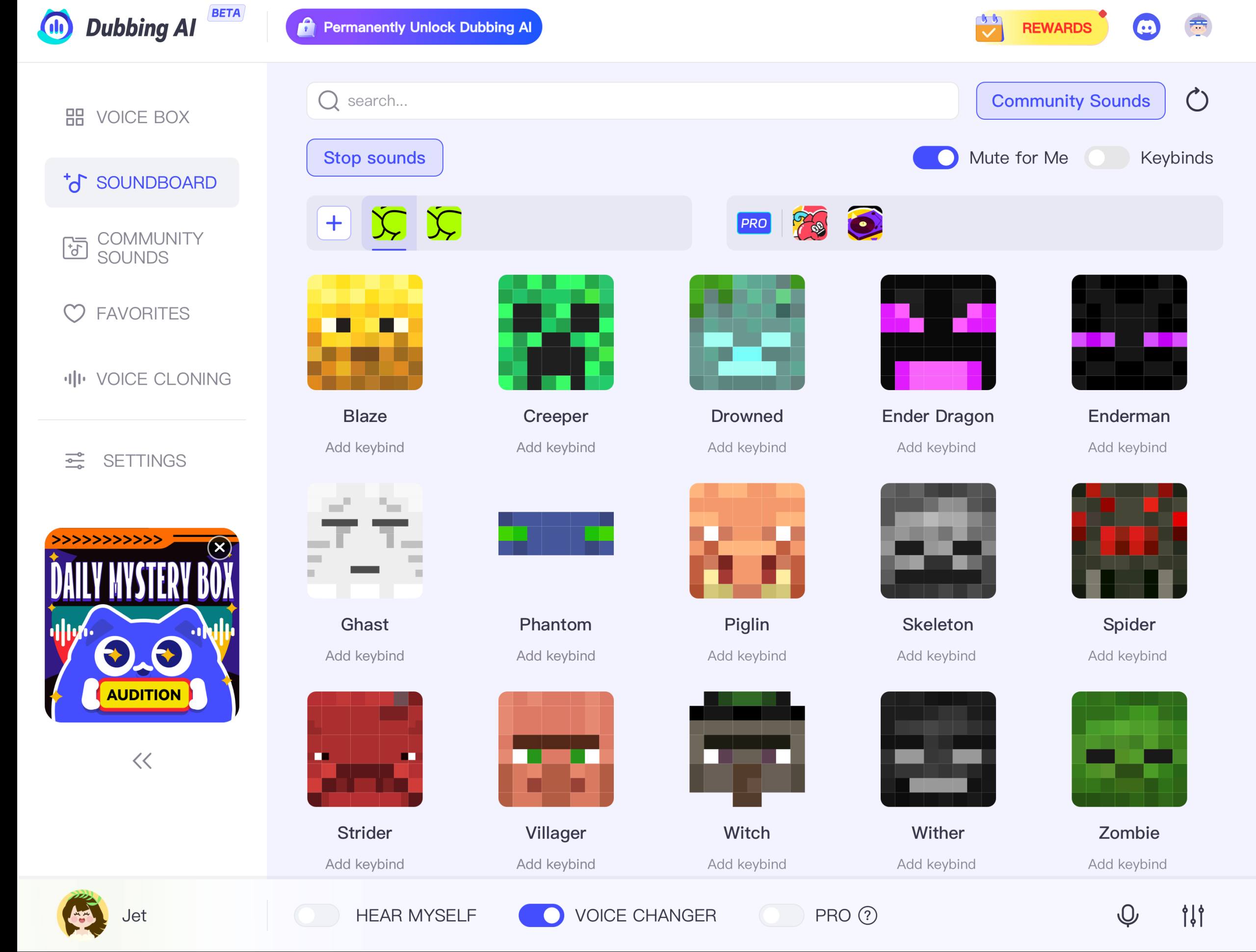
Now that you’re logged in, it’s time to explore. On the homepage, you’ll see various options. Look for the “Community Sound” tab. Click on it, and you’ll find yourself in a world of audio possibilities. Here, you can browse through different categories. To find the Minecraft soundboards, use the search bar or scroll through the list until you spot them. The interface is user-friendly, making it easy to navigate.
Selecting and Downloading Minecraft Soundboards
Once you’ve found the Minecraft section, it’s time to choose your sounds. You’ll see a variety of options, from ambient music to hilarious pranks. Click on a soundboard to preview the sounds. If you like what you hear, click the “Download” button. The soundboard will download to your device, ready for you to use in your game. Remember, you can download a soundboard as many times as you like, so feel free to explore and experiment.
With these steps, you can easily install a soundboard and transform your Minecraft adventures. Whether you’re using it for fun or to enhance your gameplay, the possibilities are endless. Enjoy the immersive experience that Dubbing AI offers with its voice changer soundboard and free sound effects. Happy gaming!
Setting Up Your Minecraft Soundboard

Ready to bring your Minecraft world to life with a soundboard? Let’s dive into setting it up and customizing it to suit your style.
Integrating the Soundboard with the Minecraft Game
Integrating a soundboard with Minecraft is simpler than you might think. Follow these steps to get started:
Install the Soundboard Software: First, ensure you have the Dubbing AI soundboard software installed on your computer. This tool will allow you to access a variety of free sound effects and AI-generated voices.
Launch Minecraft: Open your Minecraft game. Make sure it’s running smoothly before proceeding to the next step.
Open the Soundboard: Launch the Dubbing AI soundboard. You’ll see a user-friendly interface with various sound options.
Select Your Sounds: Browse through the available sounds. You can choose from ambient music, funny pranks, or even create your own unique audio clips. The Dubbing AI Community Sound where users can create and share sounds, including Minecraft meme soundboards. This feature allows you to search sounds by tags and add them to your own collection.
Assign Sounds to Keys: Assign your chosen sounds to specific keys on your keyboard. This setup allows you to play sounds instantly while gaming. Imagine digging dirt in Minecraft and hearing the distinctive sound Rosenfeld created for the game. It adds a layer of realism and fun to your experience.
Test Your Setup: Before diving into gameplay, test your soundboard setup. Press the assigned keys to ensure the sounds play correctly in Minecraft.
Customizing Soundboard Settings
Customization is key to making your soundboard truly yours. Here’s how you can tweak the settings:
Adjust Volume Levels: Ensure the sound effects don’t overpower the game’s audio. Balance the volume levels for an immersive experience.
Create Custom Sound Clips: Use the voice changer soundboard feature to create custom sound clips. You can record your voice or use AI-generated voices to add a personal touch to your game.
Organize Your Sounds: Group similar sounds together for easy access. For example, keep all ambient sounds in one section and prank sounds in another.
Update Regularly: Dubbing AI offers daily updates, so check for new sounds regularly. This way, your soundboard stays fresh and exciting.
By following these steps, you can seamlessly integrate and customize your soundboard with Minecraft. Whether you’re using it for entertainment or to enhance your gameplay, the possibilities are endless. Enjoy the creative freedom that comes with using a voice changer soundboard and free sound effects in your Minecraft adventures!
Practical Applications of Minecraft Soundboards
Enhancing Gameplay Experience
Imagine diving into your Minecraft world with a soundboard that brings every block and creature to life. You can add ambient music to your adventures or surprise your friends with a Creeper sound effect. This makes your gameplay more exciting and immersive. With a soundboard, you can easily integrate these sounds into your game. The best part? You can use it anywhere you communicate with your mic, like Discord or Skype. This means no limits to where you can enhance your gaming experience.
Content Creation and Streaming
If you’re into content creation or streaming, soundboards are your new best friend. They let you add unique audio elements to your videos or live streams. Imagine using a voice changer soundboard to create funny voices or dramatic sound effects. This keeps your audience entertained and engaged. Dubbing AI offers a wide range of free sound effects, perfect for making your content stand out. Whether you’re streaming on Twitch or creating YouTube videos, soundboards help you deliver an immersive experience to your viewers.
Collaborative Projects and Community Engagement
Soundboards also shine in collaborative projects and community engagement. You can share your soundboard creations with friends or the wider Minecraft community. This fosters collaboration and creativity. Imagine working on a project with others and using a soundboard to coordinate or add fun elements. It brings people together and enhances the overall experience. With Dubbing AI, you can even create AI-generated voices, adding a personal touch to your projects. This makes your collaborations more dynamic and engaging.
Frequently Asked Questions about Free Soundboards
Is the Soundboard Really Free?
Yes, the soundboard is completely free. You can access a wide range of sounds without spending a dime. Dubbing AI offers this feature to enhance your gaming and creative experiences. You don’t need to worry about hidden fees or subscriptions. Just sign up, and you’re good to go. Enjoy exploring the vast library of sounds available at your fingertips.
Can I Use the Soundboard for Commercial Projects?
Absolutely! You can use the soundboard for commercial projects. Whether you’re creating content for YouTube, streaming on Twitch, or working on other projects, the soundboard is a valuable tool. It allows you to add unique audio elements to your work. Just make sure to check any specific licensing agreements for individual sounds. This ensures that you comply with any usage restrictions.
How Often Are New Sounds Added?
New sounds get added regularly. Dubbing AI updates its library frequently to keep things fresh and exciting. All users can upload and share their soundboard with others too. You can expect new sounds to appear almost daily. This means you’ll always have something new to explore and use in your projects. Stay tuned for updates and make sure to check back often. This way, you won’t miss out on the latest additions.
Using free Minecraft soundboards in Dubbing AI opens up a world of creativity and fun. You can transform your game with the villager AI voice, adding depth and humor to your adventures. The real-time voice changing feature lets you experiment with different sounds, making each session unique. Whether you want to use soundboard for Discord or enhance your gameplay, the possibilities are endless. Dive into the world of text to speech and explore the villager voice generator. Share your experiences and questions with the community. Your feedback helps us grow and innovate.
See Also
Elevate Your Gaming Experience with AI Soundboard
2024 Handbook: Real-Time Voice Modulation with Dubbing AI
Dubbing AI: The Best Voice Modifier for Discord
Reasons Dubbing AI Stands Out for MMORPG Voice Changing
Prepare for the New Movie: Enchant Minecraft with Sound Effects

Related Posts