Imagine stepping into Fortnite as Hatsune Miku, not just with her iconic skin but also her unmistakable voice. That’s where Dubbing AI shines. This voice changer transforms your voice in real-time, letting you sound just like the virtual pop star. It’s incredibly easy to use and works seamlessly with Fortnite. With low latency (under 100ms) and minimal CPU usage (2-3%), it keeps your gameplay smooth. Plus, it offers hundreds of voice options, making it perfect for role-playing or just having fun. Why settle for less when you can elevate your gaming experience with Dubbing AI?
The Best AI Voice Changer with soundboard
What Is Dubbing AI
Dubbing AI is a cutting-edge tool that takes your gaming experience to the next level. It’s not just a voice changer; it’s a complete solution for real-time voice transformation. Whether you’re role-playing as Hatsune Miku or exploring other characters, Dubbing AI makes it effortless to sound exactly how you want.
Key Features of Dubbing AI
Low Latency
Nobody likes lag, especially during intense Fortnite matches. Dubbing AI ensures your voice changes in real-time with latency under 100ms. This means your gameplay stays smooth, and your voice syncs perfectly with your actions.
Awesome Voices
With over 500 voice options, Dubbing AI offers something for everyone. You can choose from anime characters, game personas, or even create your own unique voice. Hatsune Miku’s voice is just one of the many high-quality options available.
Compatibility with Fortnite and Other Platforms
Dubbing AI integrates seamlessly with Fortnite and other platforms. It consumes only 2-3% of your CPU, so you won’t experience any performance issues. Plus, it supports over 200 languages and dialects, making it versatile for all kinds of users.
How Dubbing AI Replicates Hatsune Miku’s Voice
Dubbing AI uses advanced AI technology to replicate Hatsune Miku’s voice with incredible accuracy. It combines text-to-speech capabilities with voice cloning to capture her unique vocal characteristics. This ensures you sound just like the virtual pop star, adding authenticity to your gameplay.
Benefits of Using Dubbing AI in Fortnite
Enhances Role-Playing as Hatsune Miku
Dubbing AI lets you fully immerse yourself in the role of Hatsune Miku. You can transform your voice in real-time, making your character come alive. It’s perfect for creating unique personas and engaging with other players.
Adds a Fun and Immersive Element to Gameplay
Using a voice changer like Dubbing AI makes Fortnite even more enjoyable. You can surprise your teammates, entertain your audience if you’re streaming, or simply have fun experimenting with different voices. The preloaded soundboards and customizable features add an extra layer of creativity to your sessions.
How to Set Up and Use Dubbing aI for Fortnite

Download and Installation
Where to download the software
Getting started with Dubbing AI is simple. You can download the software directly from its official website or app store, depending on your device. It’s compatible with Windows, Mac, Android, and iOS, so you’re covered no matter what platform you use. The software is lightweight, using only 3-5% of your CPU resources. To get the best results, make sure you have a reliable microphone and good headphones. These will help you achieve clear audio and make your voice changer experience even better.
Configuring Dubbing AI for Hatsune Miku
Selecting the Hatsune Miku voice preset
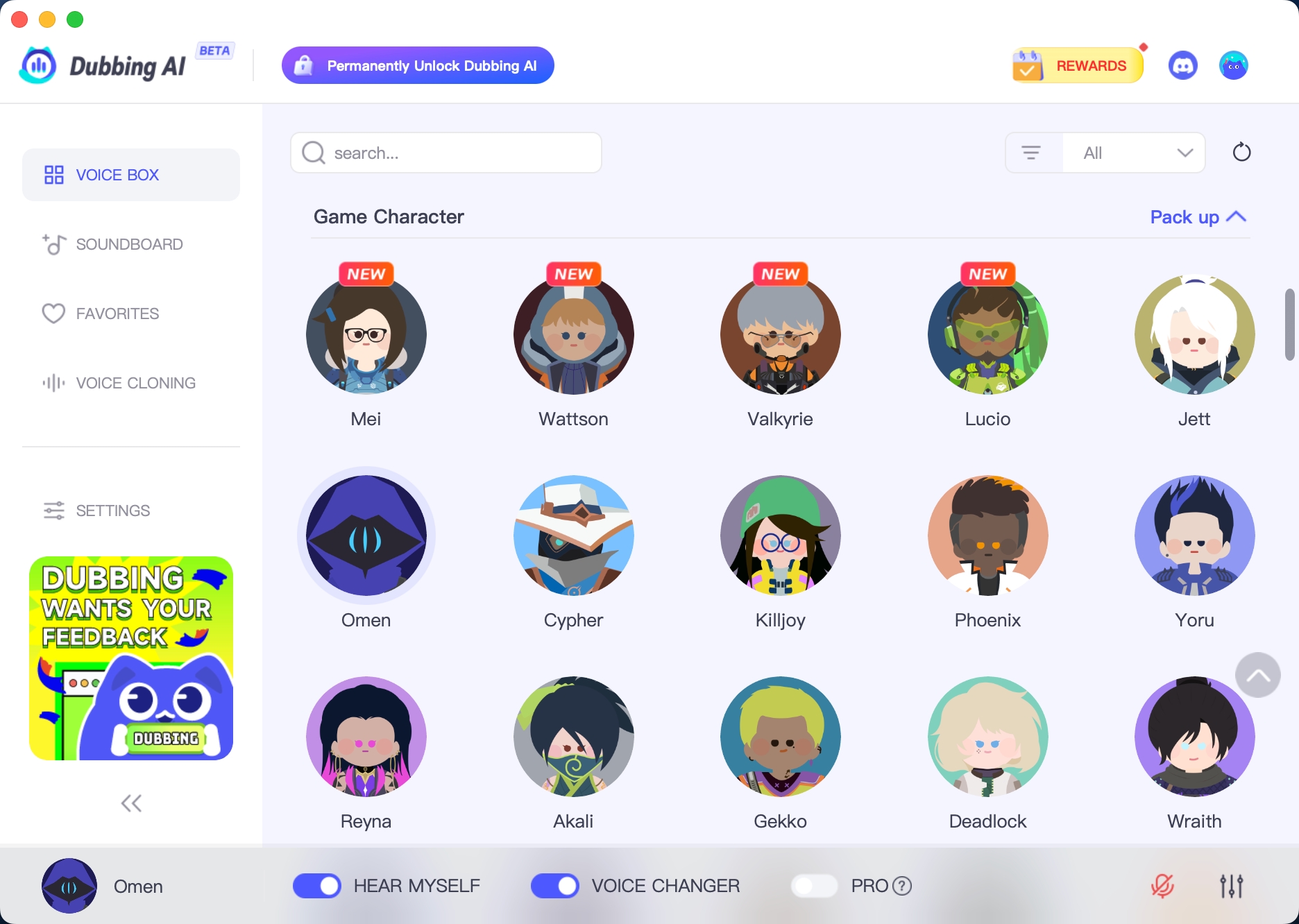
Once you’ve installed Dubbing AI, open the software and explore its voice library. Look for the Hatsune Miku voice preset. It’s easy to find since the interface is user-friendly and well-organized. Select the preset, and you’re ready to start sounding like the iconic virtual pop star.
Adjusting settings for optimal performance
To make sure everything runs smoothly, tweak a few settings. Adjust the pitch and tone sliders to match Hatsune Miku’s unique voice. You can also experiment with additional effects to customize your sound further. The software uses only 2-3% of your CPU, so you won’t have to worry about lag or performance issues during gameplay.
Integrating Dubbing AI with Fortnite
Linking the voice changer to Fortnite’s audio settings
Connecting Dubbing AI to Fortnite is a breeze. Follow these steps:
Open Fortnite and go to the audio settings menu.
Set Dubbing AI as your input device for voice chat.
Speak into your microphone, and the software will apply the Hatsune Miku voice transformation in real time.
Lag can ruin even the best gaming moments, but Dubbing AI eliminates this concern. The software delivers real-time voice changes with virtually no delay, operating with a latency of under 100ms.
With everything set up, you can now enjoy Fortnite with your new voice. Whether you’re role-playing as Hatsune Miku or just having fun with friends, this voice changer adds a whole new level of excitement to your gameplay.
Tips for Optimizing Your Voice Changer Experience

Fine-Tuning the Settings
Adjusting pitch and tone for a more accurate Hatsune Miku voice
To sound just like Hatsune Miku, you’ll want to tweak the pitch and tone settings in Dubbing AI. Her voice has a high-pitched, melodic quality that’s instantly recognizable. Open the software and adjust the sliders until you hit that sweet spot. Don’t be afraid to experiment! Small changes can make a big difference. If you’re unsure, try listening to a few of her songs for reference. This will help you match her vocal style more closely.
Enhancing Gameplay with the Voice Changer
Using the voice changer in team chats
Using a voice changer in team chats can make your Fortnite sessions more exciting. Here’s how you can set it up:
Open Fortnite and go to the audio settings.
Select Dubbing AI as your input device for voice chat.
Speak into your microphone, and the software will transform your voice in real time.
Once you’re set up, you can match your voice to your Hatsune Miku avatar. This adds a layer of immersion that your teammates will love. Plus, the virtual microphone feature lets you use the voice changer across other platforms, so you’re not limited to just Fortnite.
Creating content or streaming with the Hatsune Miku voice
If you’re a content creator or streamer, the Hatsune Miku voice can take your videos to the next level. Imagine hosting a Fortnite Festival stream featuring Miku’s popular songs and themed cosmetics. You could even showcase the game’s Miku-inspired guitars or the track “M@GICAL☆CURE! LOVE ♥ SHOT” from Sawtowne. These unique elements will captivate your audience and make your content unforgettable. Local multiplayer options and future Vocaloid-themed skins offer even more opportunities for creative gameplay.
🎮 Pro Tip: Use the Hatsune Miku voice to narrate your gameplay or interact with your viewers. It’s a fun way to engage your audience and keep them coming back for more!
Dubbing AI is the ultimate tool for bringing Hatsune Miku to life in Fortnite. Its crisp sound effects and real-time voice transformation make every match more dynamic and immersive. You’ll love how easy it is to customize soundboards and add unique audio clips to your gameplay. Whether you’re mimicking Miku’s voice or creating your own, this voice changer keeps the fun going with minimal latency. Players rave about its ability to boost immersion and add excitement to multiplayer games. Ready to elevate your Fortnite experience? Give Dubbing AI a try and let the magic begin!
FAQ
How do I know if my PC can handle Dubbing AI?
Dubbing AI is lightweight and uses only 2-3% of your CPU. If you can run Fortnite smoothly, your PC can handle this software. Just make sure you have a reliable microphone and headphones for the best experience.
Can I use Dubbing AI for other games or platforms?
Absolutely! Dubbing AI works with many platforms, not just Fortnite. You can use it for games, streaming, or even video calls. Its compatibility with over 200 languages makes it versatile for all kinds of users.
Is Dubbing AI free to use?
Dubbing AI offers both free and premium plans. The free version includes basic features, while the premium plan unlocks advanced options like Hatsune Miku’s voice preset. Check their website for pricing details.
Does Dubbing AI work on mobile devices?
Yes, it does! Dubbing AI supports Android and iOS devices. You can download the app from your device’s app store and start using it right away. It’s perfect for gaming on the go.
Can I create my own custom voice with Dubbing AI?
You sure can! Dubbing AI lets you customize voices using its advanced settings. Adjust pitch, tone, and effects to create a unique voice. It’s a fun way to personalize your gaming or streaming experience.
🎤 Pro Tip: Experiment with different settings to find the perfect voice for your character. Small tweaks can make a big difference!
See Also
Top AI Voice Modulators for Creative Content Makers
Selecting the Perfect Voice Changer and Soundboard for Gamers
Explore the Top Celebrity Voice Alteration App – Dubbing AI

Related Posts