 Image Source: pexels
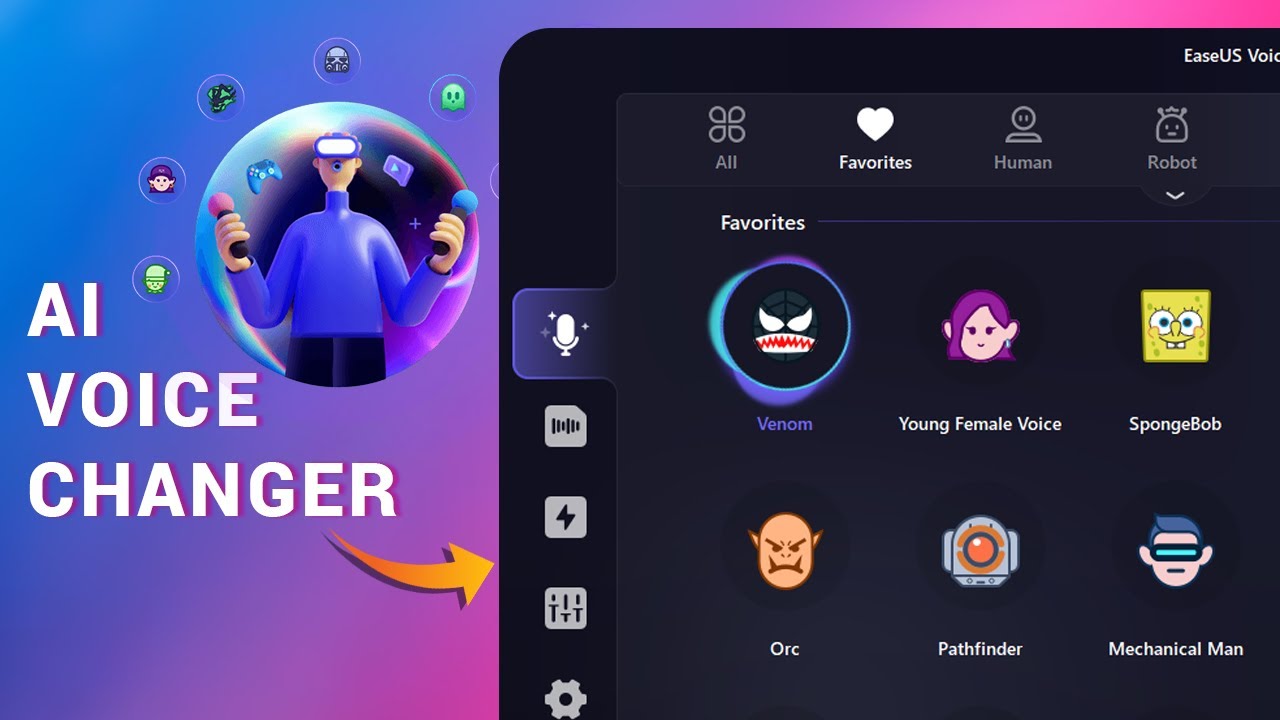
Are you searching for a cool voice changer in 2025? EaseUS Voice Changer could be the perfect choice for you. It’s great for gamers, creators, or anyone who enjoys fun online chats. This isn’t just any voice changer—it’s something special. With smart tools and live features, EaseUS Voice Changer makes changing your voice easy and exciting. It also works well with apps like Discord and Twitch. Want to try a fun new way to share your voice?
What Is EaseUS VoiceWave?
Overview of EaseUS voice changer
EaseUS VoiceWave is a modern tool that changes your voice. You can use it while gaming, streaming, or chatting with friends. It lets you switch your voice instantly with cool effects. It also works smoothly with apps like Discord and Twitch.
What makes EaseUS VoiceWave special? It mixes smart tech with an easy design. You don’t need to know much about tech to use it. The setup is fast, and the controls are simple. Plus, it keeps getting better with updates to fit what users want.
Here’s a quick look at EaseUS VoiceWave’s growth and features:
| Category | Details |
|---|---|
| Revenue (US$ Million) | Info on how much EaseUS VoiceWave earned from 2020 to 2025 in the soundboard market |
| Market Share | Data on EaseUS VoiceWave’s rank and share in the soundboard software world |
| Recent Developments | Highlights of new features and updates from EaseUS VoiceWave |
This table shows how EaseUS VoiceWave became a top choice for voice changers. Its updates and creative tools make it popular with users.
Who is EaseUS VoiceWave designed for?
EaseUS VoiceWave is for anyone who wants fun online chats. Are you a gamer who wants to sound different in games? You can sound like a robot, anime character, or even a celebrity.
If you’re a streamer, this tool can make your streams more exciting. Use fun voice effects to entertain your viewers live. It’s also great for creators who need cool voiceovers without hiring someone.
Even if you just like trying new gadgets, EaseUS VoiceWave is worth it. It’s fun, simple, and works with apps you already use.
Key Features of EaseUS VoiceWave
 Image Source: unsplash
Real-time voice changing capabilities
EaseUS VoiceWave is great for changing voices instantly. You can switch your voice while gaming, streaming, or chatting live. Whether you’re playing a game or hosting a stream, your voice changes smoothly without delays.
The tool lets you sound like a robot, baby, or villain right away. It adds fun and mystery to your chats. It works well with over 200 games and 50 messaging apps, making it super useful.
Tip: Use EaseUS VoiceWave with Discord or Twitch for more fun. Your viewers will enjoy the creative sounds!
Here’s a simple list of its best features:
| Feature | Description |
|---|---|
| Real-time voice changing | Lets users change their voice live during games, streams, and calls. |
| Variety of voice effects | Includes over 100 effects like robot, baby, male, and female voices. |
| Platform support | Works with 200+ online games and 50+ messaging apps. |
These features make EaseUS VoiceWave a top choice for voice changers.
Voice customization and personalization options
EaseUS VoiceWave lets you create your own voice effects. Want to mix a robot voice with a celebrity tone? You can adjust pitch, tone, and other settings to make a unique sound.
The software is easy to use, even for beginners. You can save your custom voices and switch between them quickly. This is helpful if you need different voices for games, streams, or chats.
Note: EaseUS VoiceWave updates its voice library often, so you’ll always find new options.
With these tools, you can make your voice stand out and be truly unique.
Pre-set voice effects, including anime and celebrity voices
EaseUS VoiceWave has many pre-set voice effects for every occasion. Love anime? You can sound like your favorite character in seconds. Want to copy a celebrity’s voice? The software has realistic celebrity profiles ready to use.
Pre-set effects are great when you want quick fun without editing. Whether you’re playing a role in a game or entertaining viewers, the variety of voices keeps things exciting.
Fun Fact: EaseUS VoiceWave offers over 100 pre-set effects, including alien and chipmunk voices.
With its large voice library, EaseUS VoiceWave makes it easy to try new sounds and find the perfect one for any moment.
Compatibility with popular platforms like Discord and Twitch
EaseUS VoiceWave works great with apps like Discord and Twitch. If you’re a gamer or streamer, it’s super easy to use. No tricky setups or tech problems—just smooth and simple operation.
Here’s why it’s awesome for these platforms:
-
It sets itself as the main voice input in Discord. You don’t need to mess with settings. Just install it, and it’s ready.
-
It also works well with tools like TeamSpeak, OBS Studio, and Streamlabs. Whether chatting or streaming, it handles everything smoothly.
-
Real-time voice changes happen instantly with no delays. This is perfect for live streams and online chats where timing matters.
Tip: Use EaseUS VoiceWave with Twitch to create fun characters. Custom voices can keep your viewers entertained and coming back.
The sound quality is another big plus. EaseUS VoiceWave makes your voice clear and sharp without distortion. Your voice won’t sound weird or robotic. The software also avoids lag, which is great for live chats. Imagine talking on Discord or streaming on Twitch without any delays.
You can also customize your voice to fit your style. Want to sound like a villain, chipmunk, or anime character? You can adjust the settings to make it happen. Creating your own voice effects adds a fun, personal touch.
EaseUS VoiceWave’s easy use with Discord and Twitch makes it a must-have. It’s not just about changing voices—it makes your online experience even better.
How to Set Up and Use EaseUS VoiceWave
Step-by-step installation process
Setting up EaseUS VoiceWave is fast and easy. You don’t need to know much about technology. Just follow these simple steps:
-
Go to the official EaseUS website and download the software.
-
Open the installer and follow the instructions on the screen.
-
Pick your language and agree to the terms.
-
Choose where to install the software and click “Install.”
-
When it’s done, open EaseUS VoiceWave to start.
The software includes a tutorial to help you set it up. It’s simple to use, so you can start exploring its features quickly.
Configuring EaseUS voice changer for real-time use
After installing, setting up EaseUS VoiceWave for live use is easy. Here’s what to do:
-
Open the app and go to the settings menu.
-
Choose your microphone as the input and headphones or speakers as the output.
-
Adjust the voice settings like pitch, tone, and volume to your liking.
-
Test your setup by speaking into the mic and trying voice effects.
EaseUS VoiceWave works well with apps like Discord and Twitch. It sets up sound settings for these apps automatically, saving you time.
Tip: Use the “Test Voice” option to check your settings before going live.
Tips for optimizing performance and achieving the best results
To make the most of EaseUS VoiceWave, try these tips:
-
Personalize your voice: Change pitch and tone to create your own sound.
-
Use the soundboard: Add fun sound effects during games or streams.
-
Check app settings: Make sure Discord or Twitch is set up correctly to avoid problems.
Here’s a table showing features that improve performance:
| Feature | Description |
|---|---|
| Customization Options | Change pitch, tone, and volume to make unique voices. |
| Inbuilt Soundboard | Play sound effects quickly during games or streams. |
| Seamless Integration | Works easily with Discord for smooth gaming and chatting. |
By using these tips, you’ll have a great time with EaseUS VoiceWave. Whether gaming, streaming, or chatting, the software is simple and fun to use.
If you’re into gaming, streaming, or creating content, this tool can make things better. It’s great for adding fun, creativity, and a professional touch to your work. Whether you’re entertaining others or just playing around, EaseUS VoiceWave is worth checking out.
Say Good Bye to EaseUS VoiceWave – Meeting Dubbing AI
Are you looking for the ultimate voice-changing experience? It’s time to make the switch from EaseUS VoiceWave to Dubbing AI , the cutting-edge voice changer designed for gamers, streamers, and content creators. Here’s why Dubbing AI is a game-changer:
Key Features of Dubbing AI Voice Changer
-
Real-Time Voice Modulation : Transform your voice instantly with industry-leading 30 ms latency , ensuring seamless, real-time interactions on platforms like Discord, Zoom, OBS, and more.
-
Massive Voice Library : Access over 1,000+ unique voices , including popular characters, celebrities, and realistic voice clones. With weekly updates, you’ll never run out of creative options.
-
Perfect for Gamers and Streamers : Elevate your streams and gameplay experiences by adding a touch of creativity and fun. Whether you’re role-playing in an online game or engaging your Twitch audience, Dubbing AI helps you stand out!
-
Natural Sounding Transformations : Powered by cutting-edge AI algorithms, Dubbing AI delivers incredibly realistic and clear voice transformations that are indistinguishable from the original voice.
-
Custom Soundboards : Boost your creativity with personalized soundboards designed to work effortlessly in all real-time environments.
-
Easy-to-Use Interface : Enjoy a sleek and intuitive application suitable for both beginners and professionals—no technical know-how required.
Why Switch to Dubbing AI?
-
Versatility : Works across multiple platforms. Whether it’s Discord, Zoom, OBS, or your favorite streaming app, Dubbing AI integrates seamlessly.
-
Constant Innovation : With frequent updates and new voices added regularly, you’ll always have fresh tools to express yourself.
-
Reliable Performance : The ultra-low latency and superior sound quality give Dubbing AI a significant edge over EaseUS VoiceWave.
Make the Switch Today!
Experience the future of AI voice technology. Whether you’re a gamer, streamer, or content creator, Dubbing AI provides unmatched quality and flexibility for all your voice-changing needs. Say goodbye to limitations—say hello to Dubbing AI!