Have you noticed how VTubing has taken the internet by storm? It’s not just a trend—it’s a creative revolution! With a 189% growth in the VTuber category and 41% of viewers engaging across platforms, the VTuber community is thriving. Free tools now make it easier than ever for beginners to join the fun. Whether you’re curious about how to become a VTuber or looking for a beginner’s guide, these tools help you dive into VTuber platforms without breaking the bank. Ready to start your journey?
Key Takeaways
Use VRoid Studio to make cool 3D avatars. It’s easy to use and has a helpful online group.
Try Live2D Cubism for 2D anime-like avatars. It’s cheap and simple to learn, great for starters.
Improve your streams with OBS Studio or Streamlabs. OBS has more tools, but Streamlabs is simpler for beginners.
Best Free VTuber Creation Software
VRoid Studio

VRoid Studio is great for making free VTuber avatars. Beginners and experts both love it. Why? It’s easy to use and lets you design cool 3D avatars for free. You can change hairstyles, faces, and clothes to fit your style.
One awesome thing about VRoid Studio is its online community. There are many tutorials, tips, and free assets shared by users. This makes learning avatar creation much easier, even if you’re new. But remember, it needs a strong computer. If your PC is slow, it might lag.
Live2D Cubism

If you like 2D avatars, Live2D Cubism is amazing. It’s one of the top tools for making anime-style 2D models. Unlike 3D tools, this focuses on a unique anime look.
Live2D Cubism is budget-friendly. You only need a webcam and software like VTube Studio to use it. Its smart features make animating and rigging faster. You can finish a 2D avatar in weeks, not months.
Advantage | Description |
|---|---|
Budget-friendly | Costs less than making and rigging 3D models. |
Easy for beginners | Needs simple hardware and is easy to learn. |
Anime-style look | Loved by anime fans for its special design. |
Quick to finish | Models take less time compared to 3D ones. |
Waidayo

Waidayo is a cool free app for VTubers. It connects your phone to your computer and turns your phone into a motion tracker. This is great for beginners who don’t want to buy pricey gear.
The app is easy to set up and works with many VTuber tools. It helps capture facial expressions and head movements, making your avatar more lifelike. While it doesn’t have advanced features, it’s simple and perfect for new users.
Free Face Tracking Software for Beginner VTubers
VSeeFace

VSeeFace is a popular free tool for face tracking. It’s open-source and has many features to make avatars lively. You can track your face and hands for more realistic movements. The software uses smart tech to detect expressions in real-time. It captures details like blinking, eyebrow raises, and mouth positions. This makes your avatar look natural and fun to watch.
Many VTubers like VSeeFace because it’s simple and accurate. You only need a webcam to start using it. Whether you smile or frown, it shows your expressions perfectly. If you want a dependable tool for VTubing, this is a great pick.
Animaze

Animaze is another free face-tracking app for VTubers. It’s easy to use and works with many types of avatars. But, it has some downsides. For example, the lip-syncing isn’t always perfect. Some users said their avatar’s mouth stayed open even when it shouldn’t. Also, Animaze only tracks faces, not upper body movements.
Even with these issues, Animaze is good for beginners. It’s quick to set up and lets you try different avatars for free.
Kalidoface 3D

Kalidoface 3D is a face-tracking tool you can use in your browser. You don’t need to download anything—just open it and start. It tracks your face and moves your avatar in real-time. This makes it a handy choice for beginners who want something simple.
One great thing about Kalidoface 3D is how easy it is to access. You can use it on almost any device, even phones. While it doesn’t have advanced features, it’s a great tool for starting your VTubing journey.
Free Voice Modulation Tools for VTubers
Dubbing AI Voice Changer
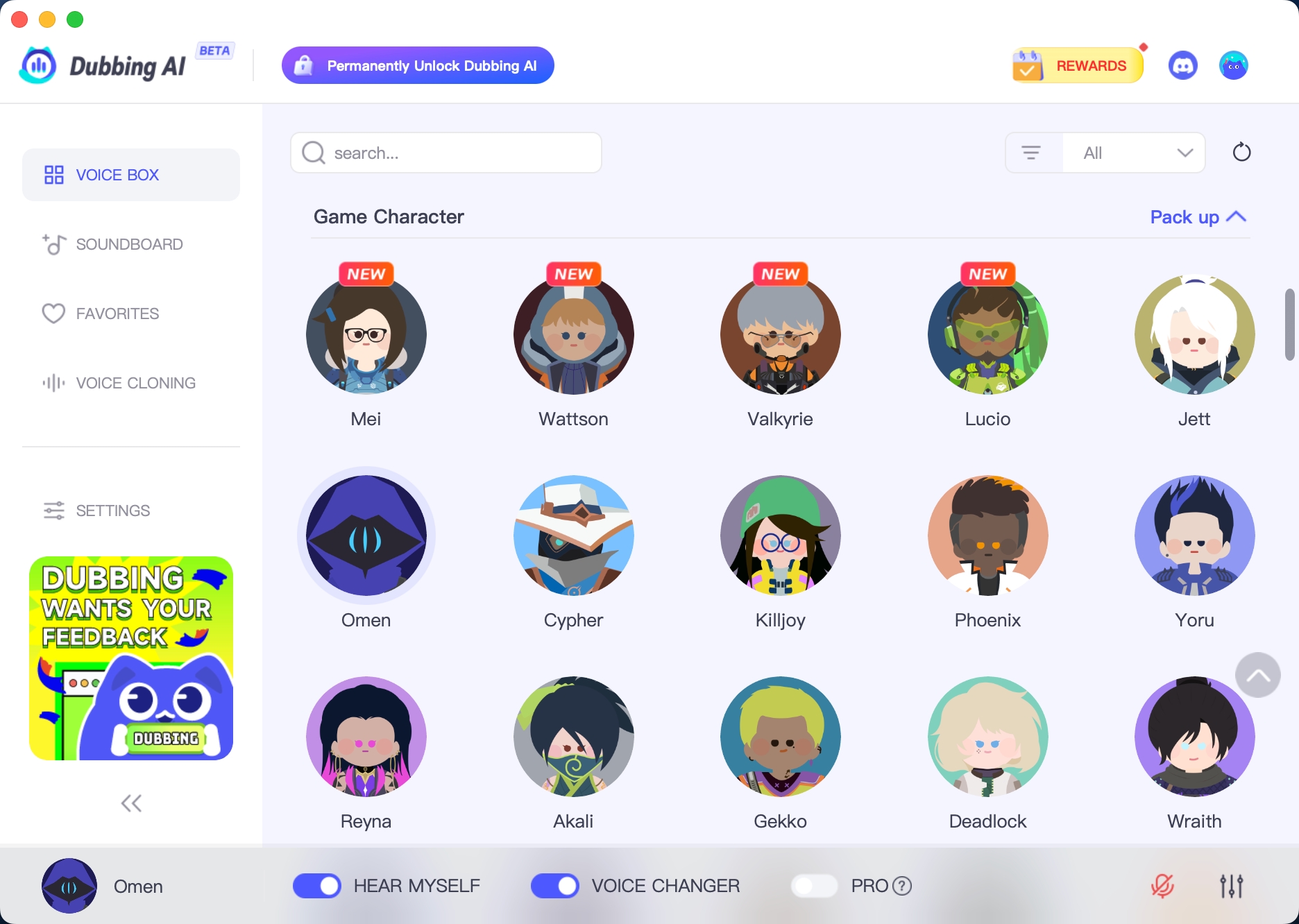
Have you ever wondered how VTubers get cool voices? Dubbing AI Voice Changer helps make voices sound unique and fun. You can sound like an anime hero or a video game character. This free tool is great for making your VTuber voice stand out.
The best part? It works super fast. It changes your voice instantly, with almost no delay. You can use it during live streams without any weird pauses. It also has over 500 voice choices, so you can try lots of styles for your VTuber.
Here’s why Dubbing AI is awesome:
Feature | Description |
|---|---|
Real-Time Voice Change | Switch voices in less than 30 milliseconds, perfect for live streams. |
Tons of Voice Options | Pick from 500+ voices, including anime and game characters. |
Low Computer Power Needed | Uses only 5% of CPU, keeping streams smooth and lag-free. |
Quick to Install | Set up in under 5 minutes with easy steps. |
Fun for Streamers | Match voices to over 1000 characters for exciting content. |
Another cool thing? It’s super simple to install. You can set it up in just a few minutes and start using it right away. Since it doesn’t slow down your computer, it’s perfect for streaming. If you want your VTuber voice to be more fun and creative, give this tool a try!
Free Streaming and Broadcasting Tools
OBS Studio
OBS Studio is a top choice for VTuber streaming. It’s free, open-source, and full of helpful features. You can record, stream, and edit your VTuber content easily. The best thing? It runs smoothly without slowing your computer.
This tool lets you control your streams completely. You can add scenes, switch between them, and include cool overlays or animations. It’s great for VTubers who want professional-looking streams without spending money.
But OBS Studio can be tricky to learn at first. If you’re new, it might take time to understand all the settings. Don’t worry—there are many online tutorials to guide you. Once you learn it, you’ll see why so many VTubers love using it.
Streamlabs
Streamlabs is another great tool for VTuber streaming. It’s made to help your streams look polished and fun. Unlike OBS Studio, Streamlabs is easier to use. It’s perfect for beginners starting their VTubing journey.
One cool feature of Streamlabs is its built-in alerts. You can add notifications for followers, donations, or subscribers right into your stream. This makes your content more exciting for viewers.
However, Streamlabs uses more computer power than OBS Studio. If your computer is older, it might run slower. Here’s a quick comparison to help you choose:
Feature | Streamlabs | OBS Studio |
|---|---|---|
Price | Free (extra features cost) | Free |
User interface | Simple and easy to use | Harder to learn |
Customization | Less flexible than OBS | Very customizable |
Built-in alerts | Yes | No (needs plugins) |
Resource usage | Lower than Streamlabs | |
Support | Has dedicated support | Community guides and forums |
If you want an all-in-one streaming tool, Streamlabs is a solid pick. Just make sure your computer can handle its higher resource needs.
Tip: OBS Studio is better for advanced users who want more control. Streamlabs is great for beginners who like simple tools.
How to Become a VTuber Using These Tools
Setting Up Your Avatar with VTuber Creation Software
Making your VTuber avatar is the first step. Tools like VRoid Studio and Live2D Cubism make it easy. VRoid Studio helps you create 3D avatars that match your style. You can change hair, faces, and clothes to fit your character. If you like 2D designs, Live2D Cubism is perfect for anime-style avatars.
Start by thinking about your character’s look and personality. Do you want a happy anime hero or a mysterious figure? Once you decide, use the software to customize your avatar. It might seem hard at first, but tutorials and online communities can help you learn.
Integrating Face Tracking for Realistic Movements
Face tracking makes your avatar feel alive. Tools like VSeeFace, Animaze, and Kalidoface 3D track your face and movements. For example, VSeeFace copies your emotions in real-time, even tracking hand gestures.
Studies show expressive avatars connect better with viewers. Here’s how face tracking improves realism:
Study | Findings | Methodology |
|---|---|---|
Kruzic et al. (2020) | Used full body motion tracking in games. | |
Integration with iClone | Real-time avatar animation with motion capture. | Used iClone software for animations. |
To start, connect your webcam and set up the software. Practice making faces to see how your avatar reacts. This step makes your VTuber more personal and fun.
Adding Voice Modulation for a Unique Persona
Your voice is as important as your avatar. Tools like Dubbing AI Voice Changer let you change your voice to match your character. You can sound like a cheerful anime star or a calm storyteller.
Changing your voice helps you stand out. Many VTubers pick voices that match their avatars. For example:
High voices are great for happy characters.
Deep voices fit serious or mysterious ones.
Key Aspect | Description |
|---|---|
Target Audience | |
Customization | Voice tools help create unique characters that fans enjoy. |
Engagement | Personal voice styles make streams more fun and relatable. |
Try different voice settings to find the best one for your character. This step adds personality and makes your streams more exciting.
Streaming Your VTuber Content Seamlessly
When your avatar and voice are ready, start streaming. OBS Studio and Streamlabs are great tools for this. OBS Studio offers advanced features, while Streamlabs is easier for beginners.
Set up your stream by adding scenes and effects. You can include animations, chat boxes, or alerts for followers. Test everything before going live to avoid problems.
Streaming is where your VTuber shines. Talk to your viewers and show off your avatar’s personality. With these tools, you can create streams people will love to watch.
Starting as a VTuber doesn’t need to cost money or be hard. Free tools like VSeeFace, MagicVox, and OBS Studio help you create and stream. You can try out avatars, voice effects, and streaming setups for free.
VTubing is a fun way to show your ideas and meet people. These tools help you make your character come alive and share your creativity. Why wait? Check out these tools and begin your VTuber journey now!
FAQ
What is a VTuber?
A VTuber is someone who uses a digital avatar to make videos or stream. They play games, chat, or share fun content with their viewers.
Do I need expensive gear to start VTubing?
No, you don’t need pricey gear! Free apps like VRoid Studio, VSeeFace, and OBS Studio help you start. All you need is a computer and a webcam.
Can I use these tools on any computer?
Most tools work on regular computers. But some, like VRoid Studio, need stronger hardware. Always check the system needs before installing.
See Also
Kizuna AI’s Popularity: The Growth of Virtual YouTubing
Harnessing AI Voice Changers for Enhanced Online Video Content
Dubbing AI’s Future: Transforming Gaming, Streaming, and Virtual Meetings
2024 Vision: Dubbing AI’s Impact on Voiceover Production
2024 Insights: Using Dubbing AI for Voice Modulation on Discord

Related Posts