Author: admin

  • What New Heroes Are Joining Marvel Rivals Season 3

    What New Heroes Are Joining Marvel Rivals Season 3

    What New Heroes Are Joining Marvel Rivals Season 3
    Image Source: unsplash

    You probably saw the season 3 trailer and wondered about the new heroes in marvel rivals season 3. Phoenix (Jean Grey) joins the marvel rivals roster at launch, bringing fiery new character additions. Blade will slice his way in when season 3.5 drops. Both step into the Duelist role, shaking up your matches. The marvel rivals leak teased their powers, and now you get to see them in action. Check the official season 3 release date & time so you don’t miss these heroes. The marvel rivals season 3 release date is almost here!

    Key Takeaways

    • Phoenix and Blade are new Duelists in Marvel Rivals Season 3. They both play fast and like to attack a lot. Phoenix is ready at the start of the season. She uses psychic powers and fire to fight. She can control fights from far away. She also works well with her team. Blade comes later in the season. He fights up close with his melee skills. He is good at quick attacks and combos. The new season is called ‘The Abyss Awakens.’ It has a darker look with new maps, villains, and skins. Season 3 also changes how the game is balanced. The new heroes and changes help players try new ways to win. This makes matches more fun and interesting for everyone.

    Marvel Rivals Season 3 Characters

    Marvel Rivals season 3 brings two long-requested characters to the game: Phoenix (Jean Grey) and Blade. You get Phoenix right at the start of the season, while Blade joins the fight in the mid-season 3.5 update. Both heroes step into the Duelist role, which means you can expect fast-paced, aggressive action every time you pick them.

    Phoenix (Jean Grey)

    Phoenix is one of the most powerful mutants in the Marvel universe. In marvel rivals, she arrives as a Duelist, ready to shake up the meta. You can use her to control the battlefield with her psychic and fire-based attacks. She fits right in with other Duelists like Spider-Man and Black Panther, but her unique powers make her stand out. If you love high-impact, flashy plays, Phoenix will quickly become one of your favorite season 3 characters.

    Phoenix’s arrival at launch means you can start mastering her abilities from day one. She brings a new level of energy to marvel rivals season 3, and her presence will change how you build your team.

    Blade

    Blade is finally here! Many players have been waiting for this vampire hunter to join the marvel rivals roster. He arrives in season 3.5, bringing a melee-focused combat style that feels fresh and exciting. Blade’s kit includes moves like Blade Chopper, Hunting Gun, Step and Chop, and his powerful Blood Liberation ultimate. You’ll find that his close-range attacks make him a strong damage dealer, perfect for players who like to get up close and personal.

    • Blade is confirmed as a Duelist in marvel rivals season 3, expected in the mid-season update.

    • His kit focuses on melee combat, with abilities that reward aggressive play.

    • Blade and Phoenix together push the meta toward fast, close-quarters battles.

    • The new two-month season format means you get content drops faster, so Blade’s arrival will quickly shake up team compositions.

    • If you want to get ready, try practicing with other Duelists like Spider-Man or Black Panther. This will help you adjust to the new aggressive playstyles that Blade and Phoenix bring.

    The team-up between Blade and Phoenix is a big deal for marvel rivals. These upcoming characters will change how you approach every match. The marvel rivals leak hinted at their arrival, and now you can finally see them in action. With both heroes joining the roster, you get more options and more ways to win.

    Hero

    Role

    Arrival Time

    Playstyle

    Phoenix

    Duelist

    Season 3 Launch

    Psychic/Fire, Ranged

    Blade

    Duelist

    Season 3.5

    Melee, Aggressive

    Want to transform your voice into Marvel Rivals’ newest heroes while gaming? Dubbing AI offers the latest voice tones from Marvel Rivals, including the fresh additions like Blade and Phoenix. Whether you’re strategizing with your team or just having fun, you can now sound like your favorite Marvel characters. Stay tuned for more voice options as new heroes join the roster!

    New Hero in Marvel Rivals Season 3 – Phoenix

    Phoenix Background

    You meet Phoenix as she bursts onto the scene, powered by the legendary Phoenix Force. She joins the fight against Knull and Hela, bringing her fiery energy to the Marvel Rivals universe. The story shows her as a hero who stands out, not just for her power, but for her connection to the cosmic force that makes her nearly unstoppable. In the game, you see her as a ranged Duelist, ready to take on any challenge. The lore in Marvel Rivals Season 3 focuses on her role in the ongoing battle, her unique powers, and her special bond with other heroes like Wolverine. You won’t find a long list of stats or old records about her in the game, but you will feel her impact as soon as you pick her.

    Phoenix Abilities

    Phoenix brings a set of abilities that make her playstyle unique. Her main attacks use psychic energy and fire, letting you control space and pressure your enemies from a distance. One of her standout mechanics is called “Tension Reaction.” This lets you build up energy during fights, then unleash it for extra damage or effects. Her ultimate move is a game-changer. When you activate it, Phoenix merges with the Phoenix Force, dealing massive damage to anyone in her path. She also has a special team-up move with Wolverine called Primal Flame. When you use this, Wolverine gets a boost from the Phoenix Force, making his attacks even stronger.

    Tip: Try using her Tension Reaction to surprise your opponents. Build up energy, then strike when they least expect it!

    Phoenix Gameplay Impact

    When you pick Phoenix, you change the way your team plays. She fits best if you like to stay at range and control the flow of battle. Her abilities let you poke at enemies, force them out of cover, and punish anyone who gets too close. The new hero in marvel rivals season 3 gives you more options for aggressive, high-skill plays. You can pair her with other Duelists or support heroes to create strong combos. Her presence in the game means you need to watch out for sudden bursts of damage and creative team-ups. If you want to lead your team and make flashy plays, Phoenix is the hero for you.

    New Hero in Marvel Rivals Season 3 – Blade

    Blade Background

    You finally get to play as Blade in Marvel Rivals Season 3. Blade stands out as a legendary vampire hunter and a trailblazer in comic book history. He first appeared in Marvel Rivals during a fight with Dracula, which teased his arrival way back in Season 1. Now, you see him join the roster as a full hero. Blade’s story matters because he is one of the most important Black characters in comics. His adventures helped shape Marvel’s movies and inspired many fans. For a long time, Blade did not get much attention in video games. That changes now. The developers worked with comic experts to make sure Blade feels true to his roots. You get a hero with a rich backstory and a unique place in the Marvel universe.

    Blade Abilities

    Blade brings a fresh set of moves to Marvel Rivals. His kit focuses on close combat and rewards players who like to get in the middle of the action. Here’s what you can expect:

    • Blade Chopper: Swing your sword for quick, powerful hits.

    • Hunting Gun: Fire at enemies who try to run away or keep their distance.

    • Step and Chop: Dash forward and slice through anyone in your path.

    • Blood Liberation (Ultimate): Unleash Blade’s full power, dealing massive damage and healing yourself.

    You can chain these abilities together for smooth combos. Blade’s skills let you chase down enemies and finish fights fast. If you enjoy fast-paced, melee heroes, you will love his playstyle.

    Tip: Use Step and Chop to close gaps quickly. Follow up with Blade Chopper for extra damage!

    Blade Gameplay Impact

    When you pick Blade, you change how your team fights. He fits best with players who want to lead the charge and break through enemy lines. Blade’s aggressive style forces your opponents to watch their backs. You can pair him with support heroes for even more impact. The arrival of blade and phoenix means you get more options for close-range battles. Teams now have to plan for fast attacks and sudden pushes. Blade’s presence makes every match feel more intense and exciting. Try him out if you want to shake up your usual strategy and surprise your enemies.

    Season 3 Updates in Marvel Rivals

    The Abyss Awakens Theme

    You get a brand-new theme in season 3 called “The Abyss Awakens.” This theme sets the stage for epic battles and introduces a darker vibe to marvel rivals. The season 3 trailer shows Phoenix and Blade stepping into the spotlight, but you also see hints of new threats and mysterious powers. The story focuses on the return of knull, who brings chaos to the universe. You will notice that the new klyntar map in season 3 fits this theme perfectly. The map feels dark and dangerous, matching the energy of the new heroes. The season 3 release date & time is right around the corner, so you can jump into the action soon.

    Knull and New Villains

    Knull arrives as the main villain in season 3. You probably saw him in the season 3 trailer, looking more menacing than ever. He brings new challenges and changes the way you play marvel rivals. The new klyntar map in season 3 is his domain, filled with traps and secrets. You will also face other new villains, making every match feel fresh. The developers added a new playable vanguard to shake up team strategies. With these updates, you get more ways to test your skills and try different team comps.

    Tip: Watch out for Knull’s attacks on the new map. He can turn the tide of battle if you are not careful!

    New Skins and Maps

    You get tons of new skins in season 3, letting you customize your favorite heroes. The season 3 trailer teased some of these looks, and now you can unlock them as you play. The new skins in season 3 help you stand out and show off your style. The new klyntar map in season 3 is not just for looks—it changes how you move and fight. Players love exploring every corner and finding new ways to win.

    Here’s a quick look at how hero balance changed with the season 3 hero adjustments:

    Buffed Characters

    Nerfed Characters

    Venom

    Emma Frost

    The Thing (new ability)

    Iron Man (poke potential)

    Namor

    The Punisher (turret power and ultimate charge rate)

    Mantis

    Mister Fantastic (survivability)

    Invisible Woman (healing efficiency)

    Loki (ultimate charge rate)

    Scarlet Witch

    Ultron (survivability and protection)

    You can see that the season 3 hero adjustments target both overpowered and underused heroes. These changes keep matches fair and exciting.

    Player numbers always spike when new content drops. Check out this chart to see how player activity changes with each update:

    Line chart showing daily and peak player counts over time in Marvel Rivals.

    The new skins in season 3 and the new klyntar map in season 3 always bring players back. Even after a drop in numbers, you see big jumps when new heroes or maps launch. The release date for season 3 is almost here, so expect another wave of excitement. If you want to stay ahead, keep an eye on the season 3 hero adjustments and try out the new playable vanguard as soon as you can.

    You now have two awesome new heroes to try in marvel rivals. Phoenix and Blade bring fresh energy and new ways to play. “The Abyss Awakens” theme makes every match feel epic. You can jump in, test their powers, and see how they change your favorite team. Got thoughts or questions about the new season? Drop them in the comments below—let’s talk about your best moments!

    FAQ

    When can you play as Phoenix and Blade in Marvel Rivals Season 3?

    You can play as Phoenix right at the start of Season 3. Blade joins the roster in the Season 3.5 update. Keep an eye on the official release dates so you don’t miss out!

    What role do Phoenix and Blade have in the game?

    Both Phoenix and Blade are Duelists. You use them for fast, aggressive fights. They shine in close battles and can turn the tide with their special moves.

    Do Phoenix and Blade have any special team-up moves?

    Yes! Phoenix has a team-up move with Wolverine called Primal Flame. Blade’s kit focuses on solo combos, but you can pair him with support heroes for even more power.

    Will there be new maps or skins in Season 3?

    Absolutely! You get the new Klyntar map and lots of fresh skins. These updates let you explore new places and show off your favorite heroes in style.

    How do the Season 3 hero changes affect your gameplay?

    You’ll notice faster matches and more aggressive playstyles. The new heroes and balance tweaks push you to try new team setups and strategies. Get ready for a fresh experience every match!

    See Also

    Get Ready With Top Deadpool Voice Changer For Release

    Use AI Voice Dubbing To Prank Friends In Valorant

    Five Essential Facts Gamers Should Learn About Black Myth

    Follow These Four Tips To Gain Roblox Community Fame

    Speak Like Iron Man Using Voice Changer And Different Masks

  • Everything You Need to Know About the Copper Golem in Minecraft

    Everything You Need to Know About the Copper Golem in Minecraft

    Everything You Need to Know About the Copper Golem in Minecraft
    Image Source: pexels

    The copper golem is a new metal friend in Minecraft’s 2025 update. This copper golem helps players sort items with copper chests. It also makes any base look more interesting. Many players like how copper has new uses in Minecraft. This golem is now a favorite part of the new update.

    Key Takeaways

    • The copper golem helps players sort items fast by moving things from copper chests to normal chests. This saves time and keeps storage tidy.

    • Players can make the copper golem with a carved pumpkin, a copper block, and a copper button. It is easy to add this helpful robot to any base.

    • The copper golem makes storage better and also gives bases a cool look. It makes bases more fun and interesting to explore.

    Copper Golem Features

    Inventory Sorting

    The copper golem changes how players organize items in minecraft. This robot takes things from copper chests and puts them in normal chests. Players can see the golem pick up items and move them. The golem works fast and keeps storage neat. Many players think the copper golem saves time when sorting lots of stuff. It helps players find things without digging through messy chests.

    Tip: Put copper chests close to your main storage. The copper golem will sort things faster and keep everything neat.

    Copper Chest Integration

    Copper chests are a new thing in the minecraft update. These chests can hold more items than wooden chests. The copper golem works with copper chests in a special way. When players add items to a copper chest, the golem checks what is inside and moves things to the right chest. This makes copper chests great for players with big bases or farms. The golem can move many items at once, so players can manage their stuff better.

    Chest Type

    Storage Slots

    Special Feature

    Wooden Chest

    27

    Basic storage

    Copper Chest

    45

    Works with copper golem

    Players can use copper chests to show off rare items. The golem keeps these displays neat and easy to see.

    Base Decoration

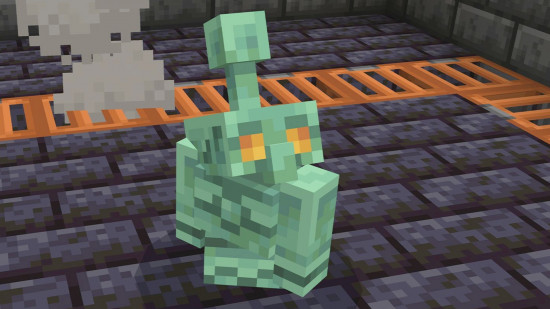
    The copper golem makes any minecraft base look cool and lively. This robot has a shiny copper body that changes color as time passes. When the copper gets old, the golem turns from orange to green. Players can wax the golem to keep its color bright. Many players like to watch the golem walk around and use chests. The golem makes bases feel busy and fun.

    Some players put the copper golem in the middle of their storage rooms. Others make special spots for the golem to work and play. The golem’s cool look and helpful skills make it a favorite in the new update.

    Get the Copper Golem

    Summoning Steps

    Players can bring the copper golem to life by following a simple process in minecraft. This robot helps with storage and adds character to any base. Here is a step-by-step guide to summoning the copper golem:

    1. Gather a carved pumpkin.

    2. Place a copper block where the golem should appear.

    3. Put the carved pumpkin on top of the copper block.

    4. Place a copper button on the copper block and press it.

    5. The copper golem will spawn, and a copper chest will appear next to it.

    Note: If you want to download copper golem sound effects or other Minecraft sound effects, you can get them from Dubbing AI. Whether you need the unique sounds of the copper golem or any other iconic Minecraft audio, Dubbing AI has you covered with a wide collection of game sound effects.

    Crafting Materials

    Players need a few special items to summon the copper golem in minecraft. Each item plays a key role in the process.

    • Copper block (any oxidized or waxed state)

    • Carved pumpkin

    • Copper button (crafted from any cut copper block, also in any oxidized or waxed state)

    The copper golem uses a unique structure. The copper block can be shiny or green, depending on its oxidation. Waxed copper blocks and buttons keep their color and do not rust. The copper button is the only button the golem will press, and it changes color over time but always works. The copper golem has 40 life points, does not take fall damage, and cannot drown. When defeated, it drops 1 to 4 copper ingots.

    Material

    How to Get

    Special Note

    Copper Block

    Crafted from 9 copper ingots

    Any oxidation or waxed state works

    Carved Pumpkin

    Use shears on a pumpkin

    Needed for the golem’s head

    Copper Button

    Crafted from cut copper block

    Only button the golem will press

    Tips for Use

    The copper golem works best when players plan their storage areas. Here are some tips to get the most out of this helpful golem:

    • Place copper chests near your main storage. The golem will sort items faster.

    • Use waxed copper blocks and buttons if you want the golem and its buttons to keep their color.

    • Watch the golem’s color change over time. Oxidation makes the robot look different and can slow its movement.

    • In survival mode, protect the golem from hostile mobs. It cannot fight back.

    • In creative mode, use the golem to decorate large bases or show off rare items in copper chests.

    • The copper golem cannot drown or take fall damage, so players can build storage rooms above water or underground.

    Tip: Players can use multiple copper golems in big bases. Each golem will help sort items and keep storage organized.

    The copper golem brings new ways to manage items and decorate bases in minecraft. Players who use this robot will find storage easier and their bases more lively.

    Copper Update: New Gear

    Copper Chests

    Copper chests bring a new way to store items in the new minecraft update. These chests hold more than wooden chests. Players can use them to organize large collections. Over time, copper chests change color because of oxidation. The chest starts bright orange and slowly turns green. Waxing a copper chest keeps its color the same. Wax acts as a shield and stops the chest from changing. Players can use honeycomb to wax a chest. This feature helps players match their storage to their base style.

    Tools and Armor

    The copper update adds new tools and armor. Copper tools work faster than stone tools but slower than iron. Copper swords and axes help players fight mobs and break blocks. Copper armor gives more protection than leather but less than iron. Players can craft these items with copper ingots. Many players like the look of copper gear. The new minecraft update gives more copper uses, so players find copper mining more rewarding.

    Gear Type

    Durability

    Protection/Power

    Special Feature

    Copper Tools

    Medium

    Medium

    Changes color over time

    Copper Armor

    Medium

    Medium

    Can be waxed

    Oxidation and Waxing

    Copper gear changes over time because of oxidation. The surface of copper reacts with air and turns green. Players can clean copper gear by polishing it. Cleaning removes dirt and tarnish. Polishing uses gentle abrasives to keep the surface smooth. Waxing is the best way to protect copper gear. Wax forms a thin layer that blocks air and slows down oxidation. Players can remove the wax with mineral spirits if they want to clean the gear again. These steps help players keep their copper gear looking new. The copper update makes copper more valuable in minecraft because players can use it for strong gear and stylish storage.

    Tip: Wax your copper gear and chests to keep them shiny and bright for a long time.

    2025 Update Access

    Beta and Preview

    Players can try the 2025 update early by joining beta or preview. Developers use special tools to manage these early versions. TestFlight lets developers invite testers and share new features. Testers get invites with update details, like screenshots and app types. Developers choose who can join, like by device or operating system. Public links help testers sign up fast. Testers can see how many people join and who fits the rules. Developers upload new builds, add notes, and invite testers with TestFlight. They can sort testers by activity, device, or feedback. Beta versions let players see new features before the update comes out.

    • Testers get invites with update info.

    • Developers pick who can join by device or OS.

    • Public links make signing up for beta easy.

    • Testers and developers can track who joins and gives feedback.

    Note: Beta and preview help make the 2025 update better before it is released. Players can share feedback to improve the copper-themed update.

    Full Release

    The full release brings all new features to every player. Devices must stay connected to Microsoft services for two hours straight and six hours total after the update starts. This connection helps the update finish right. Devices that do not meet this rule may miss new features. Players should keep their devices on and online. This step makes sure the update installs and works well. The copper-themed update is available to everyone during the official launch, so all players can enjoy the new content.

    Tip: Keep your device on and online after the update starts. This helps the update finish and lets you use all the new features in minecraft.

    The copper golem makes sorting items much easier. Players can now use it to sort things automatically. This is very helpful for people with big bases. Many players think this change makes the game better. Mojang made the golem because players wanted it. Everyone should try the new copper features and tell others what they think.

    This update is a big improvement, and more cool tools might come in the future.

    FAQ

    What is the mob vote and how does it work?

    Players join the mob vote to pick new creatures for the game. The community mob vote lets everyone choose which mob will appear in future updates.

    Why did the copper golem win the community mob vote?

    The copper golem won the community mob vote because many players liked its design. The mob vote showed strong support for a helper that sorts items and decorates bases.

    Can players join the mob vote every year?

    Yes, players can join the mob vote each year. The community mob vote happens before big updates. Players help decide which new mob joins the game.

    See Also

    How Minecraft And AI Dubbing Are Boosting Gameplay Excitement

    Top Five Essential Facts Every Player Should Know About Black Myth

    Enhance Minecraft Experience With Sound Button For Upcoming Movie

    Key Essentials Every Player Must Have For Monster Hunter Wilds

    Important Preparations To Make Before Starting Your Roblox Journey

  • Crazy Games Space Waves Made Easy with Simple Tricks

    Crazy Games Space Waves Made Easy with Simple Tricks

    Crazy Games Space Waves made easy with these simple tricks
    Image Source: pexels

    Ready to crush crazy games space waves? You can beat every level, from the easiest to the most extreme, with a few simple tricks. Focus on dodging, time your moves, and grab those power-ups. Stay patient and keep practicing. Want to show off your best runs? Share your wins on TikTok and add awesome sound effects with Dubbing AI. Stick with it—every wave gets easier when you keep trying!

    Simple Tricks to Master Space Waves

    Game Controls

    Precision Moves

    Getting good at Space Waves starts with mastering your moves. You need to guide your ship with small, careful taps. Wild swipes or holding down the controls can send you crashing into obstacles. Try to keep your movements smooth and steady. When you practice, your hands learn the right speed and direction. Over time, you will notice your ship dodges better and reacts faster.

    Here’s a quick look at how practice helps you get more precise:

    Practice Type

    Time to Peak Velocity (ms)

    Velocity Variability (SD)

    Before Practice

    258

    High

    After Practice

    218

    Low

    You can see that after practicing, your moves become quicker and more controlled. Your fingers and wrists start working together, almost like they are in sync. This makes it easier to dodge fast-moving obstacles and weave through tight spaces. The more you play, the more your hands and brain work as a team. You will feel your confidence grow with every level you beat.

    Tip: Focus on short, gentle taps instead of long presses. This gives you better control and helps you avoid sudden crashes.

    Timing and Momentum

    Timing is everything in Space Waves. You need to watch the patterns and move at just the right moment. If you rush, you might hit a wall. If you wait too long, you can get trapped. Try to match your movements with the rhythm of the waves. Many players find that their hands and fingers start to move in sync after a few rounds. This happens because your brain learns the timing and your muscles remember the right speed.

    When you practice, your moves become more coordinated. Your wrist and finger movements start to line up, almost like a dance. This makes your ship glide smoothly through tricky sections. You will notice that you react faster and make fewer mistakes. Keep practicing, and soon you will feel like you are moving with the game, not just reacting to it.

    Note: Stay calm and trust your timing. Quick, well-timed moves will help you survive even the toughest waves.

    Enemy Patterns

    Dodging Obstacles

    Enemies and obstacles in Space Waves come at you fast. You need sharp eyes and quick fingers to dodge them. Each level throws new shapes and speeds your way. Some obstacles move in straight lines. Others zigzag or spin. You can’t just react—you have to predict what comes next.

    Here are some tricks to help you dodge like a pro:

    • Watch for patterns: Most obstacles repeat their moves. If you spot the pattern, you can plan your path.

    • Stay near the center: This gives you more room to move left or right when something pops up.

    • Use short taps: Quick, light taps help you change direction fast. Heavy presses slow you down.

    • Don’t panic: If you get trapped, look for the smallest gap. Sometimes, the tiniest space is your best escape.

    Tip: If you keep crashing at the same spot, pause and watch how the obstacles move. You might notice a safe path you missed before.

    Wave Recognition

    Every wave in Space Waves has its own rhythm. Some waves move slow and steady. Others speed up or throw in surprise twists. If you learn to recognize these waves, you can get ahead of the game.

    Let’s break down the most common wave types:

    Wave Type

    What to Expect

    Best Move

    Straight Line

    Obstacles in a row

    Glide smoothly

    Zigzag

    Quick side-to-side

    Tap in sync with pattern

    Spiral

    Circles or curves

    Stay near the center

    Random Burst

    Sudden, fast obstacles

    React quickly, stay calm

    You can practice each wave type in earlier levels. Try to spot which wave is coming next. Once you know the pattern, you can move before the danger hits.

    Note: The more you play, the faster you’ll spot these waves. Soon, you’ll dodge obstacles without even thinking about it. Keep your eyes open and trust your instincts. 🚀

    Power-Ups and Upgrades

    Power-Ups and Upgrades
    Image Source: unsplash

    Best Power-Ups

    Power-ups can turn a tough level into a breeze. You just need to know which ones to grab and when to use them. Some power-ups give you a quick boost, while others help you survive longer. Here are the top power-ups you should look for:

    • Shield 🛡️: This one protects your ship from a single hit. If you see a tricky wave coming, grab a shield. You can relax for a second and focus on dodging.

    • Speed Boost 🚀: This power-up makes your ship move faster. Use it to zip past slow obstacles or escape a tight spot. Just remember, faster speed means you need quicker reflexes.

    • Magnet 🧲: The magnet pulls in coins and other goodies. You do not have to chase every coin. Let the magnet do the work while you focus on dodging.

    • Double Points ✨: This one doubles your score for a short time. Try to grab it when you see lots of coins or during easy waves.

    Tip: Always keep an eye out for shields and magnets. These two can save you from losing and help you rack up points fast.

    Upgrade Choices

    Upgrades make your ship stronger and your runs longer. You earn coins as you play, so spend them wisely. Not all upgrades help you the same way. Here’s a quick guide to smart upgrade choices:

    Upgrade Type

    What It Does

    When to Choose It

    Shield Boost

    Adds extra shield slots

    If you crash often

    Speed Control

    Improves ship handling

    For tricky, fast levels

    Magnet Range

    Increases magnet power

    To collect more coins

    Score Multiplier

    Raises your score faster

    If you want high scores

    Start with shield and speed upgrades. These help you survive longer and dodge better. Once you feel confident, upgrade your magnet and score multiplier. You will see your scores climb and your runs last longer.

    Note: Don’t spend all your coins at once. Try one upgrade at a time and see how it changes your game. You will find the best combo for your play style.

    Advanced Tips for High Scores

    Practice and Patience

    You want to get better at crazy games space waves? Start with practice. Play each level more than once. When you repeat a level, you start to see patterns. You notice where the obstacles pop up. Your hands get faster. Your eyes spot danger sooner. You learn when to tap and when to wait.

    Try this simple routine:

    1. Pick a level that feels tough.

    2. Play it five times in a row.

    3. After each run, think about what went wrong.

    4. Try a new move or timing on the next try.

    You will see your reaction time improve. Your fingers will move before you even think. That’s how you beat those tricky waves.

    Tip: Don’t rush. If you get stuck, take a break. Come back with fresh eyes. You will often pass the level on your next try.

    Patience matters just as much as practice. Some levels in crazy games space waves feel impossible at first. You might crash again and again. That’s normal. Every player faces tough spots. Stay calm. Keep trying. Each attempt teaches you something new. Soon, you will glide through waves that once seemed unbeatable.

    Community Strategies

    You don’t have to play alone. The crazy games space waves community is huge. Players share tips, tricks, and videos every day. You can learn a lot by watching others. Search for gameplay videos on TikTok or YouTube. Look for runs on level 20 or level 33. Watch how top players dodge obstacles and use power-ups. Notice their timing and movement. Try to copy their best moves in your own game.

    Here’s a quick table to help you find the best community resources:

    Platform

    What You’ll Find

    How It Helps You

    TikTok

    Short gameplay clips, tips

    Quick tricks, new ideas

    Reddit

    Discussions, guides, questions

    Ask for help, share wins

    YouTube

    Full level walkthroughs

    Learn advanced strategies

    You can also join the trend and make your own videos. Record your best runs or funny fails. Add cool sound effects with Dubbing AI. Share your clips on TikTok or Reddit. Other players will cheer you on and give you advice. You might even start a new trend!

    Note: The more you connect with the crazy games space waves community, the faster you improve. You get new ideas, support, and maybe even some new friends.

    If you want to master crazy games space waves, use every tool you can. Practice, stay patient, and join the community. You will see your skills grow with every wave.

    Common Mistakes

    Avoiding Pitfalls

    You might feel stuck because you keep making the same mistakes. That’s normal! Most players fall into a few common traps. If you know what to watch for, you can dodge these problems and level up faster.

    Here are some mistakes you should avoid:

    • Overreacting: You see an obstacle and swipe too hard. Your ship crashes. Try to use gentle taps instead.

    • Ignoring Patterns: Every wave has a rhythm. If you rush in without watching, you miss the safe spots.

    • Chasing Every Coin: Coins look tempting, but sometimes they lead you into danger. Focus on survival first.

    • Forgetting Power-Ups: You skip a shield or magnet because you think you don’t need it. Grab them when you can—they make tough spots easier.

    • Panicking: When things speed up, you freeze or mash the controls. Stay calm and trust your practice.

    Tip: If you keep crashing at the same spot, pause and watch a replay. You might spot a safer path you missed before.

    Bouncing Back

    Everyone messes up. What matters is how you bounce back. You can turn a mistake into a lesson and come back stronger.

    Try these steps when you feel frustrated:

    1. Take a Break: Step away for a minute. Stretch or grab a snack. Your mind resets.

    2. Watch Others: Check out a TikTok or YouTube video of someone beating your level. Notice their moves.

    3. Change Your Approach: If one strategy fails, try a new one. Maybe use a different power-up or tap at a new rhythm.

    4. Stay Positive: Remind yourself that every player struggles. You get better with each try.

    Mistake

    How to Bounce Back

    Repeating crash

    Watch a replay

    Getting tense

    Take a deep breath

    Losing focus

    Play in short bursts

    Note: You can always improve. Every crash teaches you something new. Keep going, and you’ll beat those waves! 🚀

    You now have the best tricks to beat crazy games space waves. Practice your moves, watch for patterns, and use power-ups wisely. Stay patient and keep trying, even when a level feels impossible. Join the community, share your wins, and add cool sound effects with Dubbing AI. You can tackle any wave with confidence. Ready to show everyone your skills? Jump back in and conquer those levels!

    FAQ

    How do you unlock new levels in Space Waves?

    You unlock new levels by beating the current one. Finish a wave, and the next level opens up. If you get stuck, keep practicing. You will get better with each try!

    What should you do if you keep crashing at the same spot?

    Take a break and watch a replay or a gameplay video. Notice what other players do. Try a different move or timing. Sometimes, a small change helps you pass that tough spot.

    Can you play Space Waves without using power-ups?

    Yes, you can! Power-ups make things easier, but you can beat levels with skill and practice. Focus on dodging and timing. Use power-ups when you want a boost or need help with a tricky wave.

    How do you share your best runs online?

    Record your gameplay using your device’s screen recorder. Add cool sound effects with Dubbing AI. Post your video on TikTok or Reddit. Other players love to see creative runs and fun moments! 🚀

  • What to Expect from Dandadan Season 2 in 2025

    What to Expect from Dandadan Season 2 in 2025

    What to Expect from Dandadan Season 2 in 2025
    Image Source: unsplash

    Are you excited for Dandadan to come back? Dandadan season 2 will start on July 3, 2025. There will be 12 new episodes this season. You will see Momo, Okarun, and their friends again. These main characters will go on crazy supernatural adventures. The new story arcs have haunted houses and cursed objects. There are also strange beings in the show. You can watch dandadan season 2 every week. It will be on Crunchyroll, Netflix, and Hulu. This is where you can watch it. The show is good for teens and older. You can enjoy it with friends who like supernatural anime.

    Key Takeaways

    • Dandadan Season 2 starts on July 3, 2025. There are 12 episodes. One new episode comes out each week. You can watch it on Crunchyroll, Netflix, and Hulu.

    • The new season has cool story arcs. There is a cursed house. Evil spirits and weird monsters haunt it. These bring lots of exciting adventures.

    • Main characters Momo, Okarun, and their friends get closer. They also get new powers. They face supernatural problems and have funny times too.

    • The show is best for teens who are 14 or older. It has scary scenes, action, and jokes. There is no graphic content.

    • Fans will see better animation and new theme songs. There are sweet and intense scenes. These keep the story fun and interesting.

    Dandadan Season 2 Release Date

    Premiere Date and Schedule

    You probably want to know when you can watch the new anime season. The official release date for dandadan season 2 is July 3, 2025. You will get 12 episodes this time. The anime will follow an episodes airing weekly format, so you can look forward to a new adventure every Thursday. If you love to plan, you can mark your calendar for the premiere on July 3, 2025. Each episode will run for about 24 minutes.

    Tip: If you missed an episode, you can always catch up the next day. The schedule makes it easy to stay on track with the story.

    Here’s a quick look at the episode plan:

    Episode

    Air Date

    1

    July 3, 2025

    2

    July 10, 2025

    3

    July 17, 2025

    12

    September 18, 2025

    Theatrical and Streaming Platforms

    You can watch dandadan season 2 in a few different ways. The anime will have a special theatrical premiere on June 6, 2025. If you want to see it on the big screen, this is your chance. After that, you can stream the new season on Crunchyroll, Netflix, and Hulu. These platforms will release each episode at 8:00 PM JST. If you live outside Japan, you may see the episode a few hours later, depending on your region.

    • Crunchyroll offers fast subtitles for many countries.

    • Netflix and Hulu also provide the anime in several languages.

    • Some regions may have a short delay, so check your local listings.

    You do not have to wait long to join the fun. Dandadan makes it easy for fans everywhere to enjoy the new season.

    What to Expect in Dandadan Season 2

    What to Expect in Dandadan Season 2
    Image Source: unsplash

    Story Arcs and Manga Chapters

    You might be curious about what will happen in dandadan season 2. Get ready for the cursed house arc, which many fans say is the best part of the series. The story starts right after the big cliffhanger from season 1. You will see events from manga chapters 35 to 61, plus a few scenes from chapter 63. The cursed house arc takes you into a haunted house with lots of spooky mysteries and new dangers.

    Momo, Okarun, and their friends go to Jiji’s family home to investigate. This house has a scary secret about the evil spirit living there. The group faces scary curses, strange rooms, and a story that keeps you guessing. The best parts of the cursed house arc are when the characters solve puzzles and fight to stay safe. Each episode gets more exciting and ends with a cliffhanger that makes you want to watch more.

    Here’s a simple look at the timeline and what the story covers:

    Arc/Chapter Range

    Main Focus

    Cursed House Arc (35-61)

    Haunted house, evil spirit, Jiji’s backstory

    Training & Maid Café

    Funny moments, character growth, new skills

    Evil Eye Arc (late 50s)

    Urban legends of Daija Town, new mysteries

    New Characters and Supernatural Entities

    You will meet some wild new characters and supernatural beings this season. The cursed house arc brings in the giant UMA, a huge worm-like monster under the house. You will also see the underground people, who make things even more dangerous and mysterious. These new threats make things harder for the main characters.

    Jiji becomes very important in this story. He starts out as a flirty guy, but you will learn about his sad connection to the cursed house. His story makes the plot deeper and the haunted house even scarier. The evil eye spirit, a strong yokai, brings more fear and excitement. You will see how the group works together to solve these supernatural mysteries.

    Note: Ever imagined hearing the vibrant characters of Dadanda Season 2 with a real-time voice makeover? Jump into Dubbing AI and watch as voices transform on the spot—experience instant, interactive voice magic like never before!

    Major Plot Developments

    The story in dandadan season 2 has lots of twists. You will see Momo get psychic powers, which help the group survive the cursed house. Okarun’s feelings for Momo make him act cooler and braver. Their slow romance grows, giving you sweet moments in the middle of all the chaos. Jiji’s house story explains why the evil spirit haunts his family, and you will finally get answers to this mystery.

    The story also has funny training scenes and a silly maid café episode. These fun moments help balance the scary parts and show how the characters grow. Every episode builds up to a cliffhanger that keeps you excited. The end of the cursed house arc solves some mysteries but leaves you wanting more.

    If you like supernatural mysteries, haunted houses, and stories with heart, you will love this season. The cliffhanger at the end promises more adventures for Momo, Okarun, and their friends.

    Dandadan Season 1 Recap

    Key Events

    Let’s take a quick look back at the wild ride you had in dandadan season 1. The story kicked off with Momo and Okarun meeting for the first time. You watched them get pulled into a world full of spirits, aliens, and strange powers. The Turbo Granny Arc started things off with a bang. Momo and Okarun faced the creepy Turbo Granny, and Okarun got his golden balls power after a wild chase. This part of the story set the tone for all the supernatural chaos that followed.

    Next, you jumped into the Acrobatic Silky Arc. Here, Aira Shiratori showed up. She brought new energy and some rivalry to the group. You saw her connection to Acrobatic Silky, which made the story even more exciting. The Serpoian Arc brought in alien threats, and you watched the team fight off these new enemies. Each arc gave you more action, more laughs, and more mysteries to solve.

    The season wrapped up with the cursed house arc. Jiji returned, and you learned about his haunted family home. The group faced scary curses and a powerful evil spirit. This arc mixed horror and friendship, making it a fan favorite. The official episode guide by Siddhartha Das on Film Fugitives covers all these arcs and highlights the big moments, so you know you’re getting the real deal.

    Returning Characters

    You’ll see all your favorite characters back for season 2. Momo Ayase stands out as the brave and caring lead. Okarun brings his awkward charm and new powers. Aira adds her own style and keeps things interesting. Jiji’s story gets even deeper, especially after the cursed house arc. These characters have grown a lot since the start of the story.

    Here’s a quick table to help you remember who’s who:

    Character

    Role in Season 1

    Special Power/Arc

    Momo

    Main heroine, psychic powers

    Turbo Granny, Cursed House

    Okarun

    Main hero, golden balls power

    Turbo Granny, Serpoian

    Aira

    Rival, joins the group

    Acrobatic Silky

    Jiji

    Friend, haunted house link

    Cursed House Arc

    Tip: If you want a full recap, check out the official episode guide on Film Fugitives. It covers every twist and turn in the story.

    Production and Trailers

    Official Trailers

    You probably want to see what’s coming in Dandadan season 2. The official trailer dropped a few months before the release. This trailer gives you a sneak peek at the new haunted house arc and the wild supernatural battles. You can spot Momo, Okarun, and Jiji facing off against creepy spirits and the giant UMA. The trailer also teases some funny moments at the maid café. If you watch closely, you’ll notice new characters and hints about the evil eye spirit.

    You can find the trailer on YouTube and the official anime website. Most fans watch it more than once to catch all the details. The animation looks even better this season. The trailer shows off smooth action scenes and cool effects. You get a real sense of the spooky and fun vibe that makes this anime special.

    Tip: Watch the trailer with friends and see who can spot the most hidden clues!

    Theme Songs and Animation

    The music in Dandadan always stands out. Season 2 brings a brand-new opening theme song that pumps you up for each episode. The ending song feels softer and matches the emotional moments. You might find yourself humming these tunes after just one episode.

    The animation team worked hard to make every scene pop. You’ll notice brighter colors and sharper details. The haunted house scenes look extra creepy, and the action feels faster. The studio uses new effects to make the supernatural battles look wild. If you love anime with great visuals, you will not be disappointed.

    Here’s a quick look at what’s new:

    Feature

    What’s Different in Season 2

    Opening Song

    New artist, catchy melody

    Ending Song

    Emotional, fits the story’s mood

    Animation Style

    Smoother, more detailed

    You can expect Dandadan season 2 to look and sound better than ever.

    Character Dynamics

    Character Dynamics
    Image Source: unsplash

    Relationships and Growth

    You will notice big changes in the characters this season. Momo and Okarun get closer as they face new dangers together. Their friendship grows into something deeper. You might even spot a few blushes and awkward smiles. Jiji joins the group and brings his own problems. He tries to fit in, but his haunted past makes things tough. Aira keeps everyone on their toes. She pushes the others to do their best.

    You see each character learn from their mistakes. Momo becomes more confident. Okarun finds his courage. Jiji learns to trust his friends. These changes make the story feel real. You can relate to their struggles and cheer for their wins.

    Tip: Watch for the small details. A simple look or a quick word can show how much the characters care about each other.

    Fan-Favorite Moments

    Season 2 packs in scenes that fans will talk about for weeks. The haunted house arc gives you wild battles and funny surprises. One moment, you might laugh at Okarun’s silly disguise. The next, you might feel the tension as the group faces a giant UMA. The maid café episode stands out as a favorite. You get to see the characters in cute outfits and silly situations.

    Some of the best parts come from emotional moments. When Momo comforts Jiji, you feel the weight of their friendship. The group’s teamwork during tough fights shows how much they have grown. Fans love these scenes because they mix action, humor, and heart.

    Here’s a quick list of moments you should not miss:

    • Momo and Okarun’s first real heart-to-heart talk

    • The group’s wild escape from the haunted house

    • Jiji’s big reveal about his family

    • The maid café chaos

    You will find yourself laughing, cheering, and maybe even tearing up a little.

    Viewing Suitability

    Age Ratings

    You might wonder if Dandadan Season 2 is right for you or your friends. Most streaming platforms list this anime as TV-14. This means the show is best for teens who are 14 years old or older. You will see some scary scenes, a bit of action, and a few jokes that younger kids might not get. If you are in middle school or high school, you will probably enjoy the wild adventures and funny moments.

    Here’s a quick table to help you see how different platforms rate the show:

    Platform

    Age Rating

    Notes

    Crunchyroll

    TV-14

    Teen themes, mild language

    Netflix

    TV-14

    Supernatural action, peril

    Hulu

    TV-14

    Some scary scenes

    Tip: If you are not sure, ask a parent or guardian to watch the first episode with you. They can help you decide if it feels right for you.

    Content Warnings

    Dandadan Season 2 brings a mix of spooky, funny, and action-packed scenes. You will see haunted houses, creepy spirits, and some intense battles. The show sometimes uses mild language and has a few jump scares. Some episodes show characters in silly costumes or awkward situations, but nothing too serious.

    Here are a few things to watch out for:

    • 👻 Scary ghosts and monsters: Some scenes might make you jump.

    • Supernatural fights: You will see battles with bright flashes and loud sounds.

    • 😳 Mild suggestive humor: The show sometimes uses jokes or scenes that are a little embarrassing.

    Most of the time, the story stays light and fun. If you like shows with a bit of a scare and lots of laughs, you will have a great time. If you do not like spooky stories or get scared easily, you might want to watch with a friend.

    Note: Dandadan does not show graphic violence or anything too mature. The focus stays on adventure, friendship, and solving mysteries.

    You have so many reasons to get hyped for Dandadan season 2! You will see wild new arcs, meet strange supernatural beings, and watch Momo and Okarun’s friendship grow. The haunted house story and maid café scenes promise lots of laughs and chills.

    • Release date: July 3, 2025

    • Where to watch: Crunchyroll, Netflix, Hulu

    Don’t forget to mark your calendar! Share your excitement with friends and follow for more updates. Join the Dandadan fan community and get ready for an epic season!

    FAQ

    When does Dandadan Season 2 come out?

    You can watch Dandadan Season 2 starting July 3, 2025. New episodes drop every Thursday. You can stream them on Crunchyroll, Netflix, or Hulu.

    How many episodes will Season 2 have?

    Season 2 will have 12 episodes. Each one runs about 24 minutes. You get a new adventure every week.

    Can I watch Dandadan Season 2 with my family?

    You can watch with your family if everyone is okay with spooky scenes and some action. The show is best for teens and older. If you have questions, check the answers in the viewing suitability section.

    Do I need to watch Season 1 first?

    Yes, you should watch Season 1 first. The story continues from there. You will understand the characters and plot better.

    Where can I find more updates about Dandadan?

    You can follow the official anime website or social media pages. Fans also share news and answers in online groups and forums.

    See Also

    How Kizuna AI Sparked Virtual YouTubing And Dubbing Fame

    Voiceover Production Transformed By Dubbing AI In 2024

    Dubbing AI Changing The Landscape Of Gaming And Streaming

    Bring Your Favorite Anime Characters To Life With Dubbing AI

    Discover The Potential Of Voice Cloning Through Dubbing AI

  • Top 10 Funniest Dr. Phil Soundboard Quotes to Make You Laugh

    Top 10 Funniest Dr. Phil Soundboard Quotes to Make You Laugh

    Top 10 Funniest Dr. Phil Soundboard Quotes to Make You Laugh
    Image Source: pexels

    Ready to unleash some serious laughter? The dr phil soundboard delivers pure comedy gold! You tap a button, and suddenly Dr. Phil’s iconic voice fills the room.

    You never know what you’ll get from a dr. phil soundboard—maybe a classic roast or a wild one-liner.
    Share these gems with your friends, prank your siblings, or use a soundboard app to become the star of any group chat. The dr. phil soundboard never fails to bring a smile. When you want a funny moment, just fire up your favorite soundboard. The dr phil soundboard always delivers.

    Key Takeaways

    • The Dr. Phil soundboard gives short, funny quotes. These quotes make any time more fun.

    • Famous lines like “How’s that working for you?” make people laugh fast in chats and pranks.

    • You can use the soundboard to prank friends. It can make group chats more fun. It also adds laughs to online games.

    • Making your own soundboards with Dubbing AI lets you pick your favorite quotes. This helps keep pranks safe.

    • Always use soundboards in a nice way. This makes sure everyone has fun and the jokes stay friendly.

    Dr. Phil Soundboard Appeal

    Blunt Humor

    You know what makes the dr phil soundboard so addictive? Dr. Phil’s blunt humor hits you right in the funny bone. He never sugarcoats anything. When you press a button on the dr. phil soundboard, you get those raw, unfiltered audio clips that make everyone burst out laughing. His words cut straight to the point. You might hear him say something wild, and you just can’t help but share it. These soundboard clips turn any boring moment into a comedy show.

    Want to break the ice? Drop a classic Dr. Phil line from the soundboard and watch the room light up with laughter.

    Iconic Catchphrases

    Dr. Phil’s catchphrases have become legendary. The dr. phil soundboard packs all his best lines into one place. You get to play those unforgettable audio clips that everyone recognizes from TV and memes. His phrases like “How’s that working for you?” or “You’re not the boss of me” have become internet gold. These soundboard gems work perfectly in group chats or as part of user-friendly meme soundboards. You can even use them to spice up your own memes. The best part? You don’t need to be a Dr. Phil fan to enjoy these clips. They just work.

    Internet Pranks

    The dr. phil soundboard has taken over the world of internet pranks. You can use these soundboard clips for a hilarious prank call or to surprise your friends in online games. The dr phil soundboard makes it easy to pull off a quick joke. People love using these audio clips because they sound so real. Dr. Phil’s background as a clinical psychologist adds a layer of irony and relatability to every soundboard moment. That’s why these soundboards have become a favorite for memes, laughter, and endless fun.

    Top 10 Funniest Quotes

    Top 10 Funniest Quotes
    Image Source: unsplash

    “How’s that working for you?”

    You press this on the dr. phil soundboard, and everyone stops to laugh. Dr. Phil’s voice drips with sarcasm. You use this line when your friend tries a wild idea and fails. It works perfectly in group chats or during a prank call. Fans love this clip because it fits almost any situation. The soundboard makes it easy to drop this line at just the right moment.

    Tip: Try this quote after someone brags about a “life hack” that totally flopped.

    “You’re not living your best life.”

    This one hits hard and funny at the same time. You play this clip when your buddy skips the gym or eats cold pizza for breakfast. The dr. phil soundboard gives you the power to roast your friends in a way only Dr. Phil can. People love using this in memes and funny sound clips. It’s a classic for any soundboard prank.

    “You can’t do squat other than sit around and drink and shit your pants.”

    This quote takes the roast to a whole new level. You hit this button, and the room explodes with laughter. The dr. phil soundboard makes this line a favorite for prank calls and online games. It’s so over-the-top, you can’t help but laugh. Fans share this clip everywhere because it’s one of the most memorable quotes from Dr. Phil.

    Note: Use this one when your friend gets caught being lazy. Instant comedy.

    “You’re ugly, you’re disgusting, I’m gonna kill you, give me $200.”

    This wild quote has become internet legend. You play this on the soundboard, and everyone knows you mean business—funny business! The shock value makes it perfect for memes and group chats. The dr. phil soundboard keeps this clip at the top of the charts for fans who love outrageous humor.

    “Do you have a brain?”

    You want to roast someone who just made a silly mistake? This is your go-to. The dr. phil soundboard delivers this line with perfect timing. You can use this clip in online games or when your friend forgets their keys for the third time. It’s a simple, funny way to call out goofy moments.

    “You’re fat.”

    This one is blunt, bold, and classic Dr. Phil. You use this clip with care—maybe when your friend jokes about eating a whole pizza. The soundboard gives you the power to drop this line and get a big laugh. Fans love this clip for its shock value and meme potential.

    Warning: Use this only with friends who can take a joke!

    “You’re not the boss of me.”

    You want to stand your ground in a funny way? This quote is perfect. The dr. phil soundboard lets you play this clip when someone tries to tell you what to do. It’s a favorite in group chats and online games. People love using this to add a little sass to any conversation.

    “No matter how flat you make a pancake, it’s still got two sides.”

    Dr. Phil drops wisdom with a side of humor. You play this clip when someone refuses to see both sides of an argument. The soundboard makes it easy to add this clever line to any debate. Fans love this quote because it’s both funny and smart.

    “That dog don’t hunt.”

    You want to call out a bad idea? This is the line for you. The dr. phil soundboard gives you this classic Southern saying in Dr. Phil’s voice. You use this clip when someone suggests something that just won’t work. It’s a favorite among fans for its charm and humor.

    Pro tip: Drop this in a group chat when someone suggests pineapple on pizza.

    “This is going to be a changing day in your life.”

    You want to sound dramatic? This quote brings the drama and the laughs. The soundboard lets you play this clip when something big (or not so big) happens. Fans love using this in memes and prank calls. It’s one of the most popular audio clips on any dr. phil soundboard.

    You can find all these funny sound clips on your favorite dr. phil soundboard. Fans everywhere use these audio clips to prank friends, spice up group chats, and create memes. These clips have become internet classics, and you can see why. Try them out and see which one gets the biggest laugh!

    How to Use Dr. Phil Soundboard for Maximum Laughter?

    Pranks and Laughs

    You want to make your friends burst out laughing? Grab a soundboard and get ready for some fun. With just a tap, you can play Dr. Phil’s funniest quotes and watch everyone’s reaction. Many soundboards let you share clips on WhatsApp, Twitter, or Discord, so you can spread the laughter far and wide. If you want to pull off a classic prank call, a soundboard app gives you all the tools you need. Real-time sound effects and voice modulation make your jokes even better.

    Tip: Always prank with kindness. Make sure your friends are in on the joke and ready to laugh with you!

    Group Chats

    Group chats can get boring, but a soundboard changes everything. You can drop a hilarious Dr. Phil quote right when the conversation needs a boost. Interactive soundboards let you play, download, or even upload your own clips. Tutorials from places like Voicy and Blerp show you how to use these features, so you become the soundboard master in no time.

    • Share your favorite quotes

    • React to messages with a funny sound

    • Keep the group chat lively and full of laughter

    Online Games

    Online games get wild when you add a soundboard to the mix. Imagine playing with friends and suddenly dropping a Dr. Phil one-liner at just the right moment. Many soundboards work with Twitch and other streaming platforms, so you can entertain your viewers, too. Features like noise reduction and custom sound effects make your jokes clear and sharp.

    Note: Use soundboards to add fun, not to annoy. Respect your teammates and keep the laughter going for everyone.

    Soundboards have become super popular because they are easy to use, work on many platforms, and always bring the fun. Just remember to use them responsibly and make sure everyone enjoys the joke!

    Create Your Own with Dubbing AI

    Custom Soundboards

    Ready to take your soundboard game to the next level? Dubbing AI lets you create a soundboard that is totally your own. You can pick your favorite Dr. Phil quotes, mix in wild sound effects, and even clone voices for extra laughs. Dubbing AI gives you access to a huge voice bank with over 130 languages, so you can make your soundboard as unique as you are. Want Dr. Phil with a British accent? You can do that. Need him to sound extra dramatic or super chill? Dubbing AI lets you fine-tune emotions and vocal styles with just a few clicks.

    Tip: Try creating a themed soundboard for your next party. Mix Dr. Phil’s funniest lines with your favorite memes for a night everyone will remember!

    Safe Pranking

    You want to prank your friends, but you also want to keep things friendly. Dubbing AI helps you do just that. You control every part of your soundboard, so you can make sure your jokes stay fun and never cross the line. Choose quotes that fit the mood, adjust the volume, and test your soundboard before you share it. If you want to prank someone in a group chat or during a game, you can set up your soundboard to play the perfect line at the perfect time.

    • Always check that your friends are cool with soundboard pranks.

    • Keep your soundboard jokes light and positive.

    • Use Dubbing AI’s features to make your soundboard safe for everyone.

    With Dubbing AI, you become the master of your own soundboard universe. You get all the laughs, none of the trouble!

    You just discovered the top 10 funniest Dr. Phil soundboard quotes. Each one packs a punch and brings instant laughs. Try these lines with your friends or drop them in your next group chat. Watch the reactions roll in!

    Want to take it up a notch?
    Check out Dubbing AI. You can build your own soundboard and become the king of comedy. Share the fun, prank responsibly, and keep the Dr. Phil magic alive! 😄

    FAQ

    What makes the dr phil soundboard so funny?

    You get a mix of blunt advice, wild roasts, and memorable quotes. The dr. phil soundboard packs each clip with humor. You never know what you’ll hear next. That surprise keeps the laughter rolling every time you tap a button.

    Can I use a soundboard app for a prank call?

    Yes! You can use a soundboard app to play funny sound clips during a prank call. Pick your favorite Dr. Phil audio clips and watch your friends react. Just remember to keep your pranks friendly and fun.

    Where do people share these funny clips and memes?

    People love sharing these audio clips and memes in group chats, on TikTok, and across social media. You can even find user-friendly meme soundboards online. Sharing brings even more laughter to your friends.

    Are these soundboards easy to use?

    Most soundboards are super simple. You just tap a button and play your favorite clips. Many apps let you download or upload your own funny sound clips. You can become the king of memes in no time.

    What are the most memorable quotes from the dr. phil soundboard?

    “How’s that working for you?” and “You’re not the boss of me” top the list. These memorable quotes turn any moment into a comedy show. You can use them in memes, prank calls, or just for a quick laugh.

    See Also

    Best Three Voice Mod Pranks To Try In CS:GO

    Complete Tutorial On AI Voice Changers For Discord Pranks

    Boost Your Gameplay Experience Using Dubbing AI Soundboard

    Effective Ways To Use Sound Buttons For Roblox Fun

    Find Top Celebrity Voice Changer App With Dubbing AI

  • Where to Get Free Allahu Akbar Sound Effects

    Where to Get Free Allahu Akbar Sound Effects

    Looking for a free Allahu Akbar sound effect? You are not alone! Whether for a project or personal use, finding good sources can be challenging. Use sites that prioritize safety and quality. You don’t want to download an Allahu Akbar sound effect that is unsafe or low-quality. Let’s explore your options!

    Key Takeaways

    • Check out reliable sites like Freesound and Zapsplat. They have good-quality Allahu Akbar sound effects and easy downloads.

    • Read the licensing rules before using any sound effects. Choose royalty-free ones to stay away from copyright problems.

    • Use antivirus programs to check downloads for safety. This keeps your device safe while you find sounds.

    Top Platforms to Get Free Allahu Akbar Sound Effects

    Finding a good site for free Allahu Akbar sounds can be tough. To help, here’s a list of trusted platforms you can try. Each one has special features to meet your needs.

    Dubbing AI

    Dubbing AI is known for its advanced tools and clear sounds. It uses smart voice cloning and text-to-speech to make realistic effects. With support for 29 languages, it’s great for users worldwide. The easy-to-use design helps you quickly find and download sounds. If you want top-quality effects, this is a solid choice.

    Freesound

    Freesound is a community site where people share free sound effects. It has a big library, including Allahu Akbar sounds, for creative projects. The site’s simple design and rating system make finding good sounds easy.

    User Feedback

    Summary

    Easy to use

    Lots of sounds with a simple download process.

    High-quality uploads

    Many sounds are praised for their clarity.

    Free downloads

    Sounds are free after signing up.

    Large library

    Great for music, videos, and more.

    Community resource

    Helpful for indie creators in film and animation.

    SoundBible

    SoundBible is another great site for free sound effects. It offers royalty-free sounds for personal or business use. The simple layout makes searching for specific sounds, like Allahu Akbar, quick and easy. No account is needed to download, saving you time.

    Zapsplat

    Zapsplat is popular for its huge collection of free sound effects. It offers high-quality files in different formats for any project. The free version is great, but upgrading gives faster downloads and exclusive sounds.

    99Sounds

    99Sounds is perfect if you want sound packs made by experts. It offers free, high-quality effects designed by professional sound creators. This site is ideal for those who value creativity and quality.

    FreeToUseSounds

    FreeToUseSounds has many unique sound effects. It offers both free and paid options, focusing on field recordings and ambient sounds. You can find Allahu Akbar sounds and other rare audio clips here.

    Mixkit

    Mixkit provides free sound effects for videos, podcasts, and more. Its clean design makes browsing and downloading simple. All sounds are royalty-free, so you don’t have to worry about copyright.

    AudioMicro

    AudioMicro has both free and paid sound effects. Its free section is smaller but still has good-quality options. It’s a favorite among video makers and podcasters.

    Pond5 Free Section

    Pond5 is known for premium media, but its free section is a hidden gem. You can find Allahu Akbar sounds and more without paying. The search filters make finding what you need easy.

    Voicy

    Voicy is a fun site where users share sound clips, memes, and effects. It’s a great place to find unique sounds, with new content added often.

    Pixabay

    Pixabay isn’t just for pictures and videos—it also has free sound effects. Its simple design and high-quality files make it a reliable choice.

    AudioJungle

    AudioJungle, part of Envato Market, offers free and paid sound effects. While most are premium, the free section has great options for budget users.

    101 Soundboards

    101 Soundboards organizes sound effects into themed boards. It’s a fun way to explore and find Allahu Akbar sounds.

    The Internet Archive

    The Internet Archive has a huge collection of free media, including sound effects. It’s a great resource for rare or historical audio clips.

    Myinstants

    Myinstants lets you play and download sound effects with one click. It’s perfect for quick access to popular sounds like Allahu Akbar.

    SoundCloud

    SoundCloud isn’t just for music—it’s also great for sound effects. Many creators upload free clips, making it a good place for unique sounds.

    These numbers show users spend time exploring, proving its value.

    Blerp

    Blerp is a fun site for sound effects, memes, and more. Its easy design makes finding and downloading audio clips simple.

    Features to Look for in a Sound Effect Platform

    When picking a site for sound effects, check if it fits your needs. Here are important things to consider:

    Free Licensing Options

    Not all free sounds are truly free to use. Some have rules that limit how you can use them. Always check if the site offers royalty-free sounds. This means you can use them without breaking copyright laws. Look for clear rules about usage. Sites like Freesound and Mixkit often explain this upfront, so you know what’s allowed.

    Easy-to-Use Design

    A simple design saves time and avoids confusion. You don’t want to waste hours searching for one sound. Sites with good search tools make finding sounds easier.

    Here’s how a simple design helps users:

    Metric

    What It Means

    Task Success Rate

    Shows how often users find what they need without problems.

    Time on Task

    Tracks how fast users locate and download sounds.

    User Error Rate

    Counts mistakes, like downloading the wrong file.

    Navigation Efficiency

    Measures how smoothly users move through the site.

    Drop-off Rate

    Finds where users quit, helping sites improve their layout.

    Sites like Zapsplat, with filters and a clean look, make searching fast and easy.

    Safe Downloads

    Safety is very important. Some sites may have files with viruses. To stay safe, use trusted sites like Pixabay or SoundBible. These sites check their files to keep them virus-free. You can also use antivirus software to scan downloads. This keeps your computer safe and your projects secure.

    By focusing on these features, you’ll find a site that’s safe, simple, and reliable for your needs.

    Tips for Safe Downloading

    Getting sound effects can be fun, but safety matters. Follow these tips to keep your downloads safe and easy.

    Check File Formats

    Always check the file type before downloading. Some formats are better than others. For clear sound, choose AIFF or WAV files. These keep the original sound quality and work with most editing tools. They’re great for high-quality projects. Formats like MP3 are okay for casual use but may lose sound details.

    Pro Tip: Listen to the sound first to make sure it’s good.

    Stay Away from Suspicious Links

    Some websites have fake download buttons. Don’t click them! Use trusted sites like Freesound or Zapsplat for safe downloads. If a link looks strange or sends you to another page, close it. Scammers use fake links to spread harmful files.

    • Things to avoid:

      • Pop-ups asking for private info.

      • Links that don’t match the site’s name.

      • Files with odd endings like .exe for audio.

    Install Antivirus Software

    Even safe sites can have risks. Antivirus software protects your device by checking files for threats. It works quietly in the background, keeping you safe.

    🛡️ Tip: Update your antivirus often to block new dangers.

    Follow these tips to download sound effects safely and without trouble.

    Finding the right Allahu Akbar sound is easy. Sites like Freesound, Zapsplat, and Pixabay help with simple designs and safe downloads. Dubbing AI is known for great sounds and works worldwide. Use trusted sites, check file types, and enjoy your audio search.

    • People like these sites because they have:

    Tip: Always use antivirus software to keep your device safe.

    FAQ

    What is the best file format for sound effects?

    For top quality, go with WAV or AIFF files. They keep the original sound intact and work well with most editing tools.

    Tip: Use MP3 for smaller, casual projects.

    Can I use these sound effects for commercial projects?

    Yes, but check the licensing terms first. Many platforms offer royalty-free sounds, but some may require attribution or have restrictions for commercial use.

    How do I know if a site is safe for downloads?

    Stick to trusted platforms like Freesound or Pixabay. Avoid sites with pop-ups or fake download buttons. Always scan files with antivirus software before opening.

    🛡️ Pro Tip: Update your antivirus regularly for better protection.

    See Also

    Maximize Your Roblox Experience with Sound Button Techniques

    Get Ready for Space Marine 2 Using Sound Buttons

    Boost Your Gameplay Experience with AI Dubbing Soundboard

    Revamp Minecraft for the New Movie Using Sound Buttons

    Top AI Voice Modifiers Every Content Creator Should Try

  • Top Picks for Bill Cipher Voice Changers This Year

    Top Picks for Bill Cipher Voice Changers This Year

    Top Picks for Bill Cipher Voice Changers This Year
    Image Source: pexels

    Here are the top 5 best Bill Cipher voice changers for 2025:

    1. HitPaw VoicePea (best overall pick)

    2. TopMediai

    3. iMyFone MagicMic

    4. FliFlik Voice Changer

    5. Dubbing AI Voice Changer

    HitPaw VoicePea gives you the most realistic Bill Cipher voice changer experience. You get clear effects and easy controls. If you want the best bill cipher voice changer, this one stands out. Try these bill cipher voice changers to see which fits your style best. Many fans love using bill cipher voice changers for gaming, streaming, or pranks.

    Key Takeaways

    • HitPaw VoicePea gives the clearest Bill Cipher voice. It sounds very real and smooth. This makes it the best pick for games, streams, and live shows.

    • Many Bill Cipher voice changers are simple to use. They work on many devices. You can start having fun fast. You do not need special skills.

    • You can use Bill Cipher voice changers for jokes, videos, and streams. They are also good for social media. This helps you join a fun and popular trend online.

    • Try changing things like pitch and speed. Use a good microphone too. This will help your Bill Cipher voice sound more real and fun.

    • Look for things like real-time voice changing and voice cloning. Free trials are helpful too. These features help you find the best voice changer for your needs and money.

    Why Bill Cipher Voice Changer is Trending?

    Why Bill Cipher Voice Changer is Trending?
    Image Source: pexels

    Have you noticed how everyone seems to talk about the bill cipher ai voice lately? You see it pop up in gaming streams, TikTok videos, and even in group chats. There are a few big reasons why the bill cipher voice changer is trending right now.

    • Fun and Creativity: You can use a bill cipher ai voice to prank your friends or add a twist to your online calls. Many people love to sound like their favorite Gravity Falls villain. It makes gaming and streaming more exciting.

    • Easy to Use: Most bill cipher voice changers work with just a few clicks. You do not need to be a tech expert. You can set up the bill cipher voice changer in minutes and start having fun right away.

    • Social Media Buzz: People love to share funny clips using the bill cipher ai voice. These videos often go viral. You might have seen some of them on your feed. When you use a bill cipher ai voice, you join a huge online trend.

    • Great for Content Creators: If you make YouTube videos or stream on Twitch, you want to stand out. The bill cipher voice changer helps you grab attention. Your viewers will remember your unique sound.

    Tip: Try using the bill cipher ai voice during a live stream or a group call. You will see how quickly people react and join the fun!

    You do not need fancy equipment. You just need a good bill cipher voice changer and a little imagination. That is why so many people are jumping on this trend.

    Best Bill Cipher Voice Changers 2025

    Dubbing AI Voice Changer

    Dubbing AI Voice Changer helps you sound like Bill Cipher fast. You can upload your voice or type words to get the bill cipher ai voice in just a few seconds. The tool uses smart AI to copy the character’s tone and style. You do not need special skills to use it.

    Key Features:

    • Fast bill cipher voice text to speech conversion

    • Supports both voice and text input

    • Simple interface for beginners

    Pricing:
    It’s free to create an account, customize your soundboard, and download sound effects. In addition, Dubbing AI offers 5 free voice credits every day.

    Ideal Use Cases:
    This tool is great if you want to change your voice quick bill cipher voice text to speech clips for TikTok, YouTube, or Discord.

    HitPaw VoicePea

    HitPaw VoicePea is the best overall pick for bill cipher voice changers. You get a smooth and real Bill Cipher voice with just a few clicks. The tool works on Windows and Mac, so you can use it almost anywhere.

    Key Features:

    • Real-time voice changing

    • High-quality Bill Cipher effects

    • Works with most streaming and chat apps

    Pros:

    • Setup is super easy

    • Sound is clear and crisp

    • Works on many platforms

    Cons:

    • Some features need a paid plan

    • Free version has watermarks

    Pricing:
    There is a free version. Premium starts at $12.99 per month.

    Ideal Use Cases:
    You can use HitPaw VoicePea for gaming, streaming, or as a bill cipher soundboard during live events.

    Note: Many users say HitPaw VoicePea gives the most natural bill cipher ai voice for both live and recorded content.

    TopMediai

    TopMediai gives you a strong bill cipher voice text to speech tool. You can type any words and hear them in Bill Cipher’s voice. The platform also lets you clone voices and change pitch and speed.

    Key Features:

    • Bill cipher text to speech and voice cloning

    • Adjustable pitch and speed

    • Supports multiple languages

    Pros:

    • Flexible editing tools

    • Good for short and long clips

    • Works online, no download needed

    Cons:

    • Some voices sound less real

    • Free plan has limits

    Pricing:
    Free trial is available. Paid plans start at $14.99 per month.

    Ideal Use Cases:
    You can use TopMediai for making bill cipher voice text to speech memes, dubbing videos, or making custom alerts.

    iMyFone MagicMic

    iMyFone MagicMic lets you change your voice in real time. You can pick the Bill Cipher effect and use it in games, calls, or streams. The tool also has a bill cipher soundboard for quick sound effects.

    Key Features:

    • Real-time voice changer

    • Bill Cipher and other character voices

    • Soundboard with effects

    Pros:

    • Works with most games and apps

    • Easy to switch voices quickly

    • Lots of sound effects

    Cons:

    • Some effects need extra downloads

    • Free version has ads

    Pricing:
    Free version has ads. Premium starts at $9.95 per month.

    Ideal Use Cases:
    You can prank friends in voice chats or add fun effects to your streams.

    FliFlik Voice Changer

    FliFlik Voice Changer lets you make a bill cipher ai voice with easy controls. You can use it for live or recorded audio. The tool has many voice effects and works on most computers.

    Key Features:

    • Live and recorded voice changing

    • Multiple voice effects

    • User-friendly interface

    Pros:

    • Quick to set up

    • Good for beginners

    • Affordable plans

    Cons:

    • Not many advanced features

    • Some voices sound less real

    Pricing:
    Free basic plan. Premium starts at $7.99 per month.

    Ideal Use Cases:
    You can use FliFlik for school projects, online games, or just for fun.

    FineShare

    FineShare gives you a bill cipher voice generator for both text and voice input. You can use it to make bill cipher ai voice clips for videos or presentations. The tool also lets you clone voices.

    Key Features:

    • Bill cipher voice generator for text and audio

    • Voice cloning

    • Easy export options

    Pros:

    • Simple to use

    • Good for content creators

    • Fast processing

    Cons:

    • Free features are limited

    • Some voices may lack emotion

    Pricing:
    Free trial. Paid plans start at $11.99 per month.

    Ideal Use Cases:
    You can make bill cipher voice text to speech clips for YouTube, school, or social media.

    Voicemod

    Voicemod is a popular pick for real-time voice changing. You can use the bill cipher ai voice in games, calls, or streams. The tool also has a bill cipher soundboard for quick sound effects.

    Key Features:

    • Real-time voice changer

    • Bill Cipher and many other voices

    • Custom soundboard

    Pros:

    • Works with most platforms

    • Lots of voice options

    • Fun soundboard

    Cons:

    • Some features need payment

    • Sometimes there is lag

    Pricing:
    Free version available. Pro starts at $12 per month.

    Ideal Use Cases:
    You can use Voicemod for gaming, streaming, or making funny videos.

    Jammable

    Jammable gives you a bill cipher voice changer that works in your browser. You do not need to download anything. The tool supports both live and recorded audio.

    Key Features:

    • Browser-based voice changer

    • Bill Cipher and other effects

    • No installation needed

    Pros:

    • Very easy to use

    • Works on any device

    • Free to try

    Cons:

    • Not many ways to customize

    • Some voices sound robotic

    Pricing:
    Free basic use. Premium starts at $8.99 per month.

    Ideal Use Cases:
    You can use Jammable for quick bill cipher ai voice clips or to make online meetings more fun.

    Here’s a quick look at how these tools compare to other popular voice changers on the market:

    Tool

    Pros

    Cons

    Market Research Evidence Highlights

    Play.ht

    Huge voice library (907 voices, 142 languages), top voice cloning, generous word limits

    No plans under $30 for fewer words

    Many voices, multilingual voice cloning, free and paid plans, used by big companies

    Typecast

    400+ real voices, multilingual dubbing, easy video editor, pitch/emotion control

    Few real or emotional voices

    Focus on AI characters and voice, pricing starts at $8.99, Pro plan at $32.99/mo

    Natural Reader

    Easy to use, school discounts, Chrome extension

    Robotic voices, unreliable pronunciation editor, needs internet

    Free and paid plans, higher price for business use

    Resemble.ai

    Voice cloning with 3 min audio, emotional expression, voice translation

    Limited voices (50), per-second pricing model

    Good voice cloning, API, pricing by seconds

    Uberduck.ai

    5,000+ expressive voices, AI raps, custom clones

    Hard to use interface, many voices not usable

    Big voice library, unique AI rap, made for developers

    Voicemaker

    Cheap, neural TTS, SSML support, pause/speed/volume control

    Simple UI

    Low price ($10/mo), two AI engines, lots of features for the price

    Listnr

    900+ voices, natural-sounding, embeddable audio player, easy UI

    No uncompressed wav downloads, word-based pricing

    Big voice library, WordPress integration, pricing starts at $19/mo

    Synthesys

    Natural voices, AI avatars with lip sync, budget-friendly

    Daily download limits, less real face swaps

    Voice generation with AI avatars, pricing from $27/mo

    Speechify

    Works on many devices, celebrity voices, good for reading disabilities

    Higher price

    Multi-platform, celebrity AI voices, plans from $288/year

    You can see the best bill cipher voice changers have easy controls, real voices, and flexible prices. Some tools are great for real-time effects. Others are best for bill cipher text to speech or voice cloning. If you want to sound like Bill Cipher, you have lots of good choices to try.

    Bill Cipher Voice Changer: Top Pick Guide

    Step-by-Step Setup

    Getting started with a Bill Cipher voice changer is easier than you might think. You can follow these simple steps to sound just like your favorite Gravity Falls villain. Here’s a quick guide using MagicMic, which many users love for its easy setup and real-time effects:

    Step

    What You Do

    Why It Helps

    1

    Download and launch the MagicMic app

    Fast install, free trial available

    2

    Select your microphone and headphones

    Lets you hear your voice changes live

    3

    Choose the Voice Changer Virtual Audio Device as input

    Works with Discord, Skype, Twitch, and more

    4

    Search for and pick the Bill Cipher AI voice in the VoiceBox

    Over 500 voices, including Bill Cipher

    5

    Start speaking and enjoy your new voice in real time

    Simple controls, instant results

    Tip: If you want to try a bill cipher voice text to speech tool, you can use Filmora or Dubbing AI. Just type your message, pick the Bill Cipher voice, and export your audio clip. This works great for videos or pranks!

    Tips for Best Results

    You want your Bill Cipher voice to sound as real as possible. Here are some easy tips to help you get the best results every time:

    • Use a good quality microphone for clear sound.

    • Test your voice settings before you go live or record.

    • Try different pitch and speed settings to match Bill Cipher’s style.

    • Record a short sample and listen back to check the effect.

    • Have fun and experiment with soundboards or extra effects.

    Remember: You do not need fancy gear. The right app and a little practice can make your Bill Cipher voice stand out!

    How to Choose the Best Bill Cipher Voice Changer

    Features to Consider

    When you look for a Bill Cipher voice changer, you want one that fits your needs. Some tools give you hundreds of voices, including famous characters and even celebrities. Others let you upload your own audio to create a custom Bill Cipher voice. You might want to adjust the pitch, speed, or tone to make your voice sound just right. Many apps let you export your clips in different formats like MP3 or WAV, which helps if you plan to use them in videos or games.

    Here are some features you might want to check:

    • Real-time voice changing for live calls or streams

    • Voice cloning for a more personal touch

    • Editing tools and noise reduction for clear sound

    • Free trials or free character counts so you can try before you buy

    Tip: If you want to reach a global audience, look for multi-language support. Some tools offer over 190 languages and accents!

    Feature

    What It Does

    Who Needs It

    Customization Options

    Change speed, pitch, tone, and volume

    Content creators, storytellers

    High-Quality AI Voices

    Realistic and varied voice tones

    Gamers, professionals

    Free Online Access

    Use in your browser, no download needed

    Beginners, casual users

    Cross-Platform Access

    Works on desktop and mobile

    Users on different devices

    Budget

    You do not have to spend a lot to get a good Bill Cipher voice changer. Many apps offer free versions with basic features. If you want more advanced options, you might pay a monthly fee. Always check what you get for free and what costs extra. Some tools give you free character counts or a trial period, so you can test them out first.

    If you want the best free bill cipher voice changer, start with apps that let you try all the main features without paying. This way, you can see if it works for you before you upgrade.

    Platform Support

    Think about where you want to use your voice changer. Some tools work right in your browser, so you do not need to install anything. Others have apps for Windows, Mac, or even mobile devices. If you switch between devices, look for a voice changer that supports both desktop and mobile. Cloud-based tools make it easy to access your voices anywhere.

    Note: Cross-platform access means you can use your Bill Cipher voice at home, at school, or on the go. This gives you more freedom to create and share.

    You have lots of great Bill Cipher voice changers to try this year. Here are the top picks:

    • HitPaw VoicePea (best overall)

    • TopMediai

    • iMyFone MagicMic

    • FliFlik Voice Changer

    • Dubbing AI Voice Changer

    Pick the one that matches your needs and budget. Want the most natural Bill Cipher sound? Go with HitPaw VoicePea.

    Ready to sound like Bill Cipher? Try these tools and let me know your favorite in the comments!

    FAQ

    How do you make your voice sound like Bill Cipher?

    You just pick a Bill Cipher voice changer from the list. Open the app, choose the Bill Cipher effect, and start talking. Most tools work with one click. You can use them for calls, games, or videos.

    Can you use Bill Cipher voice changers on your phone?

    Yes! Some voice changers work on mobile devices. Look for apps with Android or iOS support. You can use them for calls, voice messages, or even TikTok videos.

    Are Bill Cipher voice changers safe to use?

    Most popular Bill Cipher voice changers are safe. Download from official websites or app stores. Always check reviews and avoid sharing personal info. If you see ads or pop-ups, close them right away.

    Do you need a special microphone for the best results?

    You do not need a fancy mic. A basic headset or your phone’s mic works fine. For the clearest sound, try a USB microphone. 🎤

    See Also

    Selecting The Best Voice Changer And Soundboard For Gamers

    Find The Top Celebrity Voice Changer App With Dubbing AI

    Top AI Voice Changer Tools For Content Creators Today

    The Three Best Voicechanger Pranks To Try In CS:GO

    Harnessing AI Voice Changers To Enhance Online Video Content

  • Unlock Your Inner Hero with These Free Deku Voice Changers

    Unlock Your Inner Hero with These Free Deku Voice Changers

    Unlock Your Inner Hero with These Free Deku Voice Changers
    Image Source: pexels

    Ready to sound like Deku? Look at these top choices for 2025:

    Tool Name

    Platform

    Why You’ll Love It

    EaseUS VoiceWave

    Windows

    Best deku voice changer for great sound and hiding voice

    Voicemod

    Windows, macOS

    Changes your voice live with over 80 filters

    FineShare FineVoice

    Online

    Big library, great as an online deku voice changer

    Lalas

    Windows, macOS

    Smart AI, sounds real, simple to use

    You can use a free deku voice changer for games, streaming, or just for fun with friends. These deku voice changer tools work right away, support Discord, Minecraft, and TikTok, and help you sound like a real hero. Try a deku voice changer online and join the anime fun!

    Key Takeaways

    • Many free Deku voice changers help you sound like your favorite anime hero. You can use them live or with recordings. Pick a voice changer with clear sound and simple controls. Make sure you can change pitch, tone, and speed for the best Deku voice. Some tools work online and need no downloads. Others work with Discord, games, and streaming apps. Practice voice acting by copying Deku’s energy and tone. Use your voice changer to make your impression better and more fun. Share your Deku voice with friends or online. Join the anime fan community and enjoy creative roleplay or streaming.

    Best Free Deku Voice Changer Tools

    Dubbing AI

    Dubbing AI lets you sound like Deku in two ways. You can change your voice live with one click. Or you can just upload your voice with over 3,200 AI voices. Both ways let you make your Deku voice special. You can change pitch, tone, and even copy voices. It works with Zoom, Discord, and other chat apps. The audio is clear because of noise reduction. The interface is simple to use. If you want to switch voices fast or edit recordings, Dubbing AI is easy.

    Feature

    Real-Time Mode

    Text-to-Speech Mode

    Voice Library

    225+ voices

    3,200+ AI voices

    Personalization

    Fine-tune voices

    Voice cloning/editing

    Audio Quality

    Noise reduction

    Studio-quality output

    Integration

    Zoom, Discord, more

    MP3, WAV, Ogg exports

    Extra Features

    600+ sound effects

    Audio editing/splicing

    EaseUS VoiceWave

    EaseUS VoiceWave is a free deku voice changer for real-time use. It works with over 200 games and 50+ chat apps. This includes Discord, Twitch, and OBS Studio. You can pick from a big soundboard, including Deku’s voice. You can change volume, tone, and pitch. The noise reducer keeps your sound clear. The interface is simple, so you can use it right away. It works on Windows 10 and 11. You can use it for games, streaming, or chatting.

    Tip: EaseUS VoiceWave is light, so your computer stays fast during live use.

    Voicemod

    Voicemod is a real-time voice changer with over 100 effects. It has anime voices, perfect for Deku. You can use VoiceLab to make your own filters. This makes your Deku voice special. The interface is easy to use. Voicemod is free. It works on Windows and macOS. You can use it with Discord, games, and more. Anime fans like Voicemod for fun, live chats. You can join the anime voice trend with a few clicks.

    • Over 100 voice effects, including Deku and other anime characters

    • Customizable filters for a personal touch

    • Works in real time with no lag

    • Compatible with Discord, games, and streaming platforms

    Fineshare FineVoice

    Fineshare FineVoice is an online deku voice changer. You do not need to install anything. You can use it for real-time or offline voice changes. The interface is simple, so you can load effects fast. You can sound like Deku in seconds. Users say the Deku filter is accurate and easy. The free version has fewer effects, but it still works well. If you want to try deku voice change apps without downloads, FineVoice is a good choice.

    Aspect

    Details

    Ease of Use

    No install, online access, fast conversion

    Accuracy

    Good Deku voice emulation

    Limitations

    Limited free effects, small upload size

    iMyFone MagicMic

    iMyFone MagicMic lets you change your Deku voice in many ways. You can adjust pitch, tone, and speed. There are over 300 AI voice filters and 600+ sound effects. The Voice Studio lets you make any voice you want. Your Deku voice can be unique. MagicMic works in real time. It supports over 100 apps, like Discord, Zoom, Roblox, and Minecraft. It runs on Windows, macOS, Android, and iOS. You can use it anywhere. If you want a deku ai voice that fits your style, MagicMic is a great pick.

    Vozard

    Vozard has over 180 lifelike voice effects, including a Deku filter. You can use it live, record, or upload a file. You can change pitch and tone for your Deku voice. It works on Windows and Mac. You can use it with Discord, Twitch, and Skype for live voice changes. The tool uses smart AI for smooth, real sound. It switches effects quickly. Vozard is good for games, streaming, or fun with friends.

    • 180+ voice effects, including Deku

    • Three voice-changing modes

    • Customizable parameters for a perfect Deku impression

    • Works on Windows and Mac

    LALAL AI

    LALAL AI is a smart AI deku voice changer. It makes it easy to sound like your hero. The interface is simple, so you can start fast. Lalas works on Windows and macOS. You get real voice effects with a few clicks. If you want something easy and real, Lalas is a good choice for deku voice changing.

    TopMediai

    TopMediai is a web deku voice app with over 3,200 voices. It has My Hero Academia characters too. You can change pitch, speed, and emphasis to match Deku. TopMediai works in over 70 languages. It works on PC and mobile. You do not need to download anything. There are no ads. The platform is fast and easy to use. You can try voices and download your favorites quickly. If you want a free deku voice changer that is easy to use, TopMediai is a great pick.

    Feature

    Details

    Voice Library

    3,200+ voices, including Deku

    Customization

    Pitch, speed, emphasis

    Accessibility

    Web-based, no download, no ads

    Compatibility

    PC and mobile

    Performance

    Fast processing, quick downloads

    UnicTool

    UnicTool MagicVox lets you try the Deku voice changer for free. Some features are locked unless you pay. The free version lets you try Deku’s voice and other effects. You can see if you like it before buying. The premium plan is cheap and unlocks all voices and tools. If you want more voices and effects, upgrading is easy and not expensive.

    Note: You can use UnicTool for free, but premium features give you the full Deku experience.

    With these deku voice change tools, you can sound like your favorite anime hero. If you want a real-time voice changer for games or a web app for quick fun, there is a tool for you.

    Why Use a Deku Voice Changer

    Deku’s Popularity

    You probably know Deku from My Hero Academia. He is one of the most loved anime heroes right now. When you use a deku voice changer, you join a huge community of fans who want to sound like their favorite character. Many people enjoy changing their voices to popular anime characters, especially Deku. You see this trend in games, streams, and even group chats. Voice changer tools like MagicMic let you become Deku in real time. The fact that Deku’s voice is available in these apps shows how much fans want it.

    • Fans love using anime voices in games and streams.

    • Real-time voice changers make it easy to sound like Deku.

    • The more Deku shows up in voice changer apps, the more people want to try them.

    Unique Voice Traits

    Deku’s voice stands out. It is full of energy, hope, and sometimes a little nervousness. When you use a deku voice changer, you can capture these traits. You get to play with pitch, tone, and speed. This helps you sound just like Deku. You can use these tools to practice voice acting or just have fun with friends. If you want to impress other anime fans, nailing Deku’s voice is a great way to do it.

    Tip: Try changing your pitch and adding a bit of excitement to match Deku’s heroic style!

    Fan Appeal

    Fans love to connect with their favorite characters. Using a deku voice changer lets you step into Deku’s shoes. You can use it for roleplay, streaming, or even making funny videos. It is a fun way to show your love for My Hero Academia. You might even make new friends who share your passion. When you sound like Deku, you bring a bit of anime magic into your world.

    How to Choose a Free Deku Voice Changer

    Accuracy

    You want your Deku voice to sound real. Pick a voice changer that lets you change pitch, tone, and speed. Some tools use AI to copy Deku’s special sound. If you want to stream or record, choose a tool that keeps your voice clear. Make sure it does not add noise. Apps like Voicemod and FineShare give you good sound. You can adjust your voice for the best Deku impression.

    Tip: Try many settings until your Deku voice sounds right!

    Ease of Use

    If you are new to voice changers, pick something easy. The best Deku voice changers are simple to use. They have quick setup and helpful presets. You can start in just a few minutes. Even beginners can use them. Voicemod, MagicMic, and FineVoice are easy for new users.

    Voice Changer

    Ease-of-Use Features for Beginners

    Voicemod

    Simple interface, fast setup, live effects, easy changes

    FineVoice

    Online access, quick effects, clear controls

    MagicMic

    Easy interface, soundboard, live changes, works on many platforms

    Real-Time vs. Recorded

    Think about how you want to use your Deku voice. If you want to sound like Deku while gaming or streaming, pick a real-time voice changer. These let you talk live with friends or fans. If you only want to record Deku lines for videos or jokes, a recorded voice changer is fine. Some tools, like Dubbing AI and FineShare, let you do both. You can switch between live and recorded anytime.

    • Real-time: Good for games, streams, and live chats.

    • Recorded: Best for making videos, voiceovers, or sharing clips.

    Cost and Free Features

    Most Deku voice changers have free versions with many features. You get real-time filters, sound effects, and noise reduction. Some tools let you use hotkeys or clone voices with AI. Free versions may limit how many voices or effects you get. If you want more, you might see a message to upgrade. Paid plans are cheap and often have a money-back guarantee.

    Feature Category

    Details

    Free Features Included

    400+ live filters, 600+ sound effects, AI voice cloning, noise reduction, hotkeys

    Limitations of Free Version

    Fewer voices/effects, upgrade messages

    Hidden Costs

    Full access needs payment, premium plans are cheap, money-back guarantee

    Note: Try the free features first. Only upgrade if you want more voices or tools.

    Tips for Using a Deku Voice Changer

    Tips for Using a Deku Voice Changer
    Image Source: pexels

    Voice Acting Basics

    You want to sound like Deku, right? Start by listening to Deku’s voice in My Hero Academia. Notice how he talks with energy and sometimes a bit of nervousness. Try to copy his tone and speed. Practice saying your favorite Deku lines out loud. Use your Deku voice changer while you practice. This helps you get used to the sound.

    • Warm up your voice before you start.

    • Record yourself and listen back.

    • Focus on clear words and strong emotion.

    Pro Tip: Smile when you talk. Your voice will sound brighter and more like Deku!

    Enhancing Realism

    You can make your Deku impression even better with a few tricks. Adjust the pitch and speed in your voice changer until you find the perfect match. Add small pauses or laughs, just like Deku does in the anime. Try to use Deku’s catchphrases or famous quotes.

    Trick

    How It Helps You Sound Like Deku

    Adjust pitch

    Matches Deku’s youthful tone

    Change speed

    Adds excitement or nervousness

    Use catchphrases

    Makes your voice more believable

    Note: Don’t be afraid to experiment. Every Deku impression is unique!

    Sharing Your Voice

    Now you have your Deku voice ready. Share it with friends or online! Use your voice changer in games, on Discord, or while streaming. You can even make short videos or memes. Ask for feedback from other fans. They might give you tips or just enjoy your impression.

    • Join anime voice chats or fan groups.

    • Post your Deku voice clips on TikTok or YouTube.

    • Challenge friends to a Deku voice-off!

    Remember: The most important thing is to have fun and enjoy being your favorite hero!

    You now have a list of the best free Deku voice changers. These tools give you clear sound, real-time effects, and lots of ways to make your Deku voice unique. You can use them for games, streaming, or just to have fun with friends.

    Try them out and see how much fun you can have! Share your Deku voice or your favorite My Hero Academia moment with others. Unlock your inner hero today!

    FAQ

    How do I use a Deku voice changer in Discord?

    You just open your voice changer app and pick the Deku filter. Then, set your input device in Discord to the voice changer. Now, when you talk, everyone hears your Deku voice!

    Tip: Test your sound in Discord’s voice settings first.

    Are Deku voice changers safe to download?

    Most popular Deku voice changers are safe if you get them from the official website. Always avoid random download links. You should scan files with antivirus software before installing.

    Can I use a Deku voice changer on my phone?

    Yes! Some apps like MagicMic work on Android and iOS. You just download the app, pick Deku’s voice, and start talking. Not every tool supports phones, so check before you download.

    Will my real voice come through sometimes?

    If you set up your voice changer right, only the Deku voice comes through. Sometimes, if the app crashes or you turn it off, your real voice might slip out. Always double-check your settings before you go live.

    Do I need special equipment for the best Deku voice?

    You do not need fancy gear. A good headset or microphone helps your Deku voice sound clear. Most voice changers work with basic headphones and built-in mics.

    Note: A quiet room makes your Deku impression even better!

    See Also

    2024 Tutorial On Enhancing Your Voice Using Dubbing AI

    Speak Like Firefly With Dubbing AI, Top Hokai Star Rail Tool

    Dubbing AI Offers The Best Voice Changing Experience On Discord

    Bring Your Favorite Anime Character To Life Using Dubbing AI

    Complete Guide To Pranking On Discord Using AI Voice Changers

  • Best Troll Soundboards for Gamers Who Love Pranks

    Best Troll Soundboards for Gamers Who Love Pranks

    10 Best Troll Soundboards for Gamers Who Love Pranks
    Image Source: pexels

    Ready to level up your next prank? You need a troll soundboard. These clever tools let you blast funny sounds in gaming chats and keep everyone guessing. In 2025, you see troll soundboard options everywhere—Discord, Roblox, even Among Us VR. Search any website and you’ll find both free and paid choices. Some let you download a custom soundboard, while others work right from the website. Want to download the best? Check each website for compatibility and easy controls. A free troll soundboard on a good website can make any gaming session unforgettable.

    Key Takeaways

    • Troll soundboards help gamers play funny sounds to prank friends. They also make gaming more fun. The best soundboards have lots of sounds. They are easy to use. They work on many devices like PC, Mac, and mobile. Free soundboards like Myinstants and SoundBoardW.com work in browsers. You do not need to download anything. Always test your soundboard before you play games. Pick sounds that match the mood. Do not pick sounds that are rude or annoying. Use soundboards in a good way. Respect other people. Do not spam. Follow the rules of the game or server.

    Top Troll Soundboard Picks

    Top Troll Soundboard Picks
    Image Source: pexels

    Quick List

    Here’s a quick look at the best soundboards for trolling in 2025. You can use these on Discord, Roblox, Among Us VR, and more. Each one brings something special to your pranks:

    • Epic Trolling Soundboard

    • HitPaw VoicePea

    • Voicemod

    • Myinstants

    • Dubbing AI Soundboard

    • Voxal Soundboard

    • EXP Soundboard

    • Clownfish Soundboard

    • Soundboard Studio

    You can find free and paid options in this list. Some work right in your browser. Others let you download and customize your own sounds. If you want the best soundboards for trolling, you will find them here.

    Why These Are the Best

    You might wonder what makes these soundboards stand out. The best soundboards for trolling give you more than just funny noises. They offer huge libraries, easy controls, and cool features for gamers. Check out this table to see what sets the top pick apart:

    Feature

    Description

    Massive Library

    Over 1 million DMCA-safe sounds, including viral clips and game effects

    Twitch Integration

    Syncs with bits, channel points, and subs for interactive streaming

    Custom Sound Upload

    Lets you create and upload your own sounds fast

    Cross-Platform

    Works with Discord, Zoom, and more

    Pricing Model

    Free to start, with pro upgrades if you want more

    You can hype up your streams, prank your friends, or drop meme sounds in any game. These features make your trolling easy and fun. You get legal, safe sounds and lots of ways to use them. Try a few and see which one fits your style!

    Best Soundboards for Trolling

    Epic Trolling Soundboard

    If you want a troll soundboard that works almost everywhere, Epic Trolling Soundboard is a top pick. You can use it on PC, Mac, and mobile devices through your browser. It does not support consoles, but you can prank friends on Discord, Roblox, and even Among Us VR. The website lets you play popular soundboard sounds with just a click. You do not need to download anything, so it is perfect for quick pranks. You can find this soundboard on almost every soundboard download website, making it easy to access. If you want the best soundboard download for trolling, this one is always trending in 2025.

    Soundboard Name

    Compatibility Platforms

    Notes on Compatibility

    Epic Trolling Soundboard

    PC, Mac, Mobile (Web-based)

    Browser-based, no console support

    Tip: Use Epic Trolling Soundboard for fast, no-hassle pranks in any voice chat. You can even bookmark the website for instant access.

    HitPaw VoicePea

    HitPaw VoicePea is a powerful voice modulator and soundboard for gamers who want more control. You can download it for Windows and Mac. This tool lets you create custom voice effects and mix them with popular soundboard sounds. You can prank your friends in Discord, Roblox, and even Warzone. The website offers a free trial, so you can test it before you buy. If you want a reliable soundboard for trolling with lots of features, HitPaw VoicePea is a great choice. It is one of the best websites for soundboard download in 2025.

    • Compatibility: Windows, Mac

    • Key Features: Real-time voice changing, custom soundboard, easy integration with streaming platforms

    • Best For: Gamers who want to prank with both voice and sound effects

    Voicemod

    Voicemod is one of the most popular troll soundboards for PC and Mac. You can download it from the official website. It works with Discord, Roblox, Among Us VR, and many other games. Voicemod gives you a huge library of popular soundboard sounds and voice filters. You can use it for free, but the pro version unlocks even more features. The website is easy to use and offers regular updates. If you want the best soundboard download with lots of customization, Voicemod is a must-try.

    • Compatibility: Windows, Mac

    • Key Features: Real-time voice changer, meme soundboard, custom sound uploads

    • Best For: Streamers and pranksters who want to mix voice and sound effects

    Myinstants

    Myinstants is a web soundboard for trolling that works on any device with a browser. You do not need to download anything. The website has thousands of popular soundboard sounds, and you can play them with one click. Myinstants is free and easy to use, making it perfect for quick gaming pranks. You can even embed sounds into your own website or blog. The interface is simple, but you might see some ads. If you want a fast, free soundboard, Myinstants is one of the best websites for soundboard download.

    Note: Myinstants works great for Discord, Roblox, and other games. You can use it on PC, Mac, or mobile—just open the website and start pranking.

    Dubbing AI Soundboard

    Dubbing AI Soundboard is a new favorite for gamers in 2025. You can use it on PC and Mac, and the website offers a free version with lots of features. This soundboard lets you create custom voice effects and mix them with popular soundboard sounds. You can prank your friends in Discord, Roblox, and even Among Us VR. The website is easy to navigate, and you can download the app for more advanced features. If you want the best soundboard download with AI-powered options, Dubbing AI Soundboard is a top pick.

    • Compatibility: PC, Mac

    • Key Features: AI voice changer, custom soundboard, trending meme sounds

    • Best For: Gamers who want smart, creative pranks

    Voxal Soundboard

    Voxal Soundboard is a favorite for gamers who want deep customization. You can download it for Windows and Mac from the official website. Voxal lets you change your voice in real time and play popular soundboard sounds during games or streams. You can create your own custom voice effects and adjust pitch, tone, and more. The software works with Discord, Steam, and other platforms. Beginners find it easy to set up, but pros love the advanced tools. Voxal is not free, but you can try it before you buy.

    Feature Category

    Details

    Voice Effects

    Presets like male, female, robot, and more

    Real-Time Voice Changing

    Live voice modification during gaming or streaming

    Compatibility

    Works with Discord, Skype, Steam games

    Custom Voice Creation

    Make and save your own effects

    Audio Manipulation

    Adjust pitch, tone, and more

    Platform Support

    Windows (7-11), macOS (10.5+), not on mobile

    • Best For: Gamers who want full control over their trolling sounds and voices

    EXP Soundboard

    EXP Soundboard is a simple, free tool for PC users who want to prank fast. You can download it from the official website. It lets you save sounds and trigger them with hotkeys. You can play sounds through your mic using a virtual audio cable. EXP Soundboard is lightweight and supports many audio formats. Gamers love it for Discord, Roblox, and other games. You can use it to play popular soundboard sounds or mix your own. If you want a free, easy-to-use soundboard, EXP Soundboard is a great choice.

    Pro Tip: EXP Soundboard is perfect for quick pranks in voice chat. Set up your favorite sounds and trigger them with one key.

    Clownfish Soundboard

    Clownfish Soundboard is a classic choice for Discord and Roblox pranksters. You can download it for free from the official website. It works on Windows, Mac, Android, and iOS. Clownfish changes your voice system-wide, so every app uses your new sound. You can use effects like robot, alien, or baby, and play popular soundboard sounds. The software is lightweight and runs in the background. You can even create your own sound libraries and use macro keys for fast pranks. Clownfish is one of the best websites for soundboard download if you want a free, stable tool.

    • Compatibility: Windows, Mac, Android, iOS

    • Key Features: Voice changer, custom soundboard, VST plugin support, real-time processing

    • Best For: Gamers who want easy, system-wide pranks

    Soundboard Studio

    Soundboard Studio is a pro-level soundboard for gamers and streamers. You can download it for PC, Mac, iOS, and Android from the official website. The app lets you organize popular soundboard sounds, create custom playlists, and trigger effects with one tap. It is not free, but it is one of the best soundboard download options for serious pranksters. You can use it with Discord, Roblox, and even live streams. The website offers tutorials and support, making setup easy.

    • Compatibility: PC, Mac, iOS, Android

    • Key Features: Custom playlists, hotkey support, pro audio controls

    • Best For: Streamers and gamers who want advanced soundboard features

    Remember: Always prank responsibly. Use these soundboards to make your gaming sessions fun for everyone!

    Free Soundboards for Trolling

    Top Free Options

    You want to prank your friends without spending money? You have lots of free choices. Many gamers love SoundBoardW.com because it is a free website that works on any device. You do not need to download anything. Just open the website in your browser and start playing sounds. This website has a huge collection of meme sounds, gaming effects, and funny clips. You can use it on your PC, tablet, or smartphone. You can even use it at school or work because the website is unblocked.

    Here are some top free soundboards you should try:

    • SoundBoardW.com: No download needed, works on any browser, and always free.

    • Myinstants: Another free website with tons of meme sounds. You can play sounds with one click.

    • Clownfish Soundboard: Free to download and use. This soundboard works on Windows, Mac, Android, and iOS.

    • Dubbing AI: Free download for PC. You can set hotkeys for your favorite sounds.

    Tip: Always check if the website is a trusted soundboard download website before you use it. Some websites may ask you to download extra files. Stick to popular sites for safety.

    How to Access and Use

    You can start trolling in just a few steps. Most free soundboards do not need a download. You only need a browser and a good website. Here is how you can access and use a free soundboard:

    • Open your browser and go to a free soundboard website like SoundBoardW.com.

    • Use the search bar to find the sound you want. Type keywords like “meme,” “gaming,” or “funny.”

    • Click the sound button to play it. You can play as many sounds as you want.

    • Share sounds with friends by copying the link from the website.

    • If you want more control, download a free app like Clownfish or EXP Soundboard from a trusted soundboard download website.

    • Set up your sounds and use hotkeys for fast pranks during games.

    • You do not need to pay or sign up. The website is always free and easy to use.

    You can prank your friends on Discord, Roblox, or any game that supports voice chat. You do not need to worry about limits. The website lets you play unlimited sounds. You can even use the website in places where other sites are blocked. Just remember to have fun and prank responsibly!

    Prank Tips for Gamers

    Dos and Don’ts

    Want to make your gaming sessions more fun? You need to know how to prank the right way. Here are some simple dos and don’ts to help you become a master at using troll soundboards:

    ✅ Dos

    • Test your soundboard before you join a game. Make sure your mic works and your sounds play clearly.

    • Choose sounds that fit the mood. Use funny clips or memes that your friends will enjoy.

    • Keep your volume at a safe level. Loud sounds can hurt ears or annoy others.

    • Watch how people react. If your friends laugh, you know you picked the right moment.

    • Respect the rules of the server or game. Some places do not allow soundboards.

    Tip: Always ask if it is okay to use a soundboard in a new group. You will avoid trouble and make more friends.

    ❌ Don’ts

    • Do not spam sounds over and over. This can ruin the game for everyone.

    • Never use sounds that are rude or offensive. Keep your pranks friendly.

    • Avoid interrupting important moments, like team meetings or big game events.

    • Do not prank people who ask you to stop. Respect their wishes.

    • Never use a soundboard to bully or target someone.

    Good Prank Example

    Bad Prank Example

    Playing a meme sound when your team wins

    Spamming loud noises during a serious match

    You can make every game more exciting with a good prank. Just remember to keep it fun and safe for everyone.

    You have so many awesome troll soundboards to try. Each one brings something special to your pranks. Check out this quick table to help you pick your next download:

    Soundboard Name

    Key Features

    Best For

    EaseUS VoiceWave

    Real-time AI voice, 300+ presets

    Gamers, streamers

    Voicemod

    Custom effects, meme sounds

    Social media, gamers

    Myinstants

    Tons of short clips, mobile-friendly

    Pranksters on the go

    Try a few, download your favorites, and see which one fits your style. Remember to prank with respect and keep gaming fun. Share your best moments and let others know which download made you laugh the most!

    FAQ

    What is a troll soundboard and how do you use it in gaming?

    A troll soundboard lets you play funny or surprising sounds during gaming. You can use it to prank friends or lighten the mood. Just pick your favorite sounds, connect to your game or chat, and press play.

    Can I find a free and reliable soundboard for trolling?

    Yes! Many websites offer a free web soundboard for trolling. You can use these without any download. Look for a soundboard download website with lots of popular soundboard sounds and good reviews from gamers.

    How do I create a custom soundboard for my pranks?

    You can build a custom soundboard by uploading your own sounds or mixing custom voice effects. Some of the best soundboards for trolling let you add new clips. Just follow the steps on the website or app to set up your prank sounds.

    Which platforms support the best soundboard download for gaming?

    Most top soundboards work on PC, Mac, and mobile. Some even support consoles. Check the best websites for soundboard download to see if your platform is listed. Always pick a reliable soundboard for trolling that matches your device.

    What makes a voice modulator different from a regular soundboard?

    A voice modulator changes how you sound in real time. You can use custom voice effects to prank friends. A regular soundboard just plays sounds. Some apps combine both for extra fun in gaming.

    See Also

    Best Three Voice Modulator Tricks To Use In CS:GO

    Complete Tutorial On AI Voice Changers For Discord Pranks

    Selecting The Perfect Voice Changer And Soundboard For Gaming

    Boost Your Gameplay Experience Using AI Dubbing Soundboard

    Prank Valorant Friends Easily Using AI Dubbing Tools

  • Complete Guide to Finding Autobots Roll Out Sound Effects Online

    Complete Guide to Finding Autobots Roll Out Sound Effects Online

    A Complete Guide to Finding Autobots Roll Out Sound Effects Online
    Image Source: unsplash

    If you want to get the autobots roll out sound for your next project or just for fun, you have some great options. In 2025, SoundCloud stands out as a popular place to find this sound. For example, the track “ROLL OUT(TRANSFORMSER)” by Trucebeatz has drawn in 55 followers, showing real interest from fans like you. When you look for this sound, always check if the source is legal and safe before you download.

    Top Platforms to Download Free Autobots Roll Out Sound

    Looking for the autobots roll out sound? You have a lot of choices in 2025. Let’s check out the best places where you can find and download this famous sound effect.

    Dubbing AI

    Dubbing AI stands out as a trusted resource for sound effects. You can use this platform to generate or find high-quality versions of the autobots roll out sound. Dubbing AI uses advanced technology to create clear and crisp audio. Many creators like you use it for projects, videos, or even fun ringtones. You can also find royalty-free options here, which means you do not have to worry about copyright issues.

    Tip: Always check if the sound is marked as royalty-free before you use it in your own work.

    Voicy.network

    Voicy.network is a fun place where users upload and share sound clips. You can search for the autobots roll out sound and listen to different versions. The site lets you preview sounds before you download them. Many clips come from movies, memes, or fan edits. If you want to add a quick sound effect to your video or stream, Voicy.network makes it easy.

    101 Soundboards

    101soundboards.com gives you a huge library of soundboards. You can find the autobots roll out sound by searching or browsing the Transformers section. This site is popular with gamers and streamers. You can play sounds directly from the website or download them for later. Most sounds are free to use, but always double-check the license if you plan to share your project online.

    Storyblocks & Bluezone

    Storyblocks and Bluezone offer professional sound effects. These platforms work best if you want high-quality audio for commercial projects. You can find the autobots roll out sound in different formats, like MP3 or WAV. Both sites require a subscription, but you get access to a huge library of royalty-free sounds. This is a good choice if you need more than just one sound effect.

    Platform

    Free Sounds

    Royalty-Free

    Subscription Needed

    Best For

    Storyblocks

    Pro & commercial

    Bluezone

    Pro & commercial

    Myinstants

    Myinstants.com is simple and fast. You can press a button and play the autobots roll out sound right away. If you want to download it, just look for the download link under the button. This site is great for memes, pranks, or quick sound bites. You do not need an account, so you can grab the sound and go.

    TikTok & Social Media

    TikTok and other social media platforms often feature trending sounds. You can search for the autobots roll out sound in TikTok’s sound library. Many creators use this sound in their videos, so you can find lots of versions. If you want to use the sound outside of TikTok, make sure you follow the rules for downloading and sharing.

    Note: Social media sounds may have copyright restrictions. Always check before you use them in your own content.

    Tuna Soundboard

    Tuna Soundboard is another easy-to-use website. You can search for the autobots roll out sound and play it with one click. The site lets you download sounds in different formats. Many users like Tuna Soundboard because it is fast and does not need a login. You can use these sounds for gaming, streaming, or just for fun.

    With these platforms, you have plenty of ways to find and use the autobots roll out sound. Always pick the site that fits your needs and check the rules before you download.

    How to Download Autobots Roll Out Sound?

    Search for Autobots Roll Out Sound

    Start by picking your favorite platform from the list above. Use the search bar on the website and type in “autobots roll out sound.” Most platforms, like Myinstants or Voicy, make it easy to find what you want. You can also browse categories like “Transformers” or “Movie Quotes” if you want to explore more options. If you see lots of results, look for the one with the most favorites or views. That usually means other people like it, too.

    Preview and Select

    Before you download, always listen to the sound first. This helps you make sure you get the right version. Many top sites let you preview sounds with just one click. Here’s a quick look at how some platforms help you choose:

    Platform

    Preview Feature

    Extra Selection Help

    Myinstants

    Instant playback button for sound

    Shows favorites and views for social proof

    Voicy

    Playback buttons for each sound

    Lets you compare different versions before download

    Tip: Always use the preview feature. It saves you time and helps you avoid the wrong sound.

    Download Steps

    Once you find the perfect autobots roll out sound, you’re ready to download. Here’s a simple step-by-step guide:

    1. Click the download button next to the sound.

    2. Choose your file format. Most sites offer options like .wav or MIDI.

      • Waveform (.wav): This gives you high-quality sound. It’s great for videos or music projects, but the file is bigger.

      • MIDI: This is a small file that works well for music apps or games. It doesn’t have all the sound details, but it’s easy to use.

    3. Save the file to your device. Pick a folder where you can find it later.

    4. Double-check the license if you plan to share your project online.

    Now you’re ready to use your new sound effect in any project you want!

    Autobots Roll Out Sound Uses

    Autobots Roll Out Sound Uses
    Image Source: unsplash

    Creative Projects

    You can use the autobots roll out sound in all kinds of creative projects. Many fans love to add this sound to their videos, games, or even school presentations. The sound brings a sense of action and excitement. It makes your project stand out and feel more epic.

    Sound designer Erik Aadahl once shared how important sound is in the Transformers world. He talked about how each robot gets its own unique sound. The autobots roll out sound uses a special rhythm and pitch that fans recognize right away. This makes it perfect for creative work.

    You might have seen this sound in fan-made videos or music mixes. Some popular projects include Escape Fuck Yeah, RULES OF NATURE, and The Meme Games. People also use it in battle scenes, animation, and even funny meme edits. You can get inspired by these examples and try adding the sound to your own work.

    Tip: Try mixing the sound with music or voiceovers. You can create something totally new!

    Social Media & Sharing

    Social media loves the autobots roll out sound. You can find it in TikTok videos, Instagram Reels, and YouTube shorts. Creators use it to make their posts more dramatic or funny. Sometimes, people use the sound to start a challenge or trend.

    If you want to share your own video, just add the sound to your clip and upload it. Make sure you follow the platform’s rules about sound effects. Some sites let you use the sound for free, while others may have copyright rules.

    Here are some ways you can use the sound on social media:

    • Add it to a transformation video or cosplay reveal.

    • Use it as a punchline in a meme.

    • Start a challenge with friends using the sound.

    Note: Always check if you need to credit the creator or platform when you share your project.

    You have learned how to get the autobots roll out sound safely. Make sure you use trusted websites every time. Always look at the license before using any sound. If you use sounds from unsafe places, you could get a virus or lose your files. You might even get in trouble with the law.

    Be careful and have fun using your sound effects the right way!

    FAQ

    How do I know if a sound effect is legal to use?

    You should always check the license or usage rights on the website. If you see “royalty-free” or “public domain,” you’re usually safe. When in doubt, look for a copyright notice or ask the site owner.

    Can I use the autobots roll out sound in my YouTube video?

    Yes, you can use it if the sound is royalty-free or you have permission. Some sites require you to credit the creator.

    Tip: Always read the rules before uploading your video.

    What file format should I download for best quality?

    For the best sound, choose WAV. It gives you clear audio. MP3 works well for smaller files.

    Format

    Quality

    File Size

    WAV

    High

    Large

    MP3

    Good

    Small

    Is it safe to download sound effects from any website?

    No, not every site is safe. Stick to trusted platforms like Dubbing AI, Voicy, or Myinstants.

    Downloading from unknown sites can risk your device with viruses or malware.

    Can I edit the autobots roll out sound after downloading?

    Yes, you can edit most sound files. Use free apps like Audacity or GarageBand. You can trim, add effects, or mix with music.

    • Always save a backup before you start editing.

    See Also

    Mastering Sound Buttons To Boost Your Roblox Experience

    Complete 2024 Tutorial On Real-Time Voice Modulation Using AI

    Upgrade Your Gameplay With The Dubbing AI Soundboard

    Explore New AI Voice Cloning Tools For Realistic Voiceovers

    Speak Like Firefly Using Dubbing AI, Top Hokai Star Rail Changer