
If you want the top arc raider voice changer for 2025, you should look at Arc Raiders’ built-in voice changer, Dubbing AI, Voicemod, MorphVOX, and Clownfish. Dubbing AI helps you make special voices and lets you change many things. Arc Raiders just made their built-in arc raider voice changer better, so now you get nicer real-time effects and easier team talk. Voicemod is still liked because it is simple to use and works well with the game. You need a tool that fits arc raiders, feels easy, and keeps your privacy safe.
Key Takeaways
Voice changers help teams talk better. Players can sound like their characters. Players can also speak how they want.
AI voices make games feel more real. They let you make your game special. Every time you play, it feels new and fun.
Privacy is very important. Voice changers keep your identity safe when you play. This helps when you talk to people you do not know.
Pick a voice changer with effects that work right away. Make sure it works with Arc Raiders for the best time.
Try different voice settings and effects. Find the one that fits your character and mood best.
Why Use Arc Raider Voice Changer
Team Communication
You want your team to hear you clearly in arc raiders. Voice changers help you sound different, so you can match your character or just have fun. When you use ai voices, you can talk with your squad in new ways. Some players feel shy when they speak. Voice changers make it easier for you to join the conversation. You can pick a voice that feels right for you. The built-in voice changer in arc raiders lets you switch voices fast, so you never miss a callout in the game.
Tip: Try different ai voices during practice matches. You might find one that helps you feel more confident.
Immersion and Personalization
You want to feel like you are inside the game. Voice changers help you roleplay your character. You can sound like a robot, alien, or hero. Many players say that ai voices make the game more exciting. You get to choose how you sound, so every match feels fresh. Here are some ways voice changers improve immersion and personalization:
You can roleplay as your favorite character.
Shy players find it easier to talk.
The game feels more dynamic and fun.
You can use ai to create voices that match your mood or your team’s style. This makes every session unique.
Privacy and Safety
You want to keep your real voice private. Voice changers help you protect your identity. If you stream or play with strangers, you can use ai voices to stay safe. You control who hears your real voice. The built-in arc raiders voice changer and third-party tools like Dubbing AI give you options for privacy. You can change your voice in real time, so you never worry about sharing too much.
Feature | Benefit |
|---|---|
Real-time ai | Quick voice changes |
Custom voices | More privacy |
Easy setup | Less stress |
Voice changers make your game safer and more fun. You get to choose how you sound and who hears you.
Choosing an Arc Raider Voice Changer
Real-Time AI Voices
You want your voice to change instantly when you play. Real-time ai voices make your game feel alive. You can talk and hear your new voice right away. This helps you stay in character and react fast. Sometimes, ai voices sound strange. You might notice odd inflections or words that do not sound right.
“spoken lines have bizarre cadence, odd inflection, or even mispronunciation of simple words.”
Still, real-time ai voices let you switch styles and moods in seconds. You get more options for fun and teamwork.
Arc Raiders Compatibility
You need a voice changer that works well with arc raiders. Some tools crash or lag if they do not match the game. Always check if your voice changer supports arc raiders before you install it. Good compatibility means you get smooth sound and fewer problems. You want to join matches without worrying about your voice tool breaking.
A representative for Embark Studios stated, “Sometimes, recording real scenes where actors get together — allowing character chemistry and conflict to shape the outcome — is something that adds depth to our game worlds that technology can’t emulate. Other times, especially when it relates to contextual in-game action call-outs, TTS allows us to have tailored VO where we otherwise wouldn’t e.g. due to speed of implementation.”
Customization Features
You want to make your ai voices unique. Customization lets you pick effects, pitch, and style. Some voice changers offer sliders and presets. You can sound like a robot, hero, or alien. Customization helps you match your mood or your team’s vibe. Try different settings until you find the one that fits you best.
Feature | Why It Matters |
|---|---|
Effects | More fun |
Presets | Easy switching |
Sliders | Fine-tune your voice |
User-Friendly Design
You do not want to waste time learning a new tool. A user-friendly design makes setup quick. Look for simple menus and clear buttons. If you get stuck, good help guides save you time. Easy tools let you focus on the game, not on fixing problems.
“the ‘voice acting’ in The Finals and ARC Raiders sounds bad. It sounds cheap. It’s a huge drag on what is, in ARC Raiders’ case, a game with otherwise incredible sound design.”
Pick a voice changer that feels easy to use. You will spend more time playing and less time troubleshooting.
Top Arc Raider Voice Changer Tools for 2025

Ready to pick your next voice changer for arc raiders? You have lots of choices. Let’s look at the best options for 2025. Each tool brings something special to your game. You can find one that fits your style and helps you get the most out of your audio experience.
Arc Raiders Built-In Voice Changer
You get a voice changer right inside arc raiders. You don’t need to download anything extra. The built-in tool works fast and gives you real-time effects. You can switch voices with just a click. This helps you stay in character and talk to your team without missing a beat.
Features:
Real-time voice changes
Easy access from the game menu
Several preset voices
Pros:
No setup needed
Smooth integration with arc raiders
Good for quick changes
Cons:
Fewer customization options than third-party tools
Limited number of voices
Pricing:
Included with arc raiders. You pay nothing extra.
Compatibility:
Works perfectly with arc raiders. You get the best audio design because it’s made for the game.
Tip: Try all the presets before you jump into a big match. You might find a voice that fits your character better.
Dubbing AI
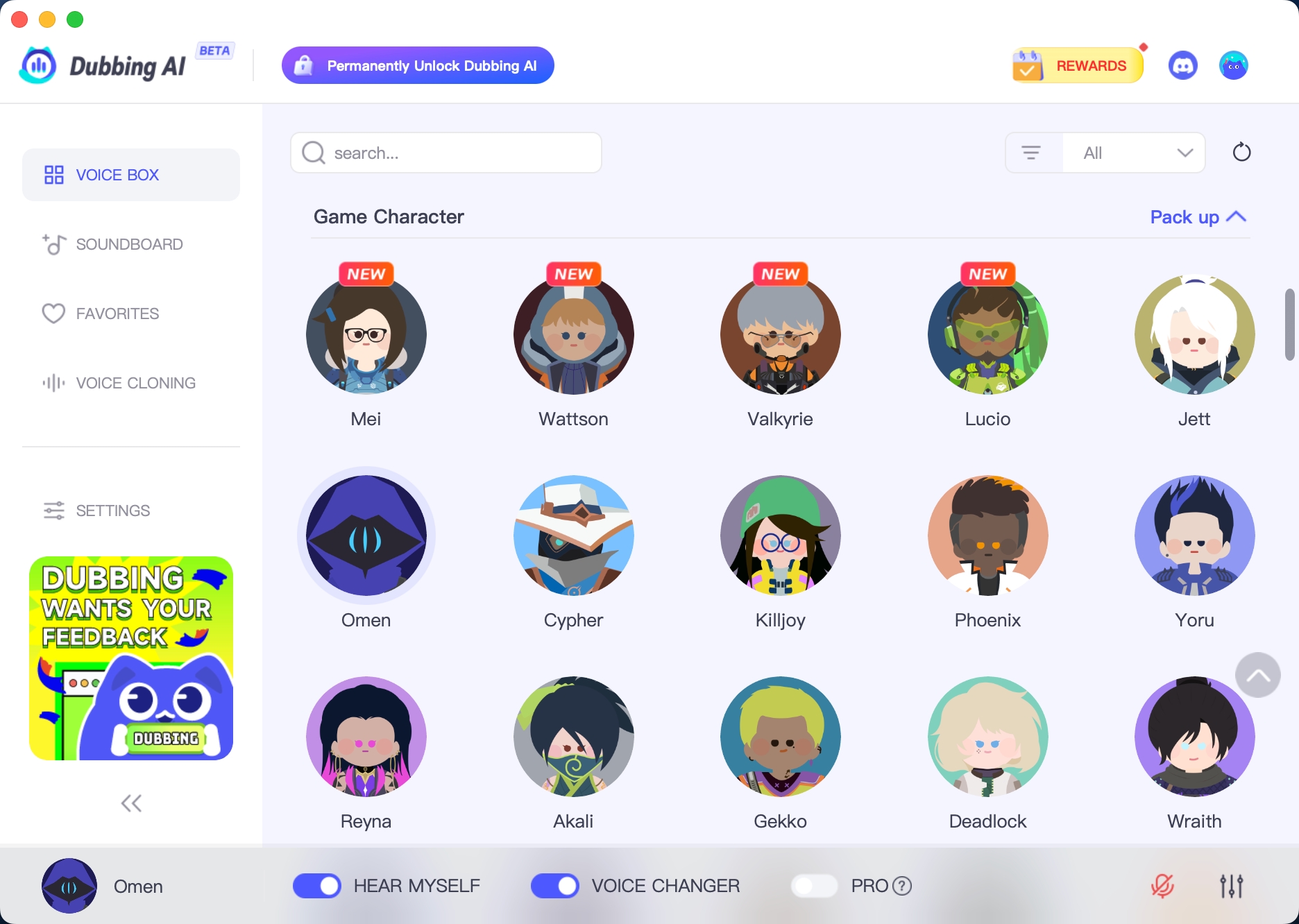
Dubbing AI stands out if you want deep customization. You can pick from over 1000 tones and tweak your voice until it sounds just right. The interface feels easy to use, so you don’t waste time learning new buttons. Dubbing AI runs with low latency, so your voice changes instantly. You can use it on Windows, macOS, and other platforms.
Here’s a quick look at how Dubbing AI compares to Voicemod:
Feature | Dubbing AI | Voicemod |
|---|---|---|
Customization Options | Over 1000 tones, easy tweaks | Decent selection |
User Interface | Intuitive and user-friendly | Aims for simplicity |
Real-time Processing | Low-latency performance | Performs well |
Platform Compatibility | Supports Windows, macOS, and more | Offers compatibility |
Pros:
Tons of voices and effects
Fast voice changes
Works on many devices
Cons:
You might need to pay for premium features
Some advanced settings take time to master
Pricing:
Free version available. Premium plans unlock more voices and effects.
Compatibility:
Works well with arc raiders. You get smooth audio and lots of ways to personalize your sound.
Note: If you love tweaking your audio design, Dubbing AI gives you more control than most other tools.
Voicemod
Voicemod stays popular with gamers. You get a simple interface and a good mix of voices. You can switch effects quickly and use soundboards for extra fun. Voicemod works on Windows and supports many games, including arc raiders.
Features:
Real-time voice changing
Soundboard for effects
Easy setup
Pros:
Simple to use
Good selection of voices
Active community for support
Cons:
Some features locked behind a paywall
Occasional bugs with updates
Pricing:
Free version with basic voices. Premium unlocks more options.
Compatibility:
Works with arc raiders. You get reliable audio and quick changes during matches.
Block Quote: “Voicemod makes your game chat more fun. You can sound like a robot, alien, or even a hero.”
MorphVOX
MorphVOX gives you strong voice-changing power. You can adjust pitch, add effects, and create custom profiles. The tool works on Windows and macOS. MorphVOX offers high-quality audio and helps you sound clear in every match.
Features:
Advanced voice effects
Custom profiles
Background noise reduction
Pros:
High-quality audio design
Lots of control over your voice
Good for roleplaying
Cons:
Interface feels old-fashioned
Takes time to set up
Pricing:
Free trial available. Full version costs extra.
Compatibility:
Works with arc raiders. You get clear audio and strong effects.
Tip: Use background noise reduction if you play in a noisy room.
Clownfish Voice Changer
Clownfish Voice Changer gives you a simple way to change your voice. You install it once, and it works with many apps. You get basic effects like robot, alien, and pitch change. Clownfish runs on Windows and uses little system power.
Features:
Basic voice effects
System-wide integration
Lightweight design
Pros:
Easy to install
Free to use
Works with lots of programs
Cons:
Fewer voices than other tools
No advanced customization
Pricing:
Completely free.
Compatibility:
Works with arc raiders. You get simple audio changes without slowing down your game.
Note: Clownfish is great if you want a free, no-fuss voice changer.
You have many choices for voice changers in arc raiders. Each tool offers something different. You can pick the one that matches your needs and helps you get the best audio design for your team.
Setting Up Voice Changers in Arc Raiders
Installation Steps
You want to get your voice changer working fast. Here’s how you can do it:
Download the tool: Go to the official website for your chosen voice changer. Pick the right version for your device.
Run the installer: Double-click the file you downloaded. Follow the instructions on the screen.
Allow permissions: If your computer asks for permission, click “Allow” or “Yes.”
Open Arc Raiders: Start the game after you finish installing.
Select your microphone: In the voice changer app, choose the microphone you use for gaming.
Activate the voice changer: Turn on the effects you want. Make sure the app runs in the background.
Tip: Always download voice changers from trusted sources. This keeps your computer safe from viruses.
Configuration Tips
You want your voice to sound clear and cool in Arc Raiders. Try these tips:
Pick a voice effect that matches your character or mood.
Adjust the pitch and speed sliders until you like how you sound.
Test your voice in a private lobby before joining a team match.
Use presets for quick changes during gameplay.
Set your input and output devices in both Arc Raiders and your voice changer app.
Setting | What It Does | Best Practice |
|---|---|---|
Pitch | Changes voice height | Keep it natural |
Speed | Makes voice faster | Avoid too fast |
Volume | Controls loudness | Match team volume |
Note: If your teammates say your voice sounds weird, lower the effects or reset to default.
Troubleshooting
Sometimes things don’t work as planned. Here’s what you can do:
If your voice doesn’t change, check if the app is running.
If Arc Raiders can’t hear you, make sure the right microphone is selected.
If you hear echoes, turn off extra audio devices.
If the app crashes, update to the latest version.
If you get lag, close other programs to free up memory.
🛠️ Quick Fix: Restart your computer if nothing else works. This solves most problems.
You can set up your voice changer and start playing in minutes. Try different settings until you find what works best for you!
Maximizing AI Voices in Arc Raiders

Best Practices
You want your AI voice to sound great every time you play Arc Raiders. Try these best practices to get the most out of your voice changer:
Test your voice before joining a team match. You can use a private lobby to check how you sound.
Adjust your microphone settings for clear audio. Lower background noise helps your team hear you better.
Switch voices only when you have a break in the action. Quick changes can confuse teammates during a fight.
Use the soundboard for fun effects, but keep it simple. Too many sounds can distract your squad.
Tip: Record a short clip of your voice in-game. Listen to it and make changes if needed.
Safety Tips
You want to stay safe while using AI voices. Protect your privacy and keep your gaming experience positive:
Never share personal information while using a voice changer.
Pick a voice that hides your real identity, especially if you stream or play with strangers.
Update your voice changer app often. New versions fix bugs and improve security.
Use strong passwords for your accounts. This keeps your data safe.
Safety Tip | Why It Matters |
|---|---|
Hide your real voice | Protects your identity |
Update your app | Blocks security risks |
Use private lobbies | Avoids unwanted guests |
⚠️ Note: If someone asks for your real name or location, do not answer. Stay safe and enjoy the game.
Customization Ideas
You can make your AI voice unique in Arc Raiders. Try these ideas to stand out:
Mix different effects like robot and echo for a cool sound.
Change your voice for each character you play. Match your voice to your hero’s style.
Save your favorite settings as presets. Switch between them fast during matches.
Use pitch sliders to create a deeper or higher voice.
Want to sound like a space explorer or a villain? Play with the settings until you find your perfect match.
You have plenty of choices for voice changers in Arc Raiders. Dubbing AI and Voicemod stand out if you want easy setup and cool effects. The built-in tool works fast, but third-party apps give you more control. Check out the table below to see how these tools help you play better:
Benefit | Description |
|---|---|
Strategic Communication | Change your voice for better teamwork. |
Role-Playing & Fun | Custom filters make the game more exciting. |
Team Coordination | Voice filters help your squad know who’s who. |
The voice changer tools in Arc Raiders use advanced TTS technology, just like other top games. You get dynamic voice responses and fresh audio every match.
AI voice tech keeps getting better. You can use voice commands to interact with characters and shape your story. Try new features as they come out and keep your game fresh!
FAQ
How do you choose the best voice changer for Arc Raiders?
You should look for real-time effects, easy setup, and good compatibility. Try free versions first. Pick the one that feels simple and works well with your game.
Can you use voice changers on consoles?
Most voice changers work on PC. Some tools support consoles, but you need extra hardware. Check the tool’s website for details before you buy or download.
Will using a voice changer affect your game performance?
Voice changers use little system power. If your computer is old, you might see small delays. Close other apps to keep your game running smoothly.
Are voice changers safe to use in Arc Raiders?
You stay safe if you download from trusted sources. Always update your app. Never share personal info while using voice changers.
Can you customize your voice for each character?
Yes! You can save presets for different characters. Switch voices fast during matches. This helps you roleplay and keeps the game fun.
See Also
Selecting The Perfect Voice Changer And Soundboard For Gaming
Boost Your Gaming Experience Using Dubbing AI Soundboard
Reasons Dubbing AI Stands Out As The Best Voice Changer

Related Posts