
Have you ever wanted to change your voice while gaming? Forsaken voice changers can help you do that! These apps let you try cool voice effects for fun online chats. Whether you’re streaming or playing multiplayer games, they have tools for you. Many apps work in real-time and on different devices. Use them to make your content better or stand out online. With so many choices, trying voice-changing apps is exciting and creative!
Key Takeaways
Voice changers make online activities more fun. They add cool effects for games, streaming, and chats.
MagicMic and Voicemod are great for live voice changes. They have many effects and work on popular apps.
Clownfish is ideal for beginners. It’s free, simple to use, and works on most devices, so it’s a good choice to start with.
Dubbing AI gives lifelike voice effects. It’s easy to use and works for both casual users and experts.
Always check if it works with your device first. This helps avoid problems when using the voice changer.
Top Free and Affordable Forsaken Voice Changers
MagicMic: Real-Time AI Voice Changer
MagicMic is a great app for changing voices instantly. It works smoothly on many platforms and sounds very realistic. Whether you’re gaming, streaming, or chatting, it has fun filters to try.
Why do people like MagicMic?
Overall rating: 4 stars ⭐⭐⭐⭐
Change your voice live with smart AI tools.
Lots of free voice effects for any situation.
Works with apps like Discord, Zoom, and Twitch.
MagicMic is easy to use and makes online activities more fun. Gamers especially enjoy adding creative sounds to their games. Its simple design and cool features make it worth trying for anyone curious about voice changers.
Voicemod: Popular Free Voice Changer for Gamers
Voicemod is a favorite free app for gamers. It lets you change your voice in real-time with fun effects. Want to sound like a robot, chipmunk, or monster? Voicemod can do it all!
What makes Voicemod special?
Real-time voice modulation: Instantly change your voice while gaming or chatting.
Wide compatibility: Works with Discord, Skype, and OBS for streaming.
Customizable effects: Make your own voice effects for free.
Voicemod adds excitement to online chats and games. It’s simple to use and offers many options for beginners and experts. If you want a free voice changer with great quality, Voicemod is a top choice.
Clownfish Voice Changer: Best Free Voice Changer for Beginners
Clownfish Voice Changer is perfect for beginners who want a free app. It changes any sound from your microphone at the system level. Use it for gaming, streaming, or chatting—it works everywhere!
Here’s what to know about Clownfish:
Feature/Aspect | Details |
|---|---|
User Interface | Easy to use, great for first-time users. |
Real-time Voice Change | Yes, works well during games, streams, and chats. |
Compatibility | Supports TikTok, Discord, Skype, and more. |
Key Features | Text-to-speech, sound effects, voice assistant, and pitch control. |
Pros | Background sounds, simple layout, good audio control, fully free. |
Cons | Fewer voice effects, minor issues, lacks advanced tools. |
Price | 100% free. |
Clownfish has 14 voice effects like robot, helium, and alien. Its text-to-speech and voice assistant features are helpful for beginners. While it doesn’t have advanced tools, it’s simple and effective for anyone starting out.
Pro Tip: New to voice changers? Clownfish is a great first step!
MorphVOX Junior: Easy and Free Voice Changer
MorphVOX Junior is a simple app to change your voice. It’s great for beginners who want to try voice-changing without confusion. This free tool has a few fun voice effects, perfect for gaming or chatting online.
Why Pick MorphVOX Junior?
Here’s why it’s a good choice:
Lightweight and Fast: It uses little space and works well on older computers.
Real-Time Voice Modulation: Change your voice instantly while playing games or chatting.
Beginner-Friendly: The design is easy to understand and quick to use.
MorphVOX Junior includes three basic voices: male, female, and kid. It doesn’t have as many choices as other apps, but it’s great for beginners trying voice-changing software.
Pro Tip: Want more voices? Upgrade to MorphVOX Pro for advanced features and extra effects.
Voxal Voice Changer: Flexible and Budget-Friendly
Voxal Voice Changer is a top free app for users who want variety. Whether you’re gaming, streaming, or creating content, this app has options for everyone. It works well with most chat platforms and offers many voice effects.
Features of Voxal Voice Changer
Extensive Voice Library: Choose from robot, alien, and other fun voices.
Real-Time and Pre-Recorded Modulation: Use it live or edit recorded audio.
Cross-Platform Compatibility: Works on Windows and Mac, perfect for PC users.
Voxal lets you adjust pitch, tone, and effects to make unique voices. This makes it popular with creators who want to add something special to their content.
Did You Know? Voxal Voice Changer is free for personal use, so you can enjoy its features without paying.
Dubbing AI: Smart Forsaken Voice Changer
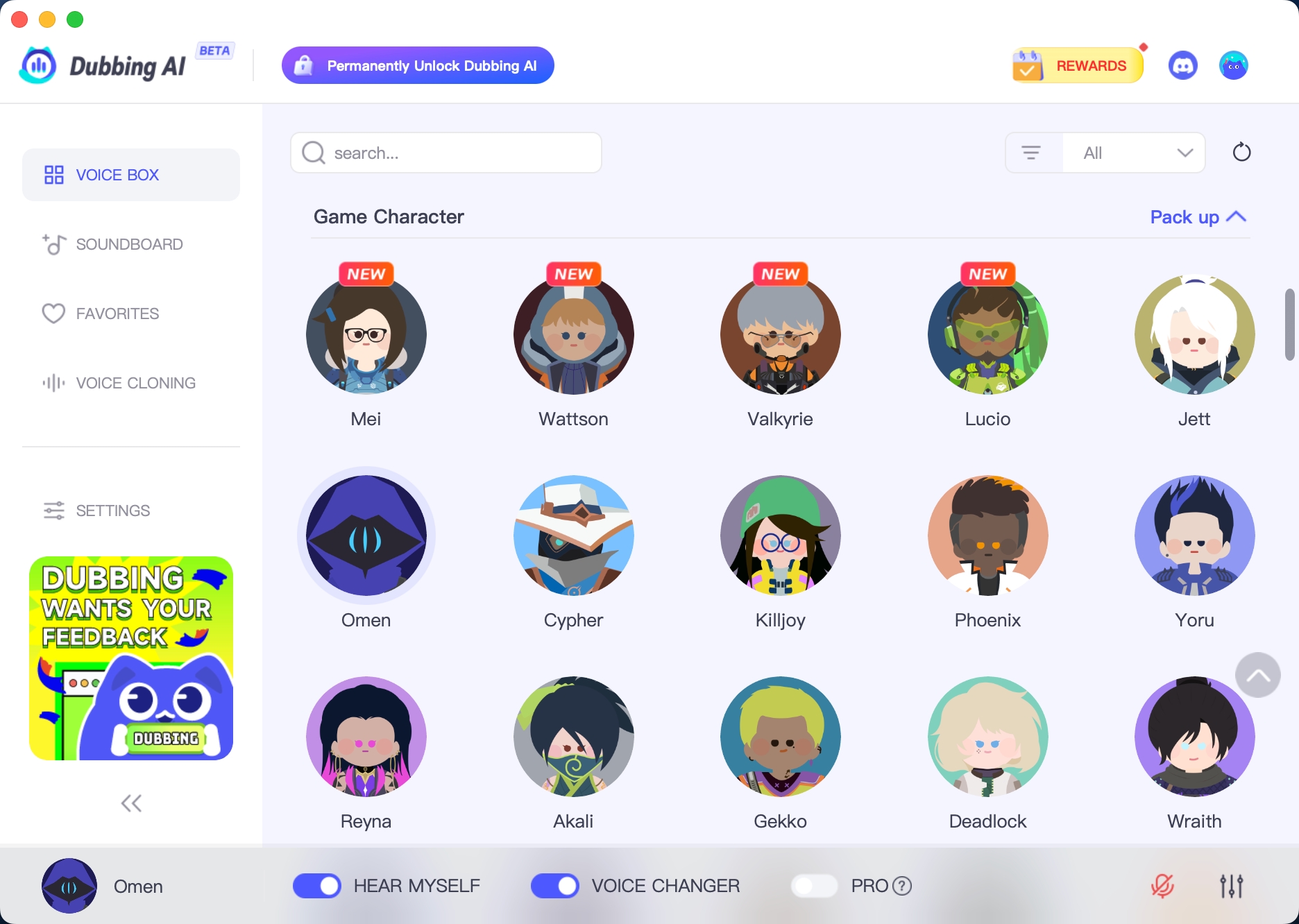
Dubbing AI uses advanced AI to create realistic voice effects. It’s great for gamers and streamers who want to stand out online. This app offers high-quality effects that sound lifelike and professional.
Why Dubbing AI Stands Out
AI-Powered Real-Time Voice Modulation: Smart AI creates realistic voice changes instantly.
Wide Range of Voices: Choose from movie-like effects or fun character voices.
User-Friendly Interface: Even with advanced tools, it’s simple to use.
Dubbing AI works for casual users and professionals alike. Whether you’re gaming, streaming, or working on creative projects, it helps make your content better.
Quick Tip: Use Dubbing AI with your favorite streaming app to impress your audience!
AV Voice Changer Software: Advanced Tools at a Low Cost
Want advanced voice-changing tools without spending too much? Try AV Voice Changer Software. It has many features for changing voices, perfect for gaming, streaming, or making professional content.
Why Pick AV Voice Changer Software?
Here’s a simple look at its best features:
Feature | Description |
|---|---|
Adjust pitch, tone, and other settings for unique sounds. | |
Easy to Use | Simple design makes it great for beginners and experts. |
Real-Time Effects | Change your voice live during games or chats. |
Large Effect Library | Offers many preset voices and sound options. |
Compatibility | Works well with Discord, Skype, Twitch, and more. |
This app is great for anyone wanting to try fun voice effects while keeping sound quality high. Whether you’re making videos or just joking with friends, AV Voice Changer Software helps you stand out.
Note: The free version has fewer features. Upgrading unlocks everything. It works best on strong computers since it uses more system power.
VoiceMeeter: Free Mixer with Voice Effects
VoiceMeeter isn’t just a voice changer—it’s a full audio mixer. It lets you control all parts of your sound. If you care about great audio, this app is a must-try.
Why Choose VoiceMeeter?
Here’s why users love it:
Feature/Aspect | Description/Feedback |
|---|---|
Adjust sound details, perfect for streaming or gaming. | |
Virtual Audio Device | Acts as a virtual device, works with most audio apps. |
Multiple Input Options | Handles microphones, audio files, and more. |
Audio Processing | Includes tools like noise filters for better sound. |
VoiceMeeter is perfect for gamers and streamers who want to improve their audio. It works with all major platforms, making it a flexible choice for sound lovers.
Pro Tip: The interface might seem tricky at first. But once you learn it, you can do so much!
Discord Voice Changer: Built-In and Free
Did you know Discord has its own voice changer? If you already use Discord for chatting or gaming, this feature adds fun voice effects without needing extra apps.
Why Try Discord’s Voice Changer?
Easy to Use: No need to download anything; it’s built into Discord.
Real-Time Effects: Change your voice live during calls or streams.
Works with Discord Features: Fits perfectly with Discord’s voice and chat tools.
This free voice changer is great for beginners who want to try voice effects during online chats. It doesn’t have as many options as other apps, but it’s a fun and easy start.
Quick Tip: Use Discord’s voice changer with apps like Voicemod for even more effects!
All-in-One Voice Changer: Affordable and Fun Tool
If you’re looking for a voice changer that’s both affordable and entertaining, the All-in-One Voice Changer might just be your perfect match. This app is designed for anyone who wants to experiment with voice effects without breaking the bank. Whether you’re gaming, chatting online, or working on creative content, this tool offers a mix of simplicity and fun.
What Makes All-in-One Voice Changer Stand Out?
Here are some reasons why this app is worth trying:
User-Friendly Interface: You don’t need to be a tech expert to use it. The layout is simple, so you can start changing your voice in no time.
Real-Time Voice Effects: Modify your voice instantly during calls or streams. It’s perfect for adding a playful twist to your conversations.
Affordable Pricing: Unlike some premium apps, this one won’t hurt your wallet. It’s a great option if you’re on a budget.
Compatibility: Works seamlessly with popular platforms like Skype, Discord, and other online communication tools.
Customizable Options: Adjust pitch and tone to create unique voice effects that suit your style.
Who Should Use It?
This app is ideal for casual users who want to have fun with voice modulation. If you’re a gamer, you can use it to prank your friends or add a creative edge to your streams. For content creation, it’s a handy tool to make your videos or podcasts more engaging. Even if you’re just chatting online, it’s a fun way to spice up your conversations.
Pro Tip: Pair the All-in-One Voice Changer with a good microphone for the best sound quality.
Limitations to Consider
While the All-in-One Voice Changer is a fantastic tool, it does have a few drawbacks:
Limited Advanced Features: If you’re looking for professional-grade tools, this app might not meet your needs.
Basic Voice Library: The selection of voice effects is smaller compared to some other free voice changers.
That said, its affordability and ease of use make it a great choice for beginners or anyone who wants to explore voice-changing without a steep learning curve.
Why You Should Try It
The All-in-One Voice Changer is all about having fun. It’s not just a tool; it’s a way to express yourself creatively. Whether you’re gaming, streaming, or just chatting with friends, this app lets you experiment with your voice in real-time. Plus, its budget-friendly price means you can enjoy all these features without spending too much.
So, if you’re curious about voice changers but don’t want to invest in a premium app just yet, give this one a shot. You might be surprised by how much fun you’ll have!
Comparison Table of the Best Free Voice Changers
OS Compatibility
Picking the right voice changer means checking if it works on your device. Some apps work on many platforms, while others are more limited. Here’s a simple look at OS compatibility for popular free voice changers:
Voice Changer | Windows | Mac | iOS | Android | Communication Apps | Streaming Software | Gaming Platforms |
|---|---|---|---|---|---|---|---|
MagicMic | Yes | No | Yes | Yes | Discord, Zoom | OBS, Streamlabs | Yes |
Voicemod | Yes | Yes | No | Yes | Skype | OBS | Yes |
Clownfish | No | Yes | Yes | No | Discord | Streamlabs | No |
Before installing, make sure the app works with your system. This helps avoid problems, especially when using real-time voice effects during games or chats.
Number of Voice Effects
The number of voice effects can change how much fun you have. Some apps have only a few effects, while others offer a lot. For example:
MagicMic: Over 200 effects like robot, alien, and celebrity voices.
Voicemod: About 80 effects, plus options to make your own.
Clownfish: 14 effects, great for beginners.
If you love gaming or creating content, more effects let you try new things and keep it exciting.
Unique Features
Each app has something special to offer. Here’s what makes them stand out:
MagicMic: Real-time voice changes with smart AI effects.
Voicemod: Custom effects and easy use with streaming tools.
Clownfish: Includes text-to-speech and voice assistant features.
These features can make your online time more fun, whether you’re gaming, streaming, or chatting with friends. Pick the app that fits your style and needs.
Pricing and Affordability
Picking a voice changer depends on how much you want to spend. Many apps are free or have low-cost plans, so finding one is easy.
Dubbing AI is a smart choice for saving money. It has plans for casual users and professionals. You get great voice effects and soundboards without extra fees. Its live processing works well for streaming and gaming.
Here’s a simple price comparison of popular apps:
Voice Changer | Monthly Cost | Free Option | User Rating |
|---|---|---|---|
Murf | ✔️ | ⭐⭐⭐⭐(4.5/5) | |
Speechify | $9.99 | ✔️ | ⭐⭐⭐⭐(4.5/5) |
FineVoice | $8.99 | ✔️ | ⭐⭐⭐⭐(4/5) |
Voicemod | $3.89 | ✔️ | N/A |
Voice.ai | Free | ✔️ | ⭐⭐(2/5) |
Hitpaw | $15.95 | ✔️ | N/A |
MagicMic | $9.99 | ✔️ | N/A |
Free apps like Voicemod and Clownfish are great for beginners. If you want advanced tools, MagicMic and FineVoice offer affordable plans with live voice-changing features.
Tip: Try the free version first. It helps you decide before paying.
Affordable apps make gaming, streaming, and chatting more fun. There’s always a voice changer that fits your budget and needs!
How to Pick the Best Free Voice Changer
Know What You Need It For
Think about why you want a voice changer. Are you gaming, streaming, or making videos? Each activity needs different features. For gaming, real-time voice changes can make multiplayer games more fun. Apps like Voicemod are great for this. If you’re streaming, choose tools that work with platforms like Twitch or OBS. MagicMic is a good option for live streaming.
For creating content, high-quality voice effects can make your videos or podcasts unique. Apps like Voice AI offer many effects and professional sound quality. Knowing your purpose helps you pick the right app.
Tip: Not sure where to start? Try Clownfish. It’s free and easy to use for most activities.
Make Sure It Works on Your Device
Not all apps work on every device. Before downloading, check if the app is compatible with your system. Some apps, like Clownfish, work well on older computers. Others, like UniConverter, need newer, more powerful systems.
Here’s what to look for:
Good sound quality: Clear output avoids distorted voices during chats or recordings.
Live or pre-recorded changes: Voicemod is great for live changes, while Voice Spice Recorder works better for editing recordings.
Easy setup: Apps like Clownfish and LingoJam are simple to use.
System requirements: Check if the app works with your operating system. For example, Voicemod supports Windows and Mac, while MagicMic also works on mobile devices.
Compatibility ensures the app runs smoothly, especially during gaming or streaming.
Look at Voice Effects and Quality
The number and quality of voice effects matter a lot. If you want many options, apps like Voice AI have a big library of AI-generated voices. These are great for creative users. For gamers and streamers, Voicemod offers fun effects that are easy to use.
Here’s what to think about:
Variety of effects: Apps like UniConverter and Voicemod have lots of choices. Simpler tools like MyVoices focus on basic effects.
Cost: Voice AI has free basic features and paid advanced options. Voicemod also offers a free version and a Pro plan for more features.
Balancing cost with features helps you get the best deal. If you’re new to voice changers, start with free apps to see what you like.
Quick Tip: Try different apps to find the one that suits you best.
Focus on Simplicity
When choosing a voice changer, pick one that’s easy to use. You shouldn’t have to spend hours learning how it works. The best apps let you start quickly and enjoy the fun right away.
Find tools with simple designs and clear controls. For instance, MagicMic has a user-friendly layout that applies real-time effects in seconds. If you’re a beginner, Clownfish is another excellent option. It’s beginner-friendly and works well on many platforms.
Here’s a quick guide to spot easy-to-use apps:
Fast Setup: Apps like Voicemod are ready to use in minutes.
Easy Navigation: Simple menus save time during games or chats.
Platform Compatibility: Pick apps that work with Discord, Zoom, or others.
For gamers or streamers, real-time voice changes are essential. Apps like Dubbing AI make this process smooth and stress-free. You can focus on having fun without worrying about tech issues.
Pro Tip: Try the free version first. It helps you decide if the app is simple enough for you.
Match Features to Your Budget
Getting the right mix of features and cost is important. You don’t need to spend a lot for a good voice changer. Many affordable apps offer great features similar to expensive ones.
Start by listing what you need. Do you want live voice changes? Or a big library of effects? Apps like Voicemod and MagicMic offer these at reasonable prices. If you’re just trying it out, free apps like Clownfish or Discord’s built-in tool might be enough.
Here’s a quick comparison of apps by cost:
App Name | Free Version | Paid Features | Best For |
|---|---|---|---|
MagicMic | ✔️ | Advanced tools | Streaming and gaming |
Voicemod | ✔️ | Custom effects | Gamers and content creators |
Clownfish | ✔️ | None | Beginners |
Affordable apps like All-in-One Voice Changer are great for casual users. They provide basic features without being too complicated. But if you’re making professional content, advanced tools like AV Voice Changer Software might be worth the cost.
Quick Tip: Only pay for features you’ll actually use. Stick to apps that fit your needs and budget.
Here are 10 Forsaken voice changers to improve your online fun. Each one has special features like live voice changes and cool effects. Use them for gaming, streaming, or just to have fun.
For flexibility, Dubbing AI is a great option. It’s simple to use and works on many devices. Its realistic voice effects can make your content even better.
Choose from these free voice changers and start exploring. Test them out to find the one that suits you best. There’s so much you can do with them!
FAQ
What is a voice changer app, and how does it work?
A voice changer app changes how your voice sounds. It uses filters to edit your microphone’s input. You can use it live during games or chats.
Can I use these apps for free?
Yes, many apps have free versions with basic features. Apps like Clownfish and Voicemod are free to try. For more tools or effects, you can pay for upgrades.
Are voice changers safe to use online?
Most voice changers are safe if downloaded from trusted websites. Always read reviews and check permissions before installing. Don’t share personal details while using these apps online.
Which app is best for real-time voice changes?
Voicemod and MagicMic are great for live voice changes. They work well with Discord and Twitch, making them ideal for gaming or streaming. Both apps have fun effects to try.
Can I use voice changers for creating content?
Yes! Apps like Dubbing AI and AV Voice Changer Software are perfect for content creation. They let you try different voices to make your videos or podcasts more creative.
See Also
Top AI Voice Modifiers Every Content Creator Should Try
2024 Insights: Transform Your Voice Using Free Dubbing AI
Explore Cutting-Edge AI Voice Cloning Tools for Realistic Voiceovers

Related Posts